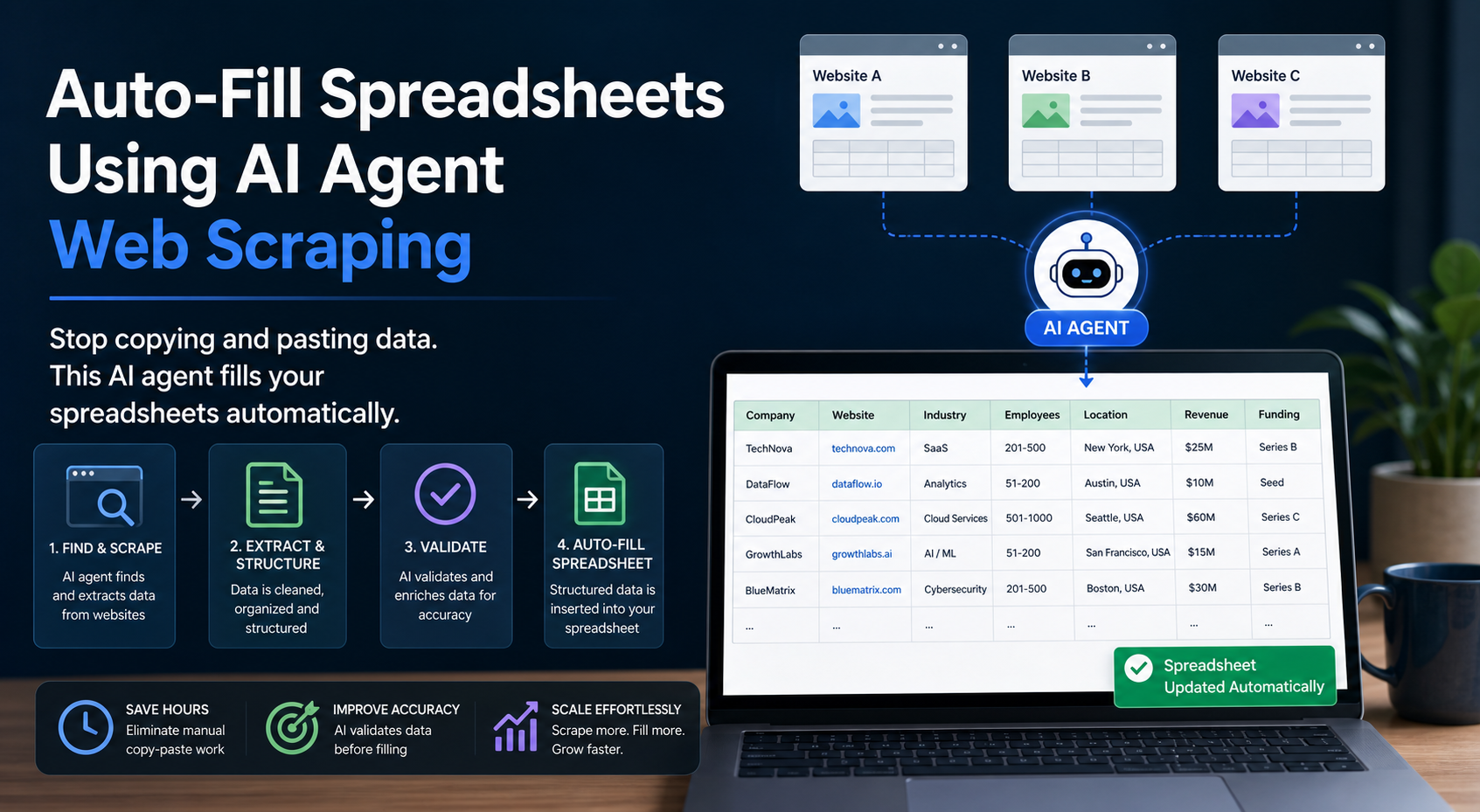
Stop copying and pasting data. This AI agent fills your spreadsheets automatically.
Business analysts, marketers, and operations teams spend hours each week manually updating spreadsheets with web data. Product pricing from competitor sites, company contact details from directories, social media metrics, review scores, inventory counts, and lead enrichment data all require tedious manual entry or complex scripting.
The problem compounds when data needs regular updates. What starts as a 20-minute task becomes a daily burden that pulls focus from analysis and decision-making. Traditional solutions require either expensive enterprise tools with steep learning curves or custom development that takes weeks to implement.
A new category of no-code AI agents now handles this work automatically. These tools extract live web data and push it directly into Excel or Google Sheets without requiring programming skills. The setup takes under 60 seconds, and the results update automatically on your schedule.
How Hermes Agent and TinyFish Automate Spreadsheet Enrichment Without Coding
Two complementary approaches have emerged for automated spreadsheet enrichment: AI agents that understand natural language instructions and visual web scrapers that capture data through point-and-click interfaces.
The AI Agent Approach: Hermes
Hermes represents the AI-native method. Instead of configuring selectors or mapping fields manually, you describe what data you need in plain English. The agent interprets your request, navigates the target website, extracts the relevant information, and formats it for spreadsheet import.
For the LycheeIP implementation details behind this step, review AI-powered browser automation hub.
The workflow looks like this:
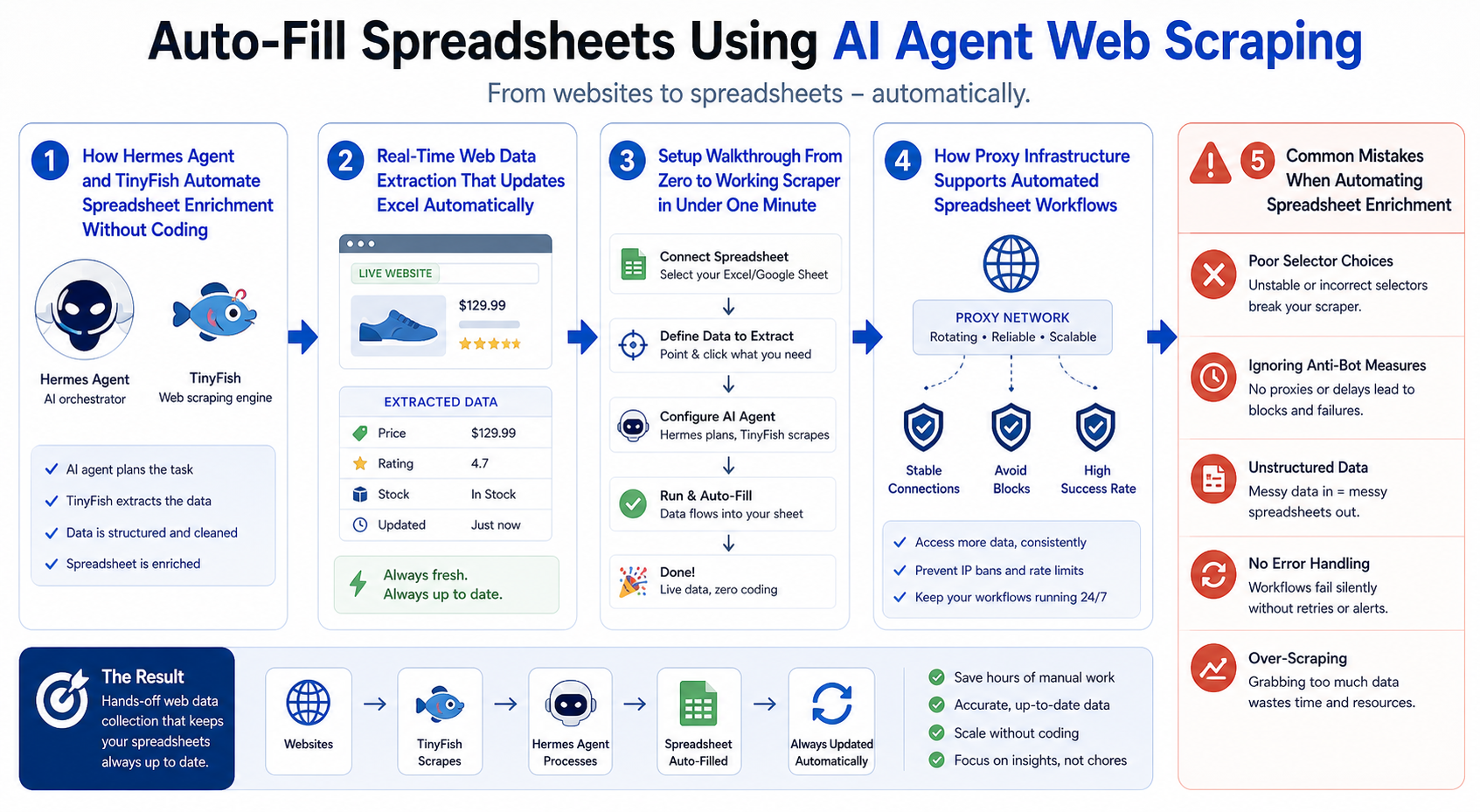
1\. Connect your spreadsheet (Excel or Google Sheets) 2\. Specify the websites or data sources 3\. Describe what information you need in natural language 4\. Set an update schedule (hourly, daily, weekly, or manual) 5\. The agent handles navigation, extraction, and data formatting automatically
This approach works well for straightforward data collection tasks where the information appears in consistent formats. Business directories, product catalogs, pricing pages, and public databases are ideal targets.
The Visual Scraper Approach: TinyFish
TinyFish takes a different path. Rather than interpreting natural language, it provides a visual interface where you point to the data elements you want to capture. You click on a product name, price, or contact email, and the tool records that selection as a data point.
For the LycheeIP implementation details behind this step, review scaling lead scraping with n8n.
The visual approach offers several advantages:
\- More control over exactly which elements get extracted \- Easier troubleshooting when data structures change \- Better handling of complex page layouts with nested information \- Visual confirmation that you are capturing the right data
Both methods eliminate the need for XPath expressions, CSS selectors, or programming logic. The choice between them depends on your comfort level with describing tasks versus showing them, and the complexity of the target website structure.
Why No-Code Tools Matter for Spreadsheet Workflows
Traditional web scraping required Python scripts with libraries like BeautifulSoup or Selenium, or enterprise platforms with monthly costs in the thousands. These solutions created barriers:
\- Technical knowledge: Most business users cannot write or maintain scraping scripts \- Time investment: Building and testing a scraper takes hours or days \- Maintenance burden: When websites update their layout, scripts break and need fixes \- Infrastructure requirements: Running scrapers requires servers, scheduling systems, and monitoring
No-code AI agents compress this entire stack into a guided workflow that business users can complete in minutes. The tools handle browser automation, error recovery, data formatting, and scheduled execution behind the scenes.
Real-Time Web Data Extraction That Updates Excel Automatically
The value of automated spreadsheet enrichment extends beyond the initial data collection. Regular updates transform static snapshots into living datasets that support ongoing analysis and decision-making.
Automatic Update Schedules
Most no-code scraping tools support scheduled execution:
\- Hourly: For time-sensitive data like stock prices, auction bids, or inventory levels \- Daily: For competitor pricing, job postings, or news monitoring \- Weekly: For industry reports, company directories, or periodic reviews \- Manual: For one-time research projects or ad-hoc analysis
The scheduling happens in the cloud. You do not need to keep your computer running or maintain server infrastructure. The agent executes on its configured schedule and updates your connected spreadsheet automatically.
Common Use Cases for Automated Spreadsheet Enrichment
For the LycheeIP implementation details behind this step, review rotating residential proxies.
For the official technical reference behind this point, see MDN HTTP overview.
**Competitor Price Monitoring**
E-commerce teams track competitor pricing across dozens or hundreds of products. Instead of manually checking each product page daily, an AI agent extracts current prices, availability status, and promotional messaging. The data flows into a comparison spreadsheet that highlights price changes and competitive gaps.
**Lead Enrichment**
Sales and marketing teams start with basic contact lists containing company names or domains. Automated enrichment adds employee counts, revenue estimates, technology stacks, social media profiles, and recent news mentions. The enriched data improves targeting and personalization.
**Product Research**
Market researchers collect product specifications, customer reviews, ratings, and feature comparisons from multiple sources. Automated extraction consolidates this information into structured spreadsheets for analysis, reporting, and product development decisions.
**Real Estate and Property Data**
Property managers and investors track listings, rental rates, occupancy status, and comparable sales. Automated scraping keeps property databases current without manual data entry.
**Job Market Analysis**
Recruiters and HR teams monitor job postings to understand hiring trends, salary ranges, required skills, and competitive employer branding. Automated collection creates datasets for workforce planning and compensation benchmarking.
How Data Gets Into Your Spreadsheet
The technical connection between scraper and spreadsheet happens through APIs or direct integrations:
For the official technical reference behind this point, see Playwright documentation.
**Google Sheets Integration**
Most no-code scrapers connect to Google Sheets through the Sheets API. You grant permission once, select the target spreadsheet and worksheet, and map scraped fields to columns. Updates append new rows or overwrite existing data based on your configuration.
**Excel Integration**
Excel integration typically uses OneDrive or SharePoint. The scraper writes to your cloud-stored Excel file, and desktop or web Excel reflects the changes. Some tools export to CSV and provide download links instead.
**Webhook Delivery**
Advanced workflows push data to webhook endpoints, allowing integration with Zapier, Make (formerly Integromat), or custom applications. This enables chaining scraped data into CRM systems, databases, or notification workflows.
Data Quality and Error Handling
Automated scrapers encounter various challenges:
\- Layout changes: Websites redesign their structure, breaking extraction logic \- Rate limiting: Aggressive scraping triggers blocks or throttling \- Dynamic content: JavaScript-rendered content requires browser automation \- Geographic restrictions: Some content varies or blocks access by location
No-code tools handle these issues with varying sophistication. Better platforms include automatic retry logic, browser fingerprinting for bot detection avoidance, and notifications when extraction patterns fail.
This is where proxy infrastructure becomes essential for reliable automated workflows.
Setup Walkthrough From Zero to Working Scraper in Under One Minute
The speed of deployment distinguishes modern no-code scraping tools from traditional approaches. Here is the typical setup process:
Step 1: Connect Your Spreadsheet (15 seconds)
Sign into the scraping tool and authorize access to Google Sheets or OneDrive. Select your target spreadsheet from the list of available files. Choose whether to create a new worksheet or write to an existing one.
Step 2: Define Your Data Source (20 seconds)
Enter the URL of the website containing your target data. For AI agents like Hermes, type a natural language description: "Extract company name, email address, and phone number from each listing." For visual tools like TinyFish, the platform opens the target page and you click on the elements you want to capture.
Step 3: Map Fields to Columns (15 seconds)
The tool shows a preview of extracted data. Match each data field to a spreadsheet column. Most platforms auto-suggest column names based on the field content (price, title, rating, etc.). Reorder columns if needed.
Step 4: Set Update Schedule (10 seconds)
Choose how often the scraper should run. Select daily, enable it for specific times, or keep it manual. Configure whether new data should append to the spreadsheet or overwrite previous results.
Step 5: Run and Verify (5 seconds)
Click Run to execute the first scraping job. Watch data populate your spreadsheet in real-time. Check that formatting looks correct and all expected fields appear. Adjust mapping if needed, then save the configuration.
Total elapsed time: under 60 seconds from authorization to working automation.
Scaling Beyond Single Pages
Most real-world use cases require extracting data from multiple pages:
**Pagination Handling**
When target data spans multiple pages (search results, product catalogs, directory listings), configure the scraper to follow next-page links. Better tools auto-detect pagination patterns and continue extraction until reaching the last page.
**Bulk URL Processing**
For extracting the same data structure from many different URLs (individual product pages, company profiles), upload a list of target URLs as a CSV. The scraper processes each URL and consolidates results into a single spreadsheet.
**Dynamic Filters and Search Terms**
Some platforms accept variables that change on each run. You might track pricing for different search terms, geographic regions, or date ranges by parameterizing the scraper configuration.
How Proxy Infrastructure Supports Automated Spreadsheet Workflows
As automated scraping moves from occasional manual execution to scheduled production workflows, proxy infrastructure becomes necessary for reliability and scale.
Why Scrapers Need Proxies
Websites implement bot detection and rate limiting to protect their infrastructure and data. When a scraper makes repeated requests from the same IP address, especially at machine speed, the target site may:
\- Return CAPTCHA challenges \- Serve rate limit errors (HTTP 429\) \- Block the IP address temporarily or permanently \- Return different content or no content to suspected bots
Proxy infrastructure rotates requests across multiple IP addresses, making the traffic pattern appear more like legitimate human visitors from different locations.
Proxy Types for Spreadsheet Automation
For the LycheeIP implementation details behind this step, review LycheeIP proxy infrastructure.
**Residential Proxies**
Residential proxies route requests through real residential IP addresses assigned by internet service providers. These IPs look like home or mobile users to target websites, making them harder to detect and block. Residential proxies work well for scraping sites with aggressive bot detection.
**Datacenter Proxies**
Datacenter proxies come from cloud hosting providers and data centers. They offer faster speeds and lower costs than residential options but are easier for websites to identify and block. They work well for less restrictive sites or when combined with proper rate limiting.
**Static Residential Proxies**
Static residential IPs provide the legitimacy of residential proxies with consistent IP addresses across sessions. This matters when scraping requires login sessions or when websites track visitor behavior across multiple requests.
**Rotating Proxies**
Rotating proxy pools automatically assign a different IP address for each request or on a timed rotation. This maximizes coverage and minimizes the chance that any single IP gets blocked.
Integrating Proxies With No-Code Scrapers
Some no-code scraping platforms include built-in proxy support. Others require you to provide your own proxy credentials. When evaluating tools, check:
\- Does the platform include proxies in the base price? \- Can you use your own proxy service? \- Does it support proxy authentication and rotation? \- Are proxy locations configurable for geo-specific content?
For teams building serious production scraping workflows, choosing proxy infrastructure becomes as important as choosing the scraping tool itself. Services like LycheeIP provide proxy infrastructure specifically designed for web scraping, public data collection, and automation workflows. These services offer residential and datacenter proxy options, geographic targeting, and API-based access that integrates with both no-code platforms and custom scraping scripts.
Geo-Testing and Localized Data Collection
Many spreadsheet enrichment use cases require collecting data as it appears in different geographic markets:
\- E-commerce pricing that varies by country \- Search engine results that differ by location \- Content availability restricted to specific regions \- Localized product catalogs or inventory
Proxy infrastructure with geographic targeting capability routes requests through IP addresses in your target markets. This ensures your automated spreadsheet updates reflect what customers actually see in each location.
Common Mistakes When Automating Spreadsheet Enrichment
Even with no-code tools, several pitfalls can undermine automated spreadsheet workflows:
Ignoring Website Terms of Service
Publicly accessible data does not always mean freely scrapable data. Review the target website's terms of service and robots.txt file. Some sites explicitly prohibit automated access. Others allow it with reasonable rate limits. Respect these guidelines to avoid legal issues and maintain ethical data collection practices.
Aggressive Request Rates
Sending thousands of requests per minute can overload target servers, especially smaller websites. Configure reasonable delays between requests (2-5 seconds is typical). Most no-code platforms handle rate limiting automatically, but verify the settings.
Insufficient Error Monitoring
Websites change their layouts regularly. When your scraper breaks, you may not notice until you review the spreadsheet days later and find stale or missing data. Set up notifications for extraction failures, empty results, or significant data changes.
Storing Sensitive Data Insecurely
If your scraped data includes personally identifiable information, contact details, or competitive intelligence, ensure your spreadsheet has appropriate access controls. Cloud-based spreadsheets default to private, but check sharing settings. Consider encrypting sensitive columns or storing them in more secure databases.
Over-Relying on AI Interpretation
AI agents like Hermes use natural language processing to interpret your data extraction requests. This works well for straightforward cases but can misinterpret ambiguous instructions. Always verify the initial results carefully. For critical workflows, visual configuration tools may offer more predictable results.
Neglecting Data Cleaning
Scraped data often arrives with formatting inconsistencies: extra whitespace, currency symbols mixed with numbers, date formats that vary, or HTML entities in text fields. Build cleaning steps into your spreadsheet using formulas or preprocessing scripts before analysis.
Failing to Plan for Scale
A scraper that works for 50 URLs might timeout or hit rate limits at 5,000 URLs. Test your workflow at realistic scale before depending on it for production decisions. Understand the platform's limits on execution time, concurrent requests, and data volume.
Explore LycheeIP Proxy Infrastructure
Conclusion
Automating spreadsheet enrichment with AI agents and no-code scrapers eliminates the manual data entry burden that wastes hours daily across business teams. Tools like Hermes and TinyFish compress what once required custom development into workflows that non-technical users can configure in under a minute.
The technology handles navigation, extraction, formatting, and scheduled updates automatically. Data flows from websites directly into Excel or Google Sheets on your chosen schedule, transforming static spreadsheets into living datasets that support real-time analysis and decision-making.
Success at scale requires understanding not just the scraping tools but the supporting infrastructure. Proxy rotation, geographic targeting, rate limiting, and error handling separate hobby projects from production workflows. For teams moving beyond occasional ad-hoc scraping to automated business processes, investing in proper proxy infrastructure ensures reliability and compliance.
The shift from manual to automated spreadsheet enrichment is not just about saving time. It enables analysis that was previously impractical, competitive monitoring at scale, and data-driven decisions based on current information rather than stale snapshots. The 60-second setup becomes the foundation for ongoing intelligence gathering that compounds in value over time.
Frequently Asked Questions
Q: Do I need programming skills to use AI agent web scraping for spreadsheets?
No. Modern no-code tools like Hermes and TinyFish are designed for business users without programming backgrounds. You describe what data you need or click on elements visually. The platform handles the technical implementation.
Q: How often can I update my spreadsheet with new scraped data?
Most platforms support hourly, daily, or weekly schedules. Some allow updates as frequently as every 15 minutes for time-sensitive data. The appropriate frequency depends on how often the source data changes and the rate limits of the target website.
Q: Will automated scraping get my IP address blocked?
It can if requests come too quickly or too frequently from the same IP. Quality no-code scraping platforms include rate limiting and proxy rotation to prevent blocks. For production workflows, using dedicated proxy infrastructure adds another layer of protection.
Q: Can I scrape data from websites that require login?
Some no-code platforms support authenticated scraping where you provide login credentials. This works for legitimate use cases like scraping your own accounts, internal dashboards, or services you subscribe to. Always verify this usage complies with the platform's terms of service.
Q: What happens when a website changes its layout?
Your scraper may break and return incomplete or incorrect data. Better platforms include notifications when extraction patterns fail. Visual tools make it easier to quickly update your configuration to match the new layout. AI agents may adapt automatically depending on how significantly the structure changed.
Q: Is web scraping legal?
Scraping publicly accessible data is generally legal in most jurisdictions, but context matters. Review the target website's terms of service and robots.txt file. Avoid scraping copyrighted content, personal data covered by privacy regulations, or data behind authentication without permission. When in doubt, consult legal counsel.
Q: How do I handle large datasets that exceed spreadsheet limits?
Google Sheets supports 10 million cells. Excel has similar limits. For larger datasets, export to CSV files, use database storage, or implement pagination where you scrape into multiple worksheets or files. Some platforms offer direct integration with databases like Airtable, PostgreSQL, or MongoDB.
Q: Can I scrape data from multiple websites into one spreadsheet?
Yes. Configure separate scraping jobs for each website and direct them all to the same spreadsheet, either in different worksheets or consolidated into one with a source column identifying where each row originated. Some platforms support multi-source workflows in a single configuration.
Q: What types of proxy infrastructure work best for automated spreadsheet workflows?
Residential proxies offer the best success rates against bot detection but cost more. Datacenter proxies provide faster speeds at lower cost for less restrictive sites. Rotating proxy pools prevent any single IP from being blocked. The best choice depends on your target websites and budget.
Q: How do I verify that scraped data is accurate?
Always manually verify initial results against the source website. Set up spot checks on a sample of rows each week. Configure notifications for anomalies like suddenly empty fields, dramatic value changes, or format differences. Build validation formulas in your spreadsheet that flag suspicious data patterns.