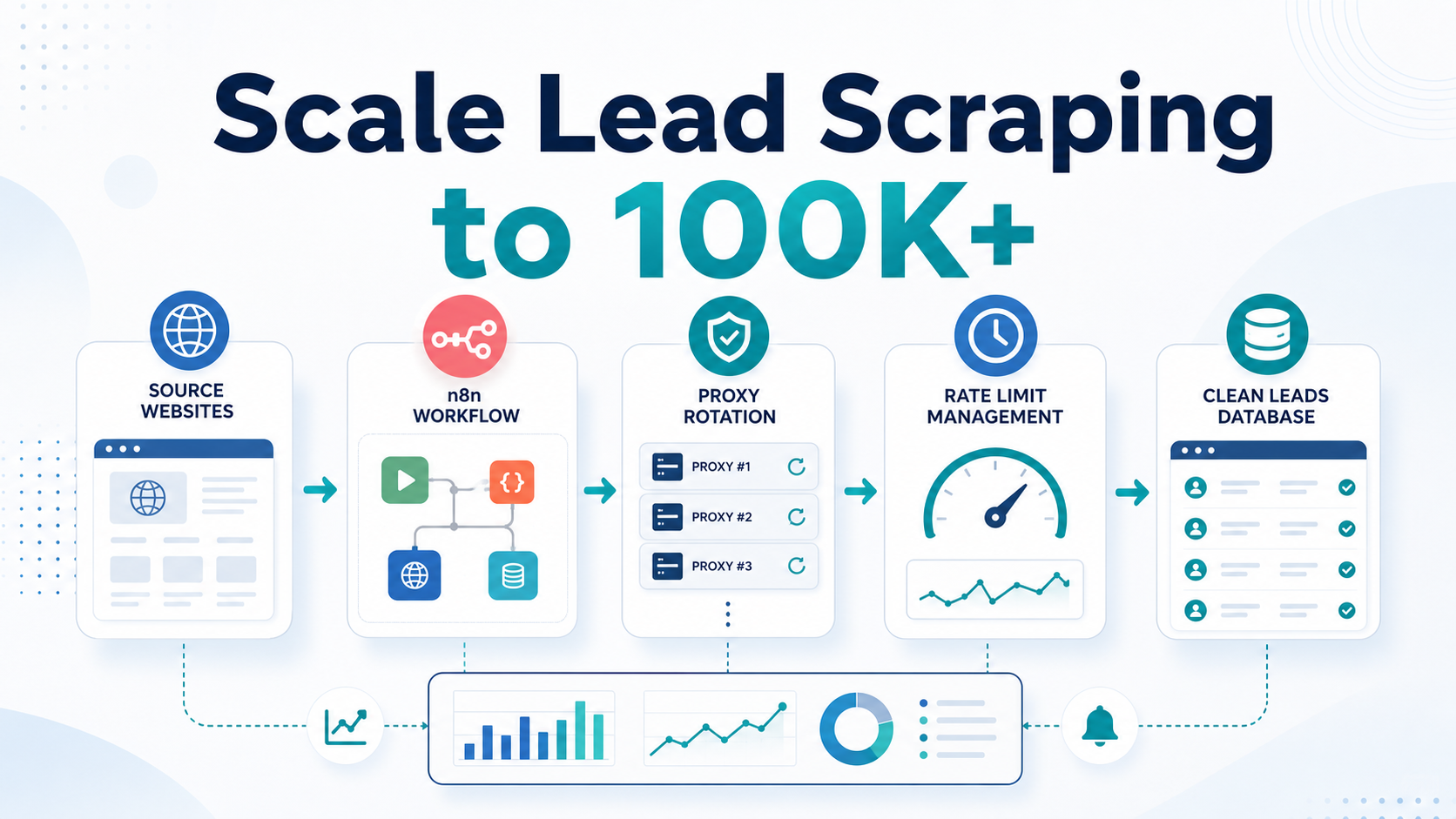
Scraping a few hundred leads is not the same as operating a 100,000-lead pipeline. At scale, the winning workflow is the one that can slow down, recover, and keep data quality visible.
Small scraping jobs often work with a simple loop. High-volume lead generation workflows fail for different reasons: request bursts trigger rate limits, one IP accumulates too much volume, memory grows too large, and a crash near the end can erase hours of progress.
This guide shows how to design an n8n lead scraping architecture that can process large lead lists with request throttling, proxy rotation, batch checkpoints, retry logic, and progress monitoring. Use these patterns for legitimate public-data collection, and always review the source site’s terms and robots guidance before scraping.
For teams using LycheeIP, proxy infrastructure can support the collection layer with residential, static, dynamic, and datacenter IP options suited to different public-data workflows.
Rate Limiting and Request Throttling in n8n
The most common reason scraping workflows fail at scale is speed. Websites monitor request patterns, and rapid repeated queries from a single source can trigger HTTP 429 responses, temporary blocks, CAPTCHA challenges, or connection failures.
Use Wait Nodes Between Request Bursts
n8n provides a Wait node for delaying workflow execution. A 1-5 second delay between requests is slower, but it is often far more reliable than pushing traffic as fast as possible.
HTTP Request -> Wait (2 seconds) -> Process Data -> Next LeadSplit Large Jobs into Batches
Use Loop Over Items, formerly Split in Batches, to divide the work into manageable chunks. Processing 500-2,000 leads per batch gives you checkpoints, cleaner retries, and better memory behavior.
Load Leads -> Loop Over Items (1,000) -> Scrape Batch -> Save Batch -> Next BatchSchedule Work Across Time Windows
The Schedule Trigger node can spread scraping across hours or days. For example, process 5,000 leads each hour instead of forcing 100,000 into one fragile run.
| Pattern | Use when |
|---|---|
| Short waits between requests | One source needs gentle pacing |
| Batch pauses | Each chunk should complete before the next begins |
| Hourly schedules | The source is sensitive or the dataset is very large |
| Adaptive backoff | 429, timeout, or block signals appear during a run |
A practical rule: test small batches, estimate the source’s tolerable pace, then operate 30-40% below that threshold. That margin absorbs retries, slower pages, and temporary server changes.
Explore LycheeIP Proxy Options
Using Proxies and Rotation Responsibly
Even with careful throttling, scraping 100,000 leads from one IP can create a suspicious volume pattern. Proxy rotation distributes public-data requests across multiple IP addresses and regions, but it should be paired with respectful pacing and source-rule review.
Proxy Types for Lead Scraping
| Proxy type | Best fit |
|---|---|
| Datacenter proxies | Fast, cost-efficient collection from less restrictive sources |
| Dynamic residential proxies | Rotating public-data collection with IP diversity and location coverage |
| Static residential proxies | Session persistence, logged-in workflows, and stable multi-step requests |
| Mixed proxy pools | Teams separating discovery, enrichment, verification, and monitoring workflows |
Proxy Pool Sizing
Pool size depends on target-site limits, request count per lead, location needs, and retry volume. If one IP can safely handle about 1,000 requests per day, 100,000 requests needs at least 100 IPs, plus a 20-30% buffer for retries and underperforming endpoints.
- Track success rate by proxy.
- Track response time so slow proxies can be excluded.
- Track ban or challenge rates by source.
- Use sticky sessions when related requests need the same IP.
- Rotate sessions periodically to avoid long-term concentration.
Implementing Proxy Rotation in n8n
For basic API and page-fetch workflows, n8n’s HTTP Request node is the central node for outbound requests. For rotation, store proxy details in a database, credential store, or upstream proxy provider API, then pass the selected proxy into each request step.
- Store the proxy list or proxy API endpoint outside the article workflow logic.
- Select a proxy using round-robin, random, health-based, or geo-based rules.
- Send the request through the chosen proxy.
- Log response status, timing, and source URL.
- Remove or cool down proxies that produce repeated failures.
LycheeIP can simplify this layer for large public-data workflows by providing proxy infrastructure with dynamic IP rotation, static session options, and datacenter IPs for different speed, cost, and reliability needs.
Batch Processing and Data Pipeline Optimization
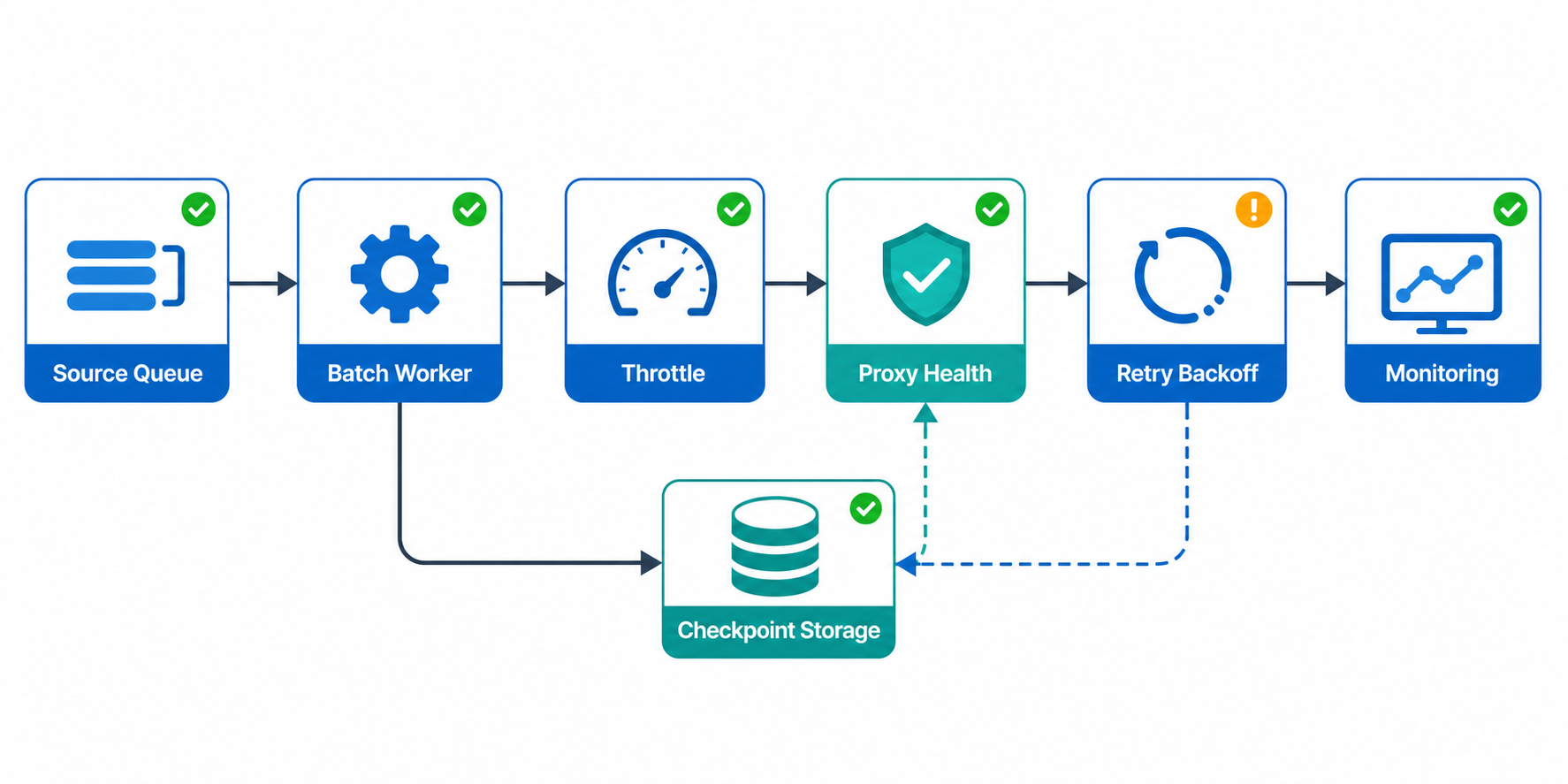
Batch processing is what prevents a large scrape from becoming one all-or-nothing run. If a workflow crashes at lead 87,543, you should be able to resume from the last completed batch rather than starting over.
Choose a Practical Batch Size
| Batch size | Tradeoff |
|---|---|
| 10-50 leads | Very safe but high overhead |
| 500-2,000 leads | Good balance for most lead pipelines |
| 10,000+ leads | Higher memory and recovery risk |
Checkpoint Every Batch
Store completion status after every batch in a database, spreadsheet, or file. Track batch ID, start row, end row, completion timestamp, success count, error count, and retry status.
- Write results incrementally instead of holding everything in memory.
- Log failed leads separately for later retry.
- Use email, domain, source URL, or listing ID as deduplication keys.
- Keep raw scraped data separate from cleaned production data.
- Back up long-running outputs to cloud or database storage.
Build a Stable Lead Collection Pipeline
Error Handling and Retry Logic
At 100,000 leads, some requests will fail. The workflow should categorize failures and continue safely.
| Error type | Recommended action |
|---|---|
| Timeout or 503 | Retry after a short delay |
| HTTP 429 | Pause, increase backoff, and reduce pace |
| 403 or repeated CAPTCHA | Stop that source or review access rules |
| 404 | Skip and log the missing page |
| Parsing failure | Save source HTML or error details for review |
A simple graduated retry pattern works well: wait 10 seconds after the first failure, 30 seconds after the second, 60 seconds after the third, then log the lead as failed and move on.
Web Scraping with Python and Beautiful Soup
Monitoring and Progress Tracking
A long-running scrape needs visibility. Track total leads processed, current batch, success rate, average time per lead, estimated completion time, error count by type, and proxy performance statistics.
Use alerts when success rate drops below a threshold, errors cluster around one source, processing time exceeds expectations, or proxy failures rise. A workflow that can notify you early is safer than one that quietly produces bad data for hours.
Common Mistakes and Considerations
Underestimating Time Requirements
With proper pacing, a 100,000-lead scrape may take 24-48 hours or longer. Reliable collection is usually slower than a demo run.
Ignoring Target Site Terms
Review source rules before scraping. Some sites prohibit automated access, and legal obligations vary by jurisdiction and data type. Focus on legitimate public business data and consult counsel for high-risk cases.
Using Too Few Proxies
Ten proxies cannot safely carry a 100,000-lead operation in most real-world conditions. Estimate pool size from per-IP request limits and add buffer.
Skipping Data Quality Checks
Validate email format, empty fields, phone format, company names, duplicate records, and suspiciously repeated values. Better to collect fewer clean leads than more unusable rows.
Failing to Test Small First
Test 100 leads, then 1,000 leads, before running the full pipeline. This catches workflow bugs, parsing problems, and rate-limit thresholds before they become expensive.
Hardcoding Credentials
If a workflow requires authenticated access, never hardcode usernames, passwords, or proxy credentials in node code. Use n8n credentials or environment variables.
Conclusion
Scaling lead scraping to 100,000+ contacts requires production-grade workflow architecture. Rate limiting protects target sites and reduces blocks. Proxy rotation distributes public-data requests across appropriate IPs. Batch processing gives you checkpoints, recovery, and visibility.
The most durable n8n architecture splits large jobs into batches, throttles request flow, logs every failure, stores incremental results, and monitors proxy health. With LycheeIP proxy infrastructure, teams can choose dynamic, static, residential, or datacenter options based on the source and workload.
Start small, measure honestly, and scale only after the workflow can pause, resume, and produce clean data without overwhelming sources.
Frequently Asked Questions
What is the minimum number of proxies needed to scrape 100,000 leads safely?
It depends on target-site limits and requests per lead. A rough planning range is 100-150 residential IPs when each IP can safely handle about 500-1,000 requests per day, plus buffer for retries.
How long does it take to scrape 100,000 leads with proper rate limiting?
Expect 24-48 hours or more with conservative delays, especially if each lead requires multiple page loads. Parallel batches can reduce wall-clock time if they are coordinated carefully.
Can I scrape 100,000 leads without proxies?
Only on sources designed for high-volume access, such as official APIs. For typical public lead sources, one IP is likely to hit rate limits or blocks long before 100,000 requests.
What is the difference between rotating and static proxies for lead scraping?
Rotating proxies change IPs automatically and are useful for high-volume distribution. Static proxies keep one IP for longer sessions and are useful when continuity matters.
How do I handle CAPTCHA challenges during large-scale scraping?
Treat CAPTCHAs as a signal to slow down, improve pacing, review source rules, and use more appropriate proxy types. Persistent CAPTCHA challenges may mean the source is not suitable for scraping.
What batch size works best for 100,000 leads in n8n?
Batches of 500-2,000 leads are a practical starting range. Use smaller batches for complex pages or heavy transformation and larger batches only after testing memory and recovery behavior.
How do I resume a scraping workflow if it crashes partway through?
Store completed batch IDs and result counts after every batch. On restart, query the checkpoint table or file and resume from the first incomplete batch.
Is it legal to scrape 100,000 leads from websites?
It depends on jurisdiction, source terms, access method, and data type. Review terms, robots guidance, and privacy rules, and get legal guidance for campaigns involving personal data.
What is more important for avoiding bans: rate limiting or proxy rotation?
Both matter. Rate limiting reduces timing-based detection and protects sources from overload. Proxy rotation reduces concentration from one public IP. At high volume, use both responsibly.