Introduction
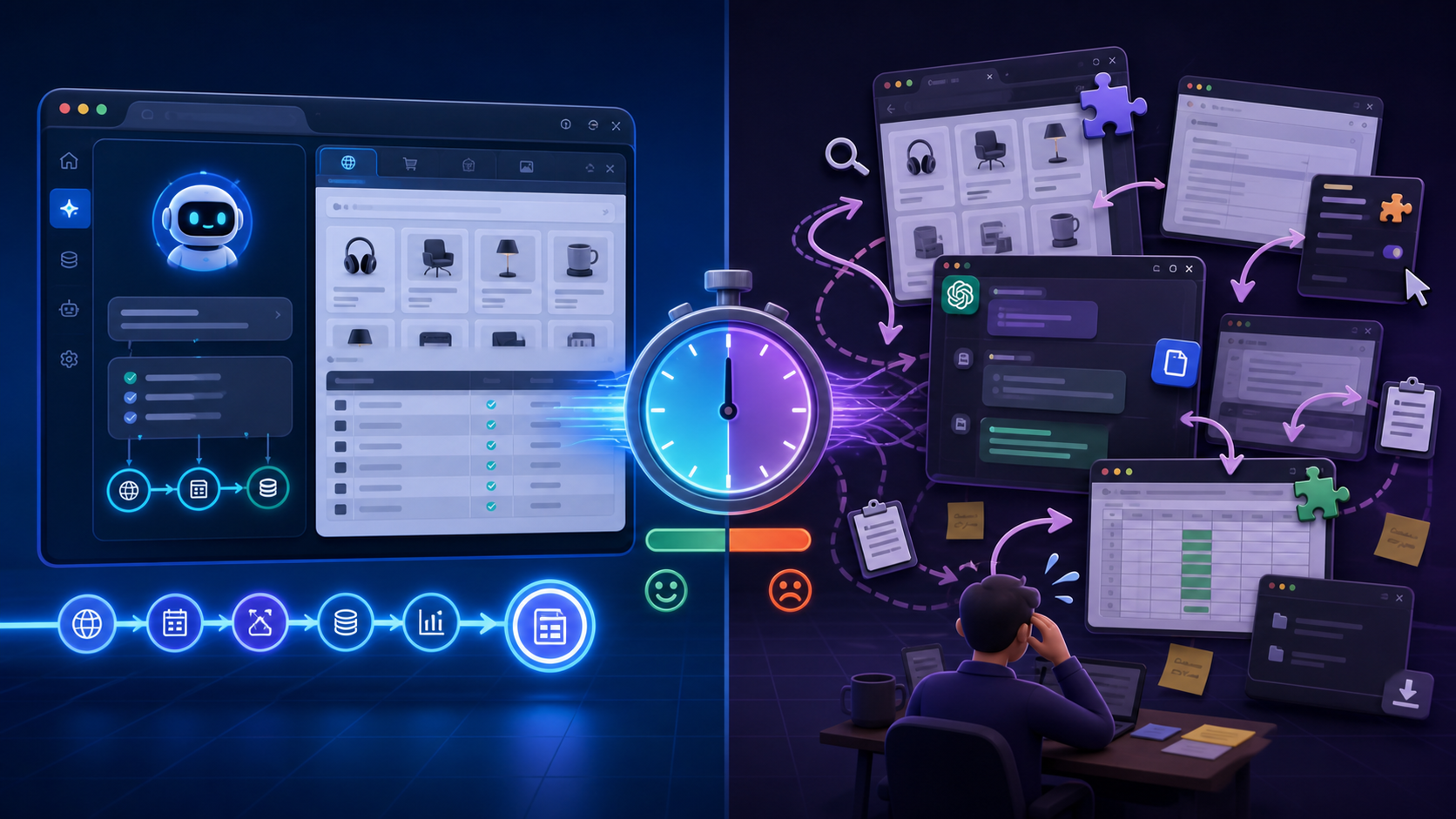
Why copying and pasting into ChatGPT is killing your productivity. Every time you copy text from a web page, switch to ChatGPT, paste it in, wait for a response, then copy that response back to your work environment, you're burning cognitive cycles on mechanical tasks that should be automated. Traditional browsers require manual switching between AI tools and workflow contexts, creating friction that compounds throughout the day.
For tech-savvy professionals running data collection workflows, web scraping operations, or automation tasks, this context switching isn't just annoying. It's a structural inefficiency that slows decision-making, increases error rates, and fragments the cognitive flow needed for complex technical work.
This article compares AI-native browser experiences against bolt-on AI extensions and traditional browser setups. We'll examine how native integration differs from add-on tools, analyze the cognitive and workflow benefits of context-aware browsing, and break down the real cost difference between free AI browsers and premium subscription stacks.
Native AI Integration vs Browser Extensions Comparison
What Native AI Integration Actually Means
A native AI browser integrates language models directly into the browser architecture. Instead of bolting AI capabilities onto an existing browser through extensions or plugins, these browsers are built from the ground up with AI as a core feature.
Key characteristics of native AI integration include:
Traditional browsers with AI extensions, by contrast, operate through a permission-constrained layer. Extensions like ChatGPT for Chrome, Merlin, or similar tools must request access to page content, operate within browser security sandboxes, and often require users to manually trigger AI interactions.
- AI context available in any text field or page without switching tabs
- Page content automatically available to the AI without manual copying
- Persistent conversation state across browsing sessions
- Direct access to page DOM, metadata, and structured data
- No permission juggling between extension and page content
The Extension Limitation Pattern
Browser extensions face architectural constraints that native integrations avoid:
Permission barriers: Extensions must explicitly request access to page content. Many websites block extension access through Content Security Policies, leaving users without AI assistance on exactly the pages where they need it most.
Context fragmentation: When you use an extension, you're still operating in a traditional browser architecture. The AI sidebar or popup is a separate UI element that doesn't understand your full browsing context without explicit user action.
Performance overhead: Extensions add processing layers between the browser and AI service. Each interaction requires permission checks, content script execution, and message passing between isolated contexts.
Update friction: Extensions depend on browser APIs that change with each browser version. Native integration controls the entire stack, reducing compatibility issues.
For workflows involving web scraping, data extraction, or automation testing, these limitations create specific problems. If you're analyzing scraped data, testing geo-targeted content, or debugging proxy-routed requests, you need AI tools that can access network logs, inspect headers, and understand request chains. Extensions rarely have this level of access.
Tabbit's Approach to Native Integration
Tabbit represents the AI-native browser category. Rather than adding AI to an existing browser, it builds browsing features around AI interaction patterns.
This means
For technical users, this architectural difference matters most when handling complex workflows. If you're comparing pricing across e-commerce sites, verifying ad placements through different geolocations, or extracting structured data from search results, native AI integration can operate on page data directly rather than requiring you to manually copy relevant sections.
- Highlight any text and invoke AI without leaving the page
- Ask questions about page content without copying and pasting
- Generate summaries, extractions, or transformations inline
- Maintain conversation context across tabs and sessions
- Access browser state (network activity, console logs, storage) through AI commands
Traditional Browser + ChatGPT Workflow
The traditional approach looks like this
This workflow creates multiple context switches per AI interaction. For occasional use, it's manageable. For professionals who need AI assistance dozens or hundreds of times per day, the friction compounds.
- Research or browse to gather information
- Identify relevant content on a page
- Copy the content (or multiple sections)
- Switch to ChatGPT tab or window
- Paste content with context explanation
- Wait for AI response
- Copy AI output
- Switch back to original context
- Paste or apply AI output
- Repeat for each new piece of content
Why Architecture Matters for Automation Workflows
When running browser automation, scraping operations, or data collection workflows, browser architecture affects more than convenience. It determines what's technically possible.
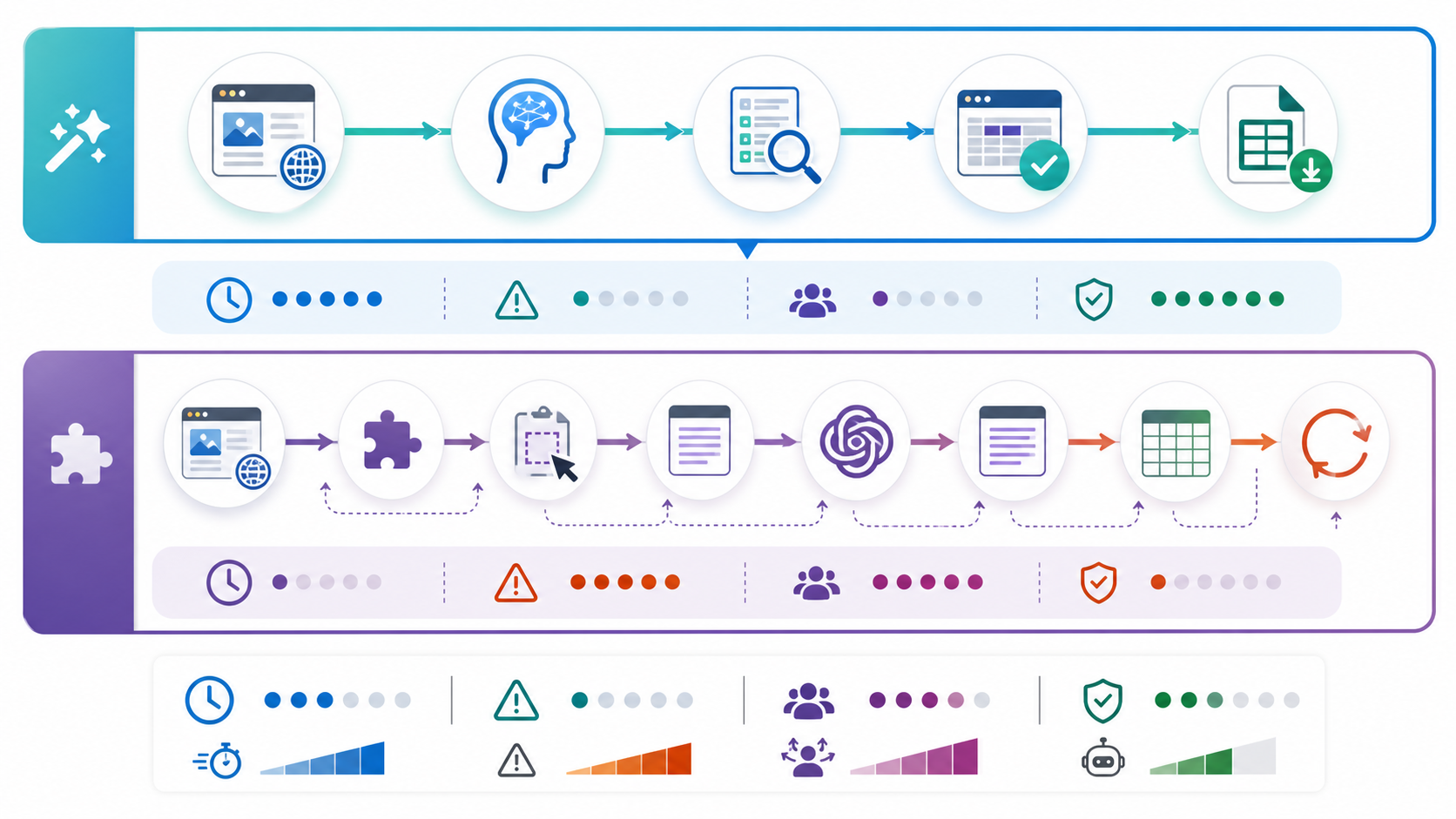
Consider a common scenario: you're testing how your website appears from different geographic locations using proxy rotation. You need to verify that localized content, pricing, and product availability display correctly for users in different countries.
With native AI integration, you could:
With an extension-based approach, you'd need to:
The native approach reduces a multi-step verification process to a single query. This efficiency gain matters when you're testing dozens of geolocations or running continuous monitoring workflows.
- Route traffic through a residential proxy in a target geography
- Load your site and immediately ask the AI to identify localization issues
- Have the AI compare the current page against expected content patterns
- Generate a structured report of discrepancies without manual extraction
- Manually screenshot or copy relevant page sections
- Switch to an AI interface
- Describe what you're testing and what to look for
- Interpret AI feedback and manually verify findings
The Cognitive Cost of Context Switching
Research on task switching shows that every context change imposes a cognitive cost. When you shift from a technical task to a mechanical copying task, then to an AI interaction, then back to technical work, you're not just losing seconds. You're losing mental state.
For technical professionals working with complex systems (proxy configuration, scraping logic, data pipelines, testing matrices), maintaining mental context is critical. You need to hold multiple variables in working memory: what you're testing, what you expect to find, what patterns matter, and what to do with the results.
Each time you break that flow to manually shuttle data between browser and AI, you risk:
- Forgetting edge cases you were tracking
- Losing sight of the broader pattern you were investigating
- Missing connections between related data points
- Introducing transcription errors from manual copying
Context-Aware Browsing Reduces Error Introduction
Manual copying introduces errors at multiple points:
Selection errors: You might copy incomplete data, missing key context like headers, metadata, or surrounding content that explains the selection.
Formatting loss: Copying from rendered web pages often strips semantic structure. A table becomes plain text. A list loses its hierarchy. JSON or code blocks lose formatting.
Ambiguity introduction: When you paste content into ChatGPT, you must manually provide context. "Here's some pricing data from a competitor site" requires you to explain what product, what market, what date, and what comparison you need. If you forget any context, the AI's response will be less useful.
Response interpretation errors: After the AI responds, you must correctly interpret and apply its output. If you asked about pricing discrepancies but forgot to mention you're viewing through a proxy in a specific region, the AI's answer might be technically correct but contextually wrong.
Context-aware browsing eliminates these error vectors by giving the AI direct access to page structure, metadata, and browsing state. The AI knows:
This contextual awareness means you can ask direct questions without extensive setup. "Is this pricing consistent with the US site?" works because the AI knows you're viewing through a UK proxy and can reference previous sessions where you checked US pricing.
- What page you're on (URL, title, headers)
- What content you selected (with full semantic structure)
- What you were doing before (browsing history, previous queries)
- What tools or configurations you're using (proxy settings, viewport size, logged-in state)
Practical Examples from Technical Workflows
web scraping development: You're building a scraper for e-commerce product data. With context-aware AI, you can:
Without context awareness, you'd need to copy the HTML, explain what you're scraping, describe the page structure, and manually apply the AI's generic advice to your specific situation.
Proxy and geo-testing: You're verifying that content displays correctly across different geographic regions using residential proxies.
- Highlight a product block and ask "What's the best XPath selector for this?"
- Query "Are there any anti-scraping indicators on this page?" and get analysis of rate limiting headers, JavaScript challenges, or behavioral detection patterns
- Ask "How should I handle pagination here?" while the AI examines the actual pagination structure
With native AI integration
Without context awareness, you'd need to manually compare screenshots, track which proxy location showed which content, and describe differences in text form.
Ad verification: You're checking that ads display correctly in different contexts.
- "Compare this page to the version I saw 10 minutes ago" (AI remembers previous proxy location)
- "Extract all pricing and convert to USD" (AI sees the page and current location context)
- "Are there any missing elements compared to the US version?" (AI can diff page structures)
With context-aware AI
Manual verification requires screenshot documentation, spreadsheet tracking, and extensive written notes to communicate findings.
- "Is this ad placement compliant with our guidelines?" (AI sees the actual rendered ad)
- "Compare this ad creative to our approved versions" (AI can analyze visual and text content)
- "Check if ad tracking parameters are correct" (AI can inspect network requests)
How Cognitive Load Reduction Affects Daily Workflows
For professionals managing multiple technical workflows, cognitive load reduction translates directly to capacity gains.
If traditional AI assistance requires
And you make 50 AI-assisted decisions per day, you're spending 25 minutes daily on mechanical overhead. Over a year, that's roughly 100 hours of pure friction.
More importantly, this friction creates a psychological barrier. When AI assistance requires 30 seconds of overhead, you skip it for marginal queries. You make assumptions instead of checking. You rely on memory instead of verification. This increases error rates in subtle ways that compound over time.
When AI assistance has near-zero overhead, you use it more frequently for smaller decisions. You verify assumptions. You check edge cases. You catch errors earlier. The quality of your work improves because the tool is always available without cognitive cost.
- 10 seconds for context switching per interaction
- 15 seconds for copying and pasting
- 5 seconds for reformulating context
- 30 seconds total overhead per AI query
Cost Analysis of Free AI Browsers vs Premium Subscriptions
The Traditional Premium Stack Cost Structure
To match the capabilities of an AI-native browser using traditional tools, you'd typically need:
ChatGPT Plus: $20/month for GPT-4 access, faster responses, and priority availability during peak times.
Browser extensions: Most AI extensions offer free tiers with usage limits, then charge $10-30/month for unlimited access. Examples include Merlin ($20/month), Monica ($15/month), or similar tools.
Productivity tools: Many professionals add tools like Notion AI ($10/month), Grammarly Premium ($12/month), or specialized tools for summarization, translation, or data extraction.
A reasonably complete AI-assisted workflow stack costs roughly $40-80/month depending on tool selection and usage intensity.
This cost structure assumes you're comfortable with the context-switching workflow and don't need native integration benefits. If those limitations create enough friction that you purchase additional automation tools (text expanders, clipboard managers, workflow automation), the cost increases further.
Free AI Browser Economics
AI-native browsers like Tabbit often use freemium models where:
The free tier typically provides enough capacity for moderate professional use. Power users might hit limits, but the base cost is zero versus $40-80/month for equivalent traditional setups.
- Basic AI integration is free with usage limits
- Core browsing features are unrestricted
- Premium tiers add higher usage limits, advanced models, or priority access
This pricing model works because
Lower infrastructure costs per user: Native integration is more efficient than running separate services. One AI call embedded in browsing state costs less than multiple API calls to reconstruct context.
User acquisition value: Free AI browsers gain users by eliminating subscription friction. They can monetize later through premium features, enterprise offerings, or strategic partnerships.
Competitive positioning: Established browsers (Chrome, Firefox, Edge) are adding AI features to defend market share. Startups can compete by offering superior integration for free while incumbents charge for extensions.
TCO Beyond Subscription Costs
Total cost of ownership includes factors beyond monthly fees:
Time cost: If native AI integration saves 25 minutes daily at a fully-loaded hourly rate of $75 (typical for senior technical professionals), the time savings value approaches $1,500/month. Even 10% of this efficiency gain justifies substantial subscription costs.
Error cost: Context-aware AI reduces errors in technical workflows. If it prevents one significant mistake per quarter (requiring 5 hours to debug and fix), that's 20 hours annually, worth $1,500 at the same rate.
Opportunity cost: When AI assistance has lower friction, you use it for more decisions. This improves work quality in ways that are hard to quantify but materially valuable.
Integration cost: Traditional setups require managing multiple subscriptions, logins, and tool configurations. Native integration is one tool to learn, one subscription to manage, and one interface to master.
Decision Framework for Tool Selection
When evaluating AI browser options, consider:
Usage intensity: If you make 10 AI queries per day, traditional tools work fine. If you need AI assistance constantly throughout the day, native integration pays for itself quickly.
Workflow complexity: Simple tasks (summarization, grammar checking) work adequately with extensions. Complex workflows (data analysis, multi-step verification, automation development) benefit more from native integration.
Technical requirements: If your work involves proxy usage, web scraping, automation testing, or similar activities requiring browser-level control, native AI access to browser state is valuable.
Budget flexibility: Free AI browsers let you test native integration without financial commitment. If it improves your workflow, premium tiers are cheaper than equivalent traditional stacks.
Data sensitivity: Some professionals can't use cloud AI services for confidential work. This eliminates both AI browsers and cloud-based extensions, requiring on-premise or self-hosted solutions regardless of cost.
The Vendor Lock-In Question
Switching to an AI-native browser creates potential vendor lock-in. If you build workflows around native features, you can't easily move to another browser without rebuilding those workflows.
This risk is real but manageable
For comparison, traditional stacks also create lock-in through multiple subscriptions, learned workflows, and integrated toolchains.
The relevant question isn't whether lock-in exists, but whether the tool provides enough value to justify the switching cost if you later need to change.
- AI-native browsers typically support standard extensions, so you can add familiar tools
- Export features let you save conversation history, bookmarks, and settings
- Most workflows adapt to traditional browsers with added friction rather than breaking entirely
LycheeIP and AI Browser Automation Workflows
For teams using proxy infrastructure in their workflows, AI browser integration creates interesting capabilities.
Explore LycheeIP Proxy Infrastructure
LycheeIP provides proxy solutions including residential proxies, datacenter proxies, and static residential IPs for web scraping, geo-testing, automation, and data collection workflows. When combined with AI-native browsing, these infrastructure capabilities become more accessible.
Common workflow scenarios where proxy infrastructure and AI browsers intersect:
Geo-targeted content verification: Route browser traffic through residential proxies in different regions while using AI to analyze content differences, extract localized data, or verify proper geo-targeting implementation. The AI can spot patterns across multiple geographic views without manual comparison.
E-commerce research: Collect pricing, availability, and product data through proxies while AI extracts structured information from pages. Instead of building custom scrapers, use context-aware AI to identify relevant data patterns and transform them into usable formats.
Ad verification workflows: View ad placements through different IP addresses and user contexts while AI checks compliance, tracks creative variations, and identifies discrepancies. The AI can maintain verification state across proxy rotations.
SERP monitoring: Check search rankings from different locations using residential proxies while AI analyzes ranking changes, identifies new competitors, and tracks keyword performance trends across geolocations.
Account testing: Manage multiple account sessions through different IP addresses while AI assists with testing workflows, verification steps, and behavioral variation to simulate realistic usage patterns.
The combination of proxy infrastructure and AI browsing reduces the technical complexity of these workflows. Instead of writing custom scripts for data extraction, comparison logic, and analysis, you can use AI interaction for many tasks while proxies handle the infrastructure layer.
When evaluating proxy infrastructure for these workflows, consider:
LycheeIP offers these proxy types for teams building data collection, testing, or automation workflows that benefit from controlled IP routing. When combined with AI-native browsers, the proxy infrastructure handles network-level concerns while AI handles data interpretation and workflow decisions.
- residential proxies provide realistic IP addresses that websites treat as regular users, useful for accessing geo-restricted content and avoiding anti-bot detection
- Static residential IPs maintain consistent identity across sessions, helpful for workflows requiring login persistence
- datacenter proxies offer higher speed and lower cost for high-volume data collection where residential IPs aren't required
- Rotation capabilities let you distribute requests across IP pools to avoid rate limiting
Common Mistakes When Evaluating AI Browser Tools
Overweighting Feature Lists
Many evaluations focus on feature counts rather than workflow fit. An AI browser with 50 features you won't use is less valuable than one with 10 features that directly address your needs.
Focus evaluation on
- Which workflows you actually perform daily
- Where friction currently slows you down
- What tasks you currently skip because they're too tedious
- Whether AI assistance would materially improve outcomes
Underweighting Privacy and Data Handling
AI browsers send browsing data to AI services for processing. This has privacy implications:
For some users, privacy concerns override convenience benefits. Verify data handling policies before committing sensitive workflows to any AI service.
- What data leaves your browser?
- Where is it processed and stored?
- Who has access to conversation history?
- Can you use the browser on confidential work?
- What happens to your data if you cancel?
Ignoring Performance Characteristics
AI integration adds latency to browsing. Each AI query requires:
This typically takes 2-10 seconds depending on query complexity and service load. For interactive workflows where you're waiting for AI responses constantly, latency compounds.
Test tools with realistic workloads before committing. A tool that feels fast during evaluation might slow down under production usage intensity.
- Sending context to AI service
- Processing the request
- Returning and rendering the response
Assuming AI Is Always Helpful
AI assistance is valuable for many tasks but counterproductive for others. AI is generally helpful for:
- Summarization and synthesis
- Format conversion and data extraction
- Pattern identification across large content sets
- Generating variations or alternatives
- Explaining complex technical content
AI is often less helpful for
Evaluate AI browser tools based on how well they handle tasks you actually need, not hypothetical capabilities.
- Tasks requiring perfect accuracy (AI makes mistakes)
- Real-time workflows where latency matters
- Highly specialized domains where models lack training data
- Creative work where AI output is generic
- Tasks where you need verifiable sources
Not Testing Proxy Compatibility
If your workflows involve proxy usage, web scraping, or automation, verify that AI browsers work correctly with:
Some AI browsers handle proxy configuration differently than traditional browsers. Test your specific proxy setup before assuming compatibility.
- HTTP and SOCKS5 proxies
- Proxy authentication
- Residential and datacenter proxy types
- Proxy rotation mechanisms
- Session persistence requirements
Forgetting About Browser Extension Ecosystems
Switching to an AI-native browser means leaving behind your existing extension collection. Verify that:
For many professionals, browser extensions are deeply integrated into daily workflows. The cost of losing them might exceed the benefit of native AI.
Conclusion: Choosing the Right AI Browser Setup for Your Workflow
The comparison between AI-native browsers like Tabbit and traditional browser setups with extensions comes down to workflow intensity and integration value.
Traditional browsers with AI extensions work adequately for occasional AI assistance. If you need to summarize an article twice a day or check grammar on important emails, the context-switching overhead is manageable. The free or low-cost extension ecosystem provides sufficient functionality without requiring browser changes.
AI-native browsers deliver meaningful value when AI assistance becomes a frequent, integral part of your workflow. For technical professionals working with data collection, web scraping, automation testing, geo-verification, or similar activities, the ability to invoke context-aware AI without friction changes how you work.
- Critical extensions have equivalents in the new browser
- The browser supports standard extension formats (Chrome extensions, Firefox add-ons)
- Your workflow doesn't depend on extensions that won't work in the new environment
The cost analysis favors AI browsers when
For teams using proxy infrastructure alongside browsing workflows, AI-native browsers offer particularly strong benefits. The combination of controlled IP routing through residential or datacenter proxies and context-aware AI assistance reduces the technical complexity of data collection, testing, and verification workflows.
The decision isn't about whether AI in browsers is valuable - it clearly is. The question is whether native integration provides enough additional value over extension-based approaches to justify switching browsers and adapting workflows. For many tech-savvy professionals, especially those working with web data, automation, and testing workflows, the answer is yes.
- You make dozens of AI-assisted decisions daily
- Your workflows involve complex browser state that AI should understand
- You're already paying for multiple AI subscriptions and tools
- Time savings from reduced friction justify tool switching costs
- Your work involves proxy usage, automation, or data extraction where native browser integration provides technical advantages
Related LycheeIP Guides and Resources
- <a href="https://www.lycheeip.com/en/home/ip">LycheeIP proxy infrastructure</a>
- <a href="https://www.lycheeip.com/en/ip/static">static residential proxies</a>
- <a href="https://www.lycheeip.com/en/ip/dynamic">rotating residential proxies</a>
- <a href="https://www.lycheeip.com/en/ip/datacenter">datacenter proxies</a>
- <a href="https://www.lycheeip.com/en/document/residential-proxy-what-it-is-how-it-works-and-when-to-use-it/607">Residential proxy guide</a>
- <a href="https://www.lycheeip.com/en/document/anonymous-proxy-server-how-it-works-types-and-when-to-use-one/608">Anonymous proxy server guide</a>
- <a href="https://www.lycheeip.com/en/document/vpn-privacy-what-actually-gets-logged/643">VPN privacy logging reality</a>
- <a href="https://www.lycheeip.com/en/document/scale-lead-scraping-to-100k-with-n8n/638">Scale lead scraping to 100K+ with n8n</a>
Reference background: <a href="https://developer.mozilla.org/en-US/docs/Web/API">MDN Web APIs documentation</a>, <a href="https://owasp.org/www-project-automated-threats-to-web-applications/">OWASP automated threats guidance</a>, <a href="https://www.rfc-editor.org/rfc/rfc9110">IETF HTTP semantics</a>, <a href="https://playwright.dev/docs/intro">Playwright documentation</a>.
Frequently Asked Questions
What's the main difference between an AI-native browser and browser extensions?
AI-native browsers integrate AI directly into the browser architecture, giving AI tools full access to page content, browsing context, and browser state without permission barriers. Extensions operate through a constrained plugin layer that requires explicit content access, works within security sandboxes, and can't access all browser features. Native integration eliminates context switching and manual copying between browser and AI interface.
Can I use proxy services with AI browsers like Tabbit?
Most AI browsers support standard proxy configurations including HTTP, HTTPS, and SOCKS5 proxies. You can route traffic through residential proxies, datacenter proxies, or rotating proxy pools just as you would with traditional browsers. Verify specific proxy authentication methods and rotation mechanisms with your browser and proxy provider to ensure compatibility.
Are AI browsers safe for confidential work?
AI browsers send page content and queries to AI services for processing, which creates privacy considerations. Review the browser's data handling policies, encryption practices, and data retention terms. For highly confidential work involving proprietary data, trade secrets, or regulated information, you may need to disable AI features, use on-premise AI solutions, or stick with traditional browsers where you control data sharing explicitly.
How much does it cost to replace my current setup with an AI browser?
Many AI-native browsers offer free tiers that cover moderate usage. If you're currently paying $20-80/month for ChatGPT Plus, AI extensions, and productivity tools, an AI browser's free or premium tier ($10-25/month typically) costs less while providing more integrated functionality. The actual savings depend on your current subscription stack and usage intensity.
Will switching to an AI browser break my existing workflows?
If your workflows depend heavily on browser-specific extensions, bookmarks sync, or enterprise browser management, switching requires migration planning. Most AI browsers support standard extension formats and can import bookmarks and settings from major browsers. The main workflow change is learning new AI interaction patterns, which typically takes days rather than weeks.
Do AI browsers work for web scraping and automation development?
AI browsers can assist with scraping and automation workflows by helping identify selectors, analyze page structure, and debug issues through conversational interaction. However, production scraping typically requires headless browsers, custom scripts, and dedicated automation tools. AI browsers are better for development, testing, and analysis workflows rather than production data collection at scale.
How does native AI integration improve geo-testing workflows?
When testing content across geographic regions using proxies, native AI integration lets you compare page versions, extract localized data, and identify discrepancies through natural language queries without manually documenting differences. The AI maintains context across proxy location changes, making it easier to spot patterns across multiple geographic views.
Can AI browsers replace my scraping scripts?
For small-scale, ad-hoc data extraction, AI browsers can replace simple scripts through conversational data extraction. For production scraping at scale, dedicated scraping frameworks with proper error handling, rate limiting, and data pipelines remain necessary. AI browsers are best for prototyping, one-off extraction, and analysis rather than automated large-scale collection.
What happens if an AI browser shuts down or changes pricing?
AI browser shutdowns or pricing changes create switching costs similar to any software transition. Most browsers support data export for bookmarks, history, and settings. Conversation history might be harder to migrate. This vendor lock-in risk exists with traditional tools too through multiple subscriptions and learned workflows. Choose browsers with clear data portability policies.
How do I evaluate if an AI browser fits my technical workflow?
Identify specific tasks where you currently use AI assistance (data extraction, analysis, comparison, debugging, verification). Test whether the AI browser's native integration genuinely reduces friction for these tasks compared to your current setup. Measure time savings, error reduction, and quality improvements over a trial period. If gains don't justify switching costs, stick with your current tools.