
Navigating the complex world of residential proxies can be daunting. This guide explains what residential proxies are, how they operate, and the most practical scenarios for using them.
Understanding residential proxies is critical for digital marketers, SEO professionals, web scrapers, and developers who need reliable infrastructure for data collection, ad verification, automation, or geo-specific testing. A residential proxy is an intermediary server that routes your internet requests through an IP address assigned by a real Internet Service Provider (ISP) to a residential location.
Unlike datacenter proxies, which originate from data centers, residential proxies come from actual home internet connections. That makes traffic appear closer to legitimate user activity when websites evaluate IP reputation, geography, and request behavior.
This distinction matters because many websites apply stricter scrutiny to datacenter IP ranges, which are easier to identify and block. Residential proxy pools can blend in with normal user behavior, reducing the likelihood of blocks, CAPTCHAs, and rate limits when used responsibly.
The growing availability of affordable residential proxy solutions, including pay-as-you-go models priced around $1 to $2.50 per gigabyte, has made this technology accessible to small teams and individual professionals. The key is knowing when residential IPs provide meaningful value over cheaper alternatives.
What Is a Residential Proxy?
A residential proxy is a proxy server that uses an IP address assigned by an ISP to a residential customer. These IP addresses are tied to physical locations such as homes and apartments, and they are distributed across cities, regions, and countries worldwide.
When you connect through a residential proxy, your requests appear to originate from a real household internet connection rather than commercial hosting infrastructure. That authenticity is the main reason residential proxies are used for ad verification, localized testing, market research, and public web data collection.
Residential proxies are often pooled by proxy providers who source IP addresses from real users who have opted into sharing unused bandwidth. Ethical providers make consent, compensation, privacy protection, and acceptable-use enforcement central to the way the network is operated.
How Residential Proxies Work
When you use a residential proxy, your application sends a request to the proxy server with the credentials provided by your proxy provider. The proxy server then routes that request through a residential IP address selected from the provider’s pool.
- Your device, script, browser, or application sends a request to the proxy endpoint.
- The proxy gateway authenticates the request and applies routing rules such as country, city, rotation, or session duration.
- The target website receives the request from a residential IP that appears to belong to a normal ISP customer.
- The website response returns through the residential IP and proxy gateway back to your application.
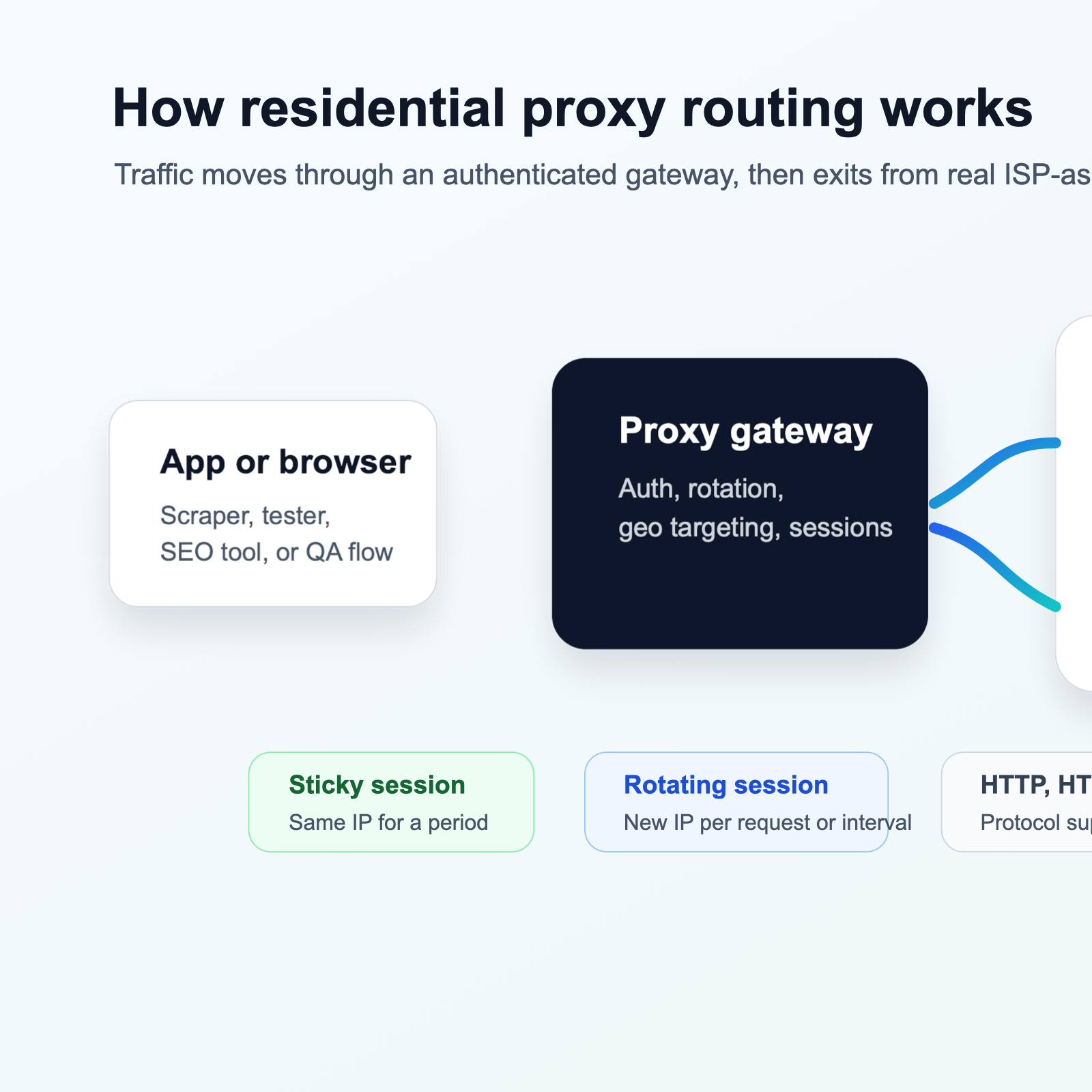
This routing process lets you test websites as if you were located in a specific country, state, city, or postal code, depending on the targeting capabilities of your provider. Geographic targeting is especially useful for geo-testing, localized SEO, ad verification, and regional price monitoring.
Residential proxies can be configured in two main session modes: rotating and sticky. Rotating residential proxies assign a new IP address for each request or after a set interval. Sticky sessions maintain the same IP address for a defined period, such as 10 to 120 minutes, which helps with account sessions, forms, and cart flows.
Key Components of a Residential Proxy
- IP address: the residential ISP address that target websites see.
- Proxy server: the managed gateway that routes traffic through the residential IP pool.
- Authentication credentials: a username, password, or API key used to authorize requests.
- Geographic targeting: controls for selecting countries, regions, cities, or postal codes.
- Session control: rotating or sticky behavior for IP persistence and request distribution.
- Protocol support: HTTP, HTTPS, and SOCKS5 compatibility for different types of traffic.
- Bandwidth allocation: the amount of transfer included in a plan, usually measured in gigabytes.
Datacenter Proxies vs Residential Proxies
One of the most common proxy infrastructure decisions is whether to use datacenter proxies or residential proxies. Both route requests through another IP address, but they differ in source, detection risk, speed, cost, and use-case fit.
What Are Datacenter Proxies?
Datacenter proxies are IP addresses provided by data centers, not residential ISPs. They are usually hosted in cloud infrastructure or colocation facilities, which makes them fast, easy to provision, and cost efficient.
However, datacenter IP ranges are well known and are often flagged by websites that want to reduce automated traffic, scraping, or abuse. Many sites apply stricter rate limits, CAPTCHAs, or outright blocks to requests originating from these ranges.
Key Differences Between Datacenter and Residential Proxies
| Factor | Datacenter Proxies | Residential Proxies |
|---|---|---|
| IP Source | Data centers and cloud providers | Real ISPs assigned to residential users |
| Authenticity | Easily identified as non-residential | Appear as legitimate home internet connections |
| Detection Risk | Higher risk of blocks and CAPTCHAs | Lower risk because the source looks residential |
| Speed | Faster due to high-speed server infrastructure | Often slightly slower because traffic routes through residential networks |
| Cost | Lower cost per IP or GB | Higher cost per GB, typically $1 to $2.50/GB |
| Geographic Coverage | Often limited to specific regions or countries | Wide coverage across cities, states, and countries |
| Session Control | Static or rotating, often with longer persistence | Rotating or sticky, with flexible session durations |
| Best For | High-speed scraping, SEO tools, non-sensitive automation | Ad verification, geo-testing, e-commerce scraping, and account sessions |
When to Choose Datacenter Proxies
- Speed is more important than residential authenticity.
- The target website does not aggressively block datacenter IP ranges.
- You need large volumes of IPs at a lower cost.
- Your use case involves general scraping, SEO rank checks, or API testing where residential IPs are not required.
- Your system already handles retries, rate limits, and rotation well.
Datacenter proxies work well for bulk tasks where the target site does not employ advanced bot detection. If you choose them, look for providers with diverse subnet ranges and stable performance.
When to Choose Residential Proxies
- Target websites actively block or flag datacenter IPs.
- You need to appear as a real user from a specific geographic location.
- Your workflow involves ad verification, price monitoring, or localized content testing.
- You are managing account sessions where IP consistency and authenticity matter.
- You need lower detection risk and fewer CAPTCHAs.
Some teams use both in combination: datacenter proxies for discovery or less sensitive endpoints, and residential proxies for protected pages, login flows, or geo-specific content.
Real-World Use Cases for Residential Proxies
Residential proxies are used across technical and business workflows where authenticity, geographic targeting, and lower detection risk matter. The best use cases are usually workflows where the target site changes behavior based on location or IP type.
Ad Verification
Ad verification confirms that digital ads appear correctly in different regions, on the right websites, and to intended audiences. Advertisers and agencies use residential proxies to simulate real users in specific countries or cities and verify placements, creative, and targeting rules.
Web Scraping and Data Collection
Residential proxies help teams collect public data from websites such as product prices, search results, reviews, and market information. They distribute requests across many residential IPs, which can reduce blocks when combined with responsible rate limits and realistic request behavior.
- Price monitoring and competitive analysis for e-commerce teams.
- Search engine result page data for SEO research and rank tracking.
- Product availability tracking for inventory workflows.
- Review and sentiment analysis for brand monitoring.
- Real estate listing aggregation and job posting research.
When scraping with any proxy, review the target website’s terms of service, robots.txt file, and acceptable-use rules. Google’s robots.txt guidance is a useful starting point for understanding crawler directives.
SEO Data Collection and Rank Tracking
SEO teams use residential proxies to collect search engine data from specific locations without relying on a single biased network path. This supports local keyword tracking, SERP monitoring, autocomplete research, and regional content strategy.
Geo-Testing and Localized Content Verification
Geo-testing verifies that websites, applications, prices, languages, offers, and payment flows display correctly for users in different regions. Residential proxies let QA and growth teams test those regional experiences without traveling or maintaining physical infrastructure in every market.
Account and Session Management
Teams that manage multiple legitimate account sessions sometimes use residential proxies to separate sessions and reduce cross-account linking. Sticky sessions are helpful here because they maintain IP consistency during an entire workflow.
Automated Testing and Browser Automation
Developers and QA teams can route browser automation through residential proxies to test user journeys from different regions. Tools such as Playwright document proxy support for browser contexts and launches in their HTTP proxy documentation.
Price Monitoring and Market Research
Retailers, airlines, and analysts use residential proxies to collect regional pricing, product availability, and promotion data. This helps teams understand how competitors price products across markets and how offers differ by location.
How to Choose a Residential Proxy Provider
Choosing a residential proxy provider means evaluating IP quality, coverage, session behavior, cost, protocol support, documentation, and sourcing practices. A provider that works for one workflow may be poor for another, so test against your real targets before scaling.
IP Pool Size and Geographic Coverage
The size and diversity of a provider’s IP pool affect your ability to scale and target locations. If you need Indian residential proxies, city-level US testing, or European ad verification, confirm that coverage exists before purchasing.
Pricing Model and Cost Structure
Residential proxy pricing is typically based on bandwidth usage, measured in gigabytes. Pay-as-you-go models help teams start small, test success rates, and scale only when performance is proven.
Session Control and Rotation Options
Evaluate whether the provider supports both rotating and sticky sessions. Rotating sessions are useful for high-volume collection, while sticky sessions support workflows that need continuity, such as login flows and checkout testing.
Protocol Support and Integration
Most web workflows need HTTP and HTTPS support, while SOCKS5 can be useful for lower-level routing or non-HTTP applications. The SOCKS5 protocol is defined in RFC 1928, while modern HTTP semantics are covered in RFC 9110.
Speed and Reliability
Residential proxies are generally slower than datacenter proxies because they route traffic through real home networks. Test latency, throughput, and success rates with a small workload before committing to a large plan.
Ethical Sourcing and Compliance
Ethical sourcing matters. Reputable providers source IPs from users who explicitly consent to share bandwidth, often in exchange for compensation or free services. Avoid providers with unclear sourcing, malware-based networks, or evasive documentation.
Customer Support and Documentation
Good documentation reduces setup time and support friction. Look for clear examples covering authentication, browser setup, API usage, session control, and troubleshooting.
How to Configure and Use Residential Proxies
Configuring residential proxies involves obtaining credentials, setting up authentication, and routing traffic from your browser, application, scraping framework, or automation tool through the proxy gateway.
Step 1: Obtain Proxy Credentials
- Proxy server address or hostname.
- Proxy port number.
- Username and password or API key.
- Session configuration options such as rotating or sticky mode.
- Geographic targeting options such as country, region, city, or postal code.
Step 2: Configure Your Application or Browser
- Browser extensions such as FoxyProxy or Proxy SwitchyOmega can route browser traffic through the proxy endpoint.
- HTTP clients in Python, Node.js, Ruby, or other languages can pass a proxy URL with credentials.
- Browser automation tools such as Puppeteer, Playwright, and Selenium can use launch options or browser context settings.
- Scraping frameworks can route requests through middleware or request configuration.
Step 3: Test Your Proxy Connection
After configuration, test your proxy connection with an IP lookup service and confirm that the IP address and location match your selected settings. For sticky sessions, verify that the IP remains consistent. For rotating sessions, verify that rotation happens as expected.
Step 4: Monitor Usage and Performance
Most proxy providers include dashboards for bandwidth, request count, session activity, and billing. Monitor these metrics so you can detect failures, control costs, and optimize request patterns.
Step 5: Implement Best Practices
- Respect rate limits and avoid bursts that look unnatural.
- Review terms of service and robots.txt before scraping.
- Use rotating sessions for high-volume collection and sticky sessions for continuity.
- Implement retry logic for timeouts, temporary errors, and rate limits.
- Use realistic user agents, headers, and request timing.
- Avoid scraping private data, bypassing login walls, or violating access controls.
What is a Proxy Server?
Common Mistakes to Avoid When Using Residential Proxies
Residential proxies are powerful, but they are not a guarantee against all blocking or detection. Most failures come from poor request behavior, weak monitoring, unrealistic automation patterns, or low-quality IP sourcing.
Using the Same IP Address for Too Many Requests
Even residential IPs can be flagged if they send too many requests in a short time. Rotate IPs when appropriate and distribute requests across a broad pool.
Ignoring Target Website Rules
Using residential proxies does not exempt you from a website’s rules. Scraping private data, bypassing authentication, or violating access controls can create legal and account risks.
Using Unrealistic Request Patterns
Requests that arrive in perfectly timed bursts, use outdated user agents, or omit normal headers can be detected even when the IP is residential. Automation should behave responsibly and realistically.
Choosing Cheap Providers with Poor IP Quality
Very cheap providers may resell overused IPs, source addresses unethically, or provide addresses already flagged by target sites. Research providers carefully and test before scaling.
Failing to Monitor and Adjust
Target sites change structure, rate limits, and anti-bot systems over time. Track success rates, errors, latency, bandwidth, and block patterns so your workflow can adapt.
Overusing Sticky Sessions
Sticky sessions support continuity, but keeping the same IP for too long can increase detection risk. Balance persistence with rotation based on the workflow.
How Residential Proxies Fit Into Your Data Workflow
Residential proxies are one component of a broader data infrastructure stack. Depending on the use case, you may also need scraping frameworks, data pipelines, monitoring tools, queues, storage, and QA checks.
Combining Proxies with Scraping Frameworks
Frameworks such as Scrapy, Puppeteer, and Playwright integrate with proxies and add request scheduling, extraction, retry logic, and error handling. Combining a framework with rotating residential proxies helps teams build more maintainable public data workflows.
Building Monitoring and Alerting Systems
Monitoring helps detect failures, performance issues, and target-site changes. Track success rates, response times, error codes, CAPTCHA frequency, bandwidth use, and per-region availability.
Implementing Data Pipelines
Once data is collected, it needs to be cleaned, validated, stored, and analyzed. Tools such as Airflow, Prefect, and custom queues can orchestrate scraping jobs and downstream transformations.
Evaluating Proxy Infrastructure Providers
When evaluating proxy infrastructure, compare providers on routing control, session management, geographic coverage, support quality, and pricing. LycheeIP is relevant for teams comparing rotating residential proxies, static residential proxies, and datacenter proxies for workflows that require controlled request routing and session handling.
Explore LycheeIP Residential Proxies
When to Upgrade from Free or Cheap Proxies
Free and low-quality proxies can look attractive for experiments, but they often create reliability, speed, security, and compliance problems. They are rarely suitable for production workflows or business-critical data collection.
Risks of Free Proxies
Free proxies are often slow, unstable, and heavily flagged. They may also create privacy or security risks because you do not know who operates the server or how your traffic is handled.
When to Invest in Paid Residential Proxies
- You need consistent uptime for business-critical workflows.
- Target websites block free or datacenter proxies.
- You need geographic targeting and session control.
- You want to reduce CAPTCHAs, blocks, and detection risk.
- You require documentation, support, and usage dashboards.
- You need to scale data collection or automation workflows.
Paid residential proxies offer better reliability and control than free alternatives, especially when the workflow depends on regional accuracy, session behavior, and predictable delivery.
Conclusion
Residential proxies are useful for digital marketers, SEO professionals, web scrapers, QA teams, and developers who need authentic IP addresses for data collection, ad verification, geo-testing, and automation.
The key tradeoff is simple: residential proxies usually cost more and can be slower than datacenter proxies, but they provide stronger authenticity and better geographic realism. Used responsibly, they can reduce blocks, improve localized testing, and support reliable public data workflows.
When choosing a provider, evaluate IP pool quality, coverage, pricing, session controls, protocols, support, documentation, and ethical sourcing. Test with a small workload, monitor results, and scale only when the infrastructure works for your actual use case.
Frequently Asked Questions
What is a residential proxy?
A residential proxy is a proxy server that uses an IP address assigned by a real ISP to a residential customer, making requests appear to come from a normal home internet connection.
How does a residential proxy differ from a datacenter proxy?
Residential proxies use ISP-assigned home IPs, while datacenter proxies use cloud or data center IPs. Residential proxies usually offer higher authenticity and lower detection risk, while datacenter proxies are generally faster and cheaper.
When should I use a residential proxy instead of a datacenter proxy?
Use residential proxies when you need geographic authenticity, lower block rates, account-session continuity, ad verification, localized content checks, or access to sites that aggressively flag datacenter IPs.
What are rotating residential proxies?
Rotating residential proxies assign a new IP address for each request or after a defined time interval, helping distribute traffic across many residential IPs.
What are sticky sessions in residential proxies?
Sticky sessions maintain the same residential IP for a set period, such as 10 to 120 minutes, which helps with login flows, forms, carts, and other session-based workflows.
How much do residential proxies cost?
Residential proxies are commonly priced per gigabyte, often around $1 to $2.50 per GB, with discounts or subscription plans available from some providers.
What are common use cases for residential proxies?
Common use cases include ad verification, web scraping, SEO data collection, geo-testing, price monitoring, browser automation, account management, and localized content checks.
Are residential proxies legal to use?
Residential proxies are legal tools, but the use case matters. Always review terms of service, robots.txt, privacy rules, and applicable laws before scraping or automating access.
How do I configure a residential proxy in my browser?
Use browser proxy settings or extensions such as FoxyProxy or Proxy SwitchyOmega, then enter the server address, port, username, and password from your provider.
Can I use residential proxies for web scraping?
Yes, residential proxies are widely used for public web scraping because they can reduce blocks and CAPTCHAs. You should still respect target-site rules and use responsible request rates.
What is the difference between HTTP, HTTPS, and SOCKS5 proxies?
HTTP and HTTPS proxies are designed for web traffic. SOCKS5 proxies operate at a lower network level and can support a wider range of traffic types.
How do I choose a residential proxy provider?
Compare IP pool quality, geographic coverage, pricing, session control, protocol support, ethical sourcing, documentation, customer support, and real performance on your targets.
Can I use residential proxies to buy limited-edition products or sneakers?
Some users try this, but it may violate retailer terms and can result in account bans or order cancellations. Review retailer policies before using proxies for purchasing workflows.
How can I buy Indian residential proxies?
Choose a provider that supports country or city targeting for India, confirm coverage, test performance, and verify session controls before scaling usage.
What is ethical sourcing in residential proxies?
Ethical sourcing means IP addresses come from users who explicitly consent to share bandwidth, usually with compensation or clear value exchange.
Do residential proxies guarantee that I will not be blocked?
No. Residential proxies reduce detection risk compared with datacenter proxies, but websites can still detect automation through request patterns, headers, behavior, and other signals.