Is Starlink worth it? The short answer
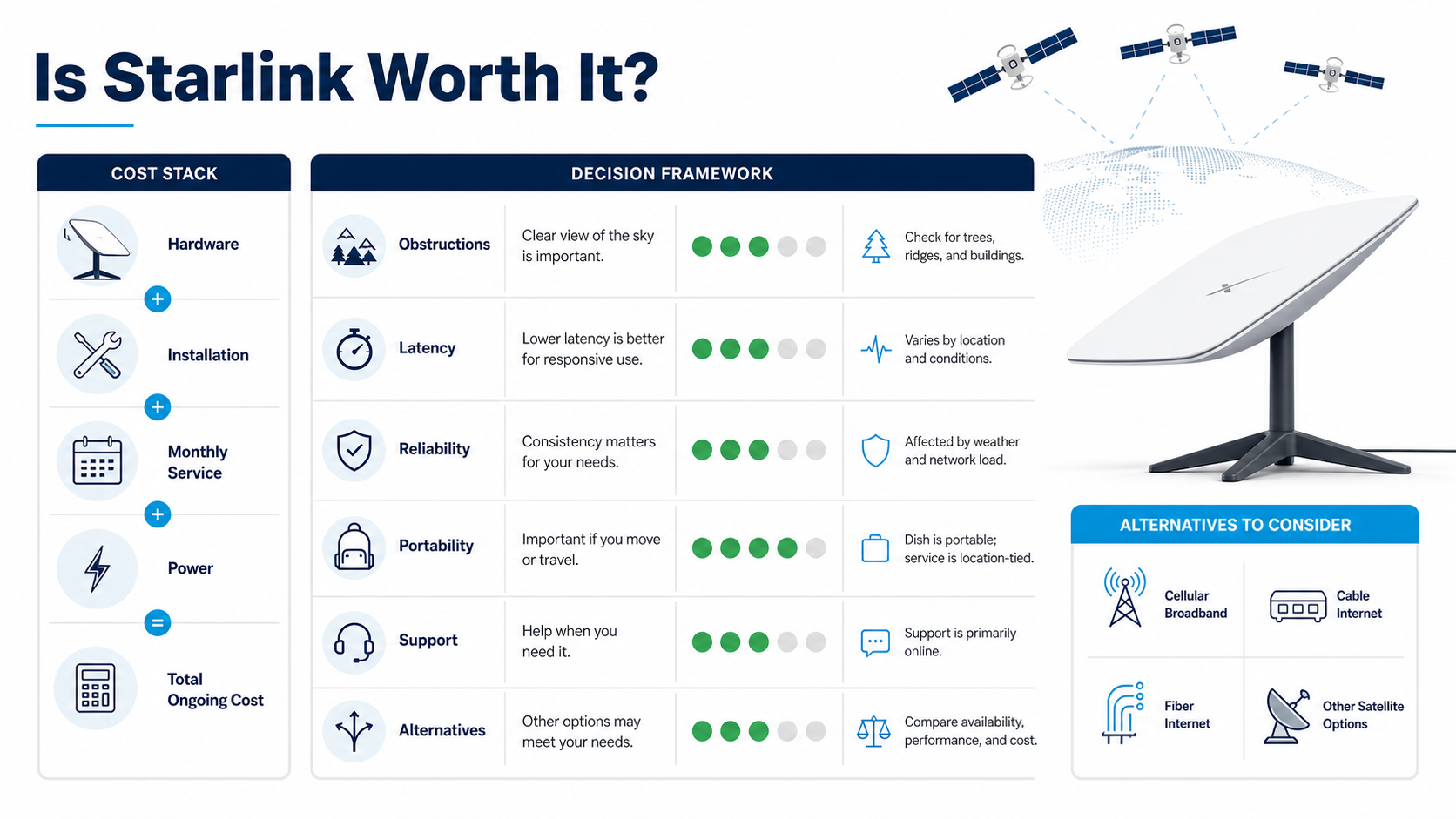
It is a strong candidate for an underserved rural property, remote work site, mobile deployment supported by the selected plan, or backup link that has an unobstructed installation point. It is a weaker fit when a reliable fiber or cable service is available at a lower total cost, the dish cannot see enough sky, or the workload requires consistently low latency.
Check Starlink's current support information for the currently available hardware, plan, installation, and troubleshooting terms in the service location. The FCC broadband benchmark order provides a policy reference for broadband capability, but a household should still define its own application requirements.
Calculate total cost with current local inputs
| Cost component | What to verify |
|---|---|
| Equipment | Dish, router, mount, cable, shipping, taxes, and replacement terms |
| Installation | Safe mounting, roof work, cable route, grounding, and professional labor if needed |
| Recurring service | Plan scope, location rules, priority terms, and taxes |
| Power | Normal operation, heating features, backup power, and off-grid capacity |
| Network equipment | Ethernet adapter, mesh access points, gateway, and surge protection |
| Operational cost | Support time, obstruction remediation, downtime, and a backup connection |
Do not reuse a price from another country or month. Record the checkout total and terms on the decision date. For network teams comparing routes, the region mismatch guide explains why location is more than an IP label, while the self-hosted WireGuard guide covers secure remote access over any underlying connection.
Test Starlink before making the decision
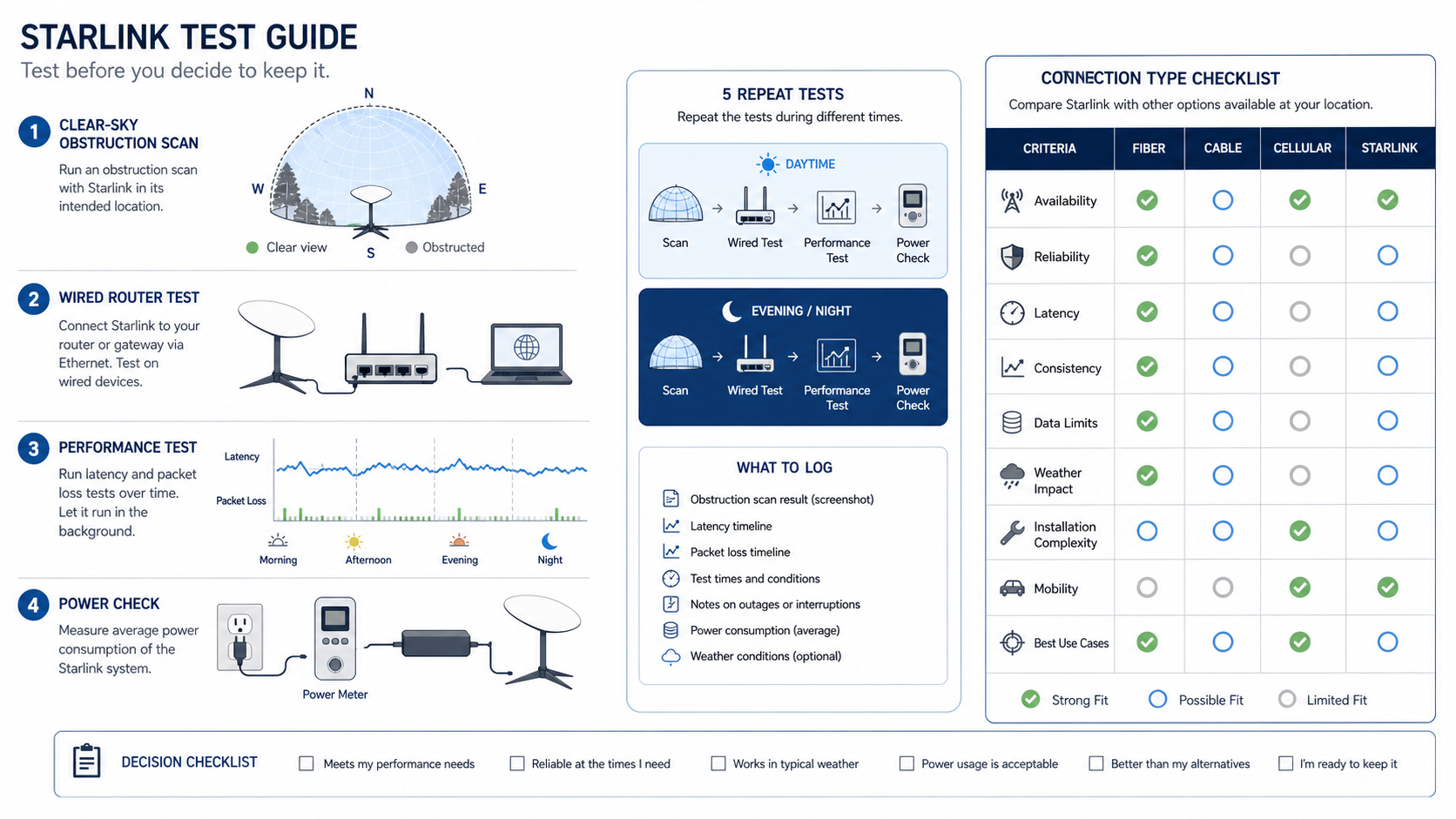
- Run the official obstruction scan at the exact installation point.
- Test on Ethernet or near the router to separate Wi-Fi from the satellite path.
- Measure the applications that matter, not only a speed-test endpoint.
- Repeat morning, afternoon, evening, and adverse-weather tests.
- Record latency distribution, packet loss, interruptions, and recovery time.
- Measure power if the site is off-grid or backup runtime matters.
- Compare the same test plan with every available local alternative.
A single peak result cannot prove consistency. For application-specific routing, compare VPN and proxy trust boundaries, SOCKS5 routing, and datacenter proxy infrastructure. Those tools change application paths; they do not fix sky obstruction or satellite capacity.
Decision criteria by use case
Remote home or work site
Prioritize availability, obstruction, video-call stability, upload behavior, support, and backup power. Confirm that required corporate VPNs and real-time tools work during the busiest local period.
Backup internet
Test failover, DNS recovery, session interruption, and whether the dish remains powered during the event that disables the primary link. A backup that shares the same power or physical risk may not provide the expected resilience.
Travel or portable use
Verify that the selected plan permits the intended movement and locations. Include setup time, safe placement, power, weather, and local regulatory requirements.
Urban fiber or cable alternative
Compare total cost and consistency, not novelty. Wired service often has an advantage for indoor installation and latency-sensitive use, while actual local provider quality can vary.
How developers should evaluate network fit
Keep a test log with timestamp, route, resolver, application, sample count, and errors. Browser automation should use bounded retries and preserve evidence; the Puppeteer and Playwright comparison and bot-detection workflow show how to separate network failures from browser-state failures. If authorized regional QA needs controlled endpoints, review residential proxy fit and the provider evaluation framework.
Obstruction, installation, and Wi-Fi are separate variables
The dish needs the field of view defined by the current installation guidance. A location that looks open from ground level may still have intermittent obstruction from trees, roof lines, poles, or seasonal foliage. Run the scan at the planned mounting height, save the result, and repeat after installation. Do not treat a temporary lawn or window test as proof that a permanent roof location will behave the same way.
Plan the cable route before mounting. Check bend limits, weather sealing, drip loops, grounding or surge protection required for the site, and a safe service path. A professional installer may be appropriate when roof access, structural attachment, or local electrical rules are involved. Include that work in total cost rather than assuming the equipment price is the full installation price.
After the satellite link is working, test Wi-Fi separately. Compare a wired device, a device near the router, and the normal work area. Poor mesh placement or crowded local Wi-Fi can produce a bad user experience even when the satellite path is healthy. The Android network guide provides a useful application-versus-network troubleshooting model.
Latency, packet loss, and application behavior
Download speed is only one dimension. Video meetings, remote desktops, online games, voice calls, interactive shells, and transactional applications also depend on latency variation, packet loss, reconnect behavior, and upstream capacity. Measure the actual application during the periods when it matters. A test server selected by a speed-test application may use a different route from the work service.
Record median and tail latency rather than one minimum. Note short interruptions, how long the application takes to recover, and whether a VPN reconnects. If a corporate VPN fails while normal browsing works, capture the protocol, endpoint, time, and exact error for the administrator. Do not represent a successful web test as proof that every enterprise tunnel is compatible.
Network management, capacity, and fair-use terms
Read the current plan description for priority, data, congestion, location, and mobility terms. These terms can vary by market and plan and can change after an article is published. Save the offer and policy version used for the decision. If a household has several simultaneous users, reproduce that mix instead of testing an idle line with one device.
Build a small workload table: number of video calls, typical cloud backups, large downloads, streaming devices, game sessions, security cameras, and remote-access connections. Mark which are latency-sensitive and which can be scheduled. That makes it possible to decide whether the service is adequate without inventing a universal bandwidth threshold.
Reliability and backup design
Reliability should include outage frequency, duration, recovery, power, equipment, local Wi-Fi, and upstream service dependencies. Track incidents for a representative period. Distinguish complete loss from application-specific problems and record whether the failure occurred during an obstruction, weather event, local power issue, router restart, or wider service incident.
For a backup design, decide how traffic moves between links. Manual failover is simple but requires someone on site. Automatic dual-WAN failover can be faster but needs health checks that do not switch routes unnecessarily. Test active calls and sessions: many will reconnect because the public IP changes. A static proxy endpoint may stabilize one approved application path, but it does not preserve every device session across an internet failover.
Support, returns, and operational ownership
Before committing, verify the current return process, warranty, replacement path, support channel, and any service-location restrictions. Run one support interaction during the evaluation period with a real, sanitized question. Note whether the response explains diagnosis and next steps rather than only resetting equipment.
Assign ownership for firmware updates, physical inspection, account access, billing, and incident escalation. For a business or remote site, document administrator succession and a recovery method that does not depend on the Starlink connection itself. Store account credentials and recovery methods in an approved password manager.
Starlink comparison worksheet
| Requirement | Starlink evidence | Best local alternative evidence | Decision |
|---|---|---|---|
| Available at the exact address | Current checkout and plan terms | Provider serviceability result | Pass, fail, or uncertain |
| Total first-year cost | Equipment, installation, service, power | Activation, equipment, service | Comparable scope |
| Interactive performance | Repeated application tests | Same devices and schedule | Meets requirement |
| Reliability | Incident and recovery log | Same observation period | Acceptable risk |
| Support | Trial ticket and policy review | Equivalent support test | Operational fit |
| Power and installation | Measured and documented | Local equipment needs | Site fit |
A decision remains local. A rural user with no wired option can rationally accept costs and variability that an urban fiber customer should reject. Document the reason, review date, and assumptions so the choice can be revisited when plans or local alternatives change.
When Starlink is probably the wrong choice
Reject or postpone the purchase when no safe installation point passes the obstruction check, the verified service plan does not support the intended location or mobility, power demand is incompatible with the site, or required applications fail a representative trial. It is also difficult to justify when an existing wired service already meets the same requirements at a lower total cost and the satellite link would not provide an independent resilience benefit.
Do not buy it solely to change a public IP, solve an application ban, or avoid normal account controls. Those are different problems. For controlled network testing, a proxy-provider scorecard or datacenter endpoint may be more targeted, while an account or policy problem requires the service owner's supported process.
Let's do the math on Starlink that hardware providers and ISPs often gloss over.
With Low Earth Orbit (LEO) satellite internet cementing its place in the mainstream, remote engineering teams, digital nomads, and rural consumers face a critical question: does Starlink's premium price tag deliver real infrastructural value, or are you paying an early-adopter tax?
For data teams running heavy cloud workloads or remote developers relying on stable SSH connections, raw bandwidth is only half the story. This analysis cuts through the marketing spin to dissect the true Total Cost of Ownership (TCO), network reliability, and latency reality of Starlink in 2026.
Performance vs Traditional Alternatives
Speed Reality Check
Starlink advertises varying speeds based on your service tier, but real-world telemetry tells a more nuanced story. Interestingly, Starlink's performance consistently aligns with the FCC's updated broadband benchmark of 100 Mbps download and 20 Mbps upload.
- Download (100–150 Mbps): Excellent for rural areas and sufficient for large Docker image pulls or database syncing.
- Upload (10–20 Mbps): This is the network's Achilles' heel. If you are routinely pushing massive video files or large datasets to AWS/GCP, this will feel sluggish compared to symmetric fiber.
- Latency (25–50ms): Thanks to LEO technology, ping times are vastly superior to legacy geostationary satellite internet (which often suffered 600ms+ delays). While 30ms is perfectly fine for Zoom calls and general web browsing, competitive gamers or high-frequency traders will still prefer the 5–15ms latency of hardwired fiber.
Network Management and Data Caps
Starlink's Standard plan offers "unlimited" data, but it is subject to network management. During peak hours in congested cells, standard users are deprioritized in favor of Priority/Business tier users. Still, compared to legacy rural ISPs that enforce draconian 150GB hard caps, Starlink's policy is highly permissive for remote tech workers.
The Weather Factor and Installation
Microwave frequencies (Ku/Ka bands) used by Starlink are susceptible to rain fade. Heavy downpours or thick, wet snow can degrade performance by 20–30% or cause brief micro-outages.
Furthermore, Starlink requires an unobstructed view of the sky. A single branch intersecting the dish's field of view will cause regular, frustrating drops in service—fatal for VPNs or live SSH sessions. Always use the Starlink app's augmented reality obstruction checker before purchasing.
Frequently Asked Questions
Is Starlink worth it for rural internet?
It can be when wired alternatives are unavailable and the site has a clear installation point, but verify the current offer and run repeat tests first.
Is Starlink better than fiber?
Fiber is usually the stronger fit when it is reliable and affordable. The practical answer depends on local availability, total cost, latency, consistency, and support.
What costs should I include?
Include hardware, shipping, taxes, mounting, installation, power, network accessories, monthly service, support time, and any backup link.
Does bad weather affect Starlink?
Conditions and obstructions can affect a radio path. Test normal and adverse conditions at the actual site and record interruptions and recovery.
Can I use Starlink for remote work?
Test the exact VPN, calling, upload, and collaboration tools during busy periods before relying on it for work.
Should I keep another internet connection?
A backup may be appropriate when downtime has a high cost. Verify that it does not share the same power, equipment, or physical failure mode.