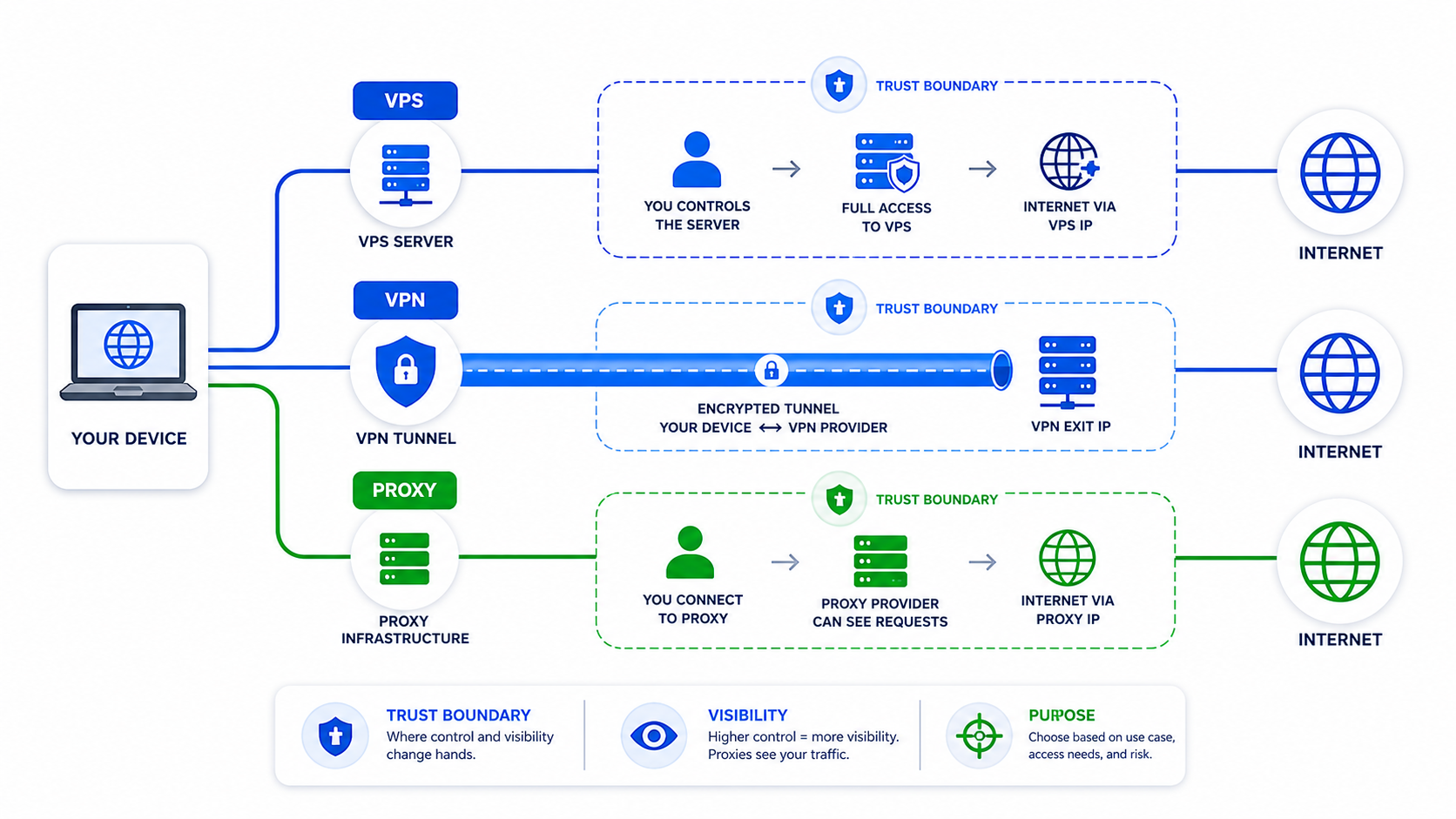
A self-hosted VPN on a VPS can be useful, but it is not automatically more private than a commercial VPN. It shifts trust from a VPN provider to your VPS host, your configuration, and your maintenance habits.
VPS vs VPN: The Core Difference
A VPS is a rented server. A VPN is a tunnel. You can run WireGuard on a VPS, but you still need to manage logging, updates, DNS, firewall rules, and provider trust. The WireGuard quickstart explains setup primitives; the EFF VPN guide explains the trust decision.
| Option | What you trust | Best fit |
|---|---|---|
| Commercial VPN | VPN operator, app, audit quality | General device-wide privacy |
| Self-hosted VPN on VPS | VPS host and your server config | Personal tunnel and lab access |
| Proxy infrastructure | Proxy provider and session rules | Automation, QA, scraping, regional routing |
Self-Hosted VPN Architecture
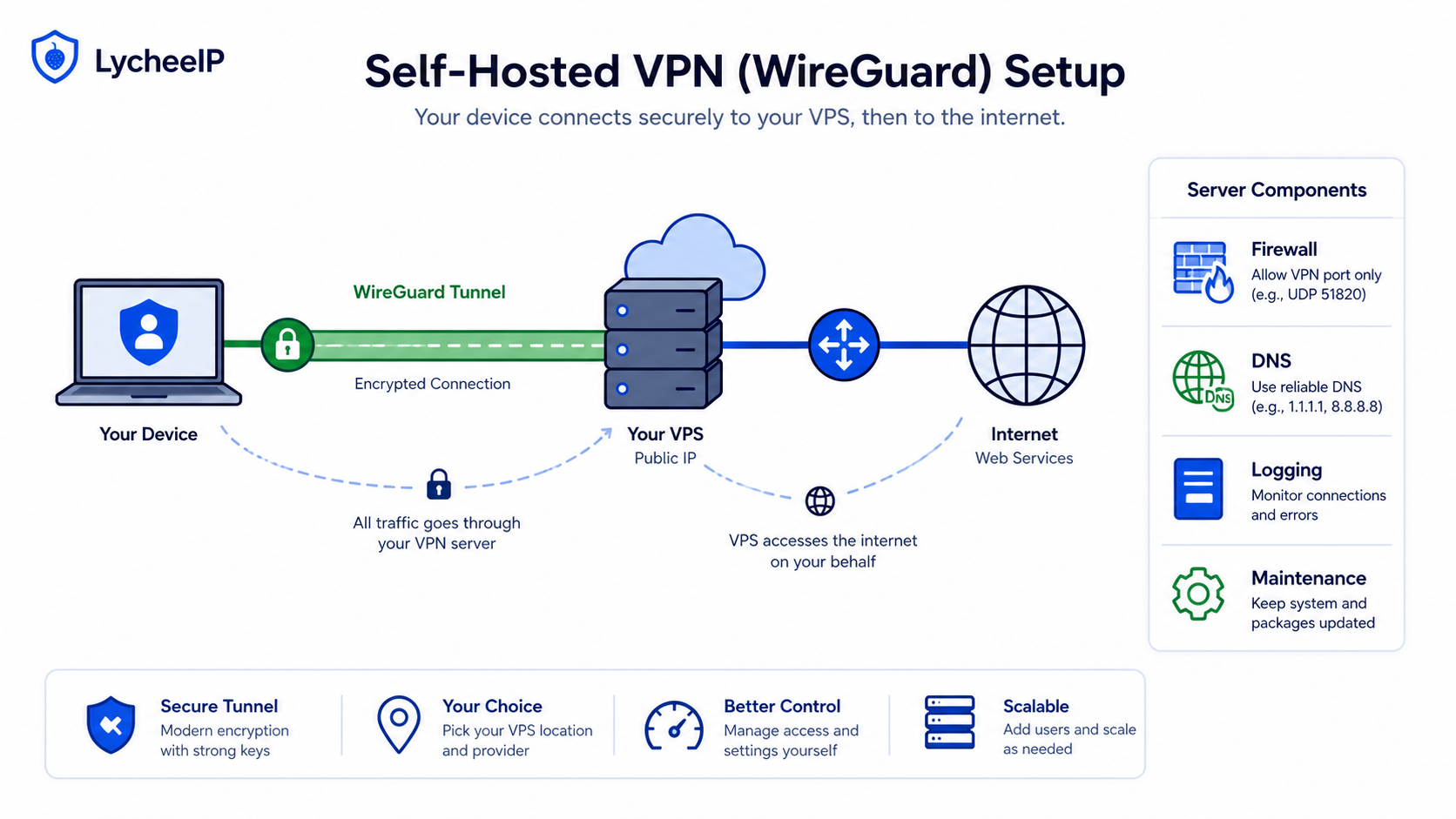
Use the self-hosted WireGuard setup guide and WireGuard vs OpenVPN comparison when the tunnel itself is the goal.
ufw allow 22/tcp
ufw allow 51820/udp
ufw enable
apt update && apt upgrade -y
When Proxies Fit Better
For scraping, browser automation, product monitoring, or regional testing, one VPN exit can be fragile. Use rotating residential proxies for distributed requests, static residential proxies for sticky sessions, datacenter proxies for speed and cost, and the residential proxy guide for IP-type decisions.
The same decision connects to LycheeIP proxy infrastructure, browser fingerprinting, Playwright stealth workflows, Puppeteer vs Playwright choices, geo-restriction checks, and proxy provider comparison.
Explore LycheeIP Proxy Infrastructure
The Trust Shift Is the Real Privacy Question
People often ask whether self-hosting is “more private” as if privacy were a simple yes-or-no badge. In reality, self-hosting changes who you trust and what you have to operate. If your goal is to reduce dependence on a commercial VPN brand and you are willing to manage the server well, a self-hosted design can make sense. If your goal is easy device protection with low maintenance, the extra control may not be worth the operational burden.
What Self-Hosting Adds to Your Workload
Running your own VPN means more than launching a server. You own OS patching, firewall policy, key rotation, DNS behavior, device onboarding, and incident response when a laptop is lost or a configuration breaks. Those tasks are manageable for some teams and annoying for others. The right answer depends on whether the control benefit justifies the ongoing maintenance.
- Patch the VPS and VPN software regularly.
- Document what is logged and for how long.
- Plan how to rotate keys and revoke lost devices.
- Test whether traffic really uses the tunnel the way you expect.
Use-Case Fit Matters More Than the Label
| Need | Likely best fit | Why |
|---|---|---|
| Simple device privacy on public Wi-Fi | Commercial VPN | Lower maintenance and faster setup. |
| You want to control your own tunnel endpoint | Self-hosted VPN on a VPS | More direct control, but more operational work. |
| You need many isolated sessions for automation | Proxy infrastructure | The job needs session-aware routing rather than one shared tunnel. |
| You need server hosting plus optional tunnel termination | VPS | The compute environment itself is part of the requirement. |
Why Automation Teams Usually Need Proxies Instead
For automation, browser testing, and scraping, the real requirement is often not “VPN privacy.” It is session control, region targeting, and repeatable egress behavior. That is why pages like Playwright stealth planning, browser automation tradeoffs, and bot-detection basics are more relevant than generic VPN advice once the job becomes workflow-driven.
If the requirement is multi-session routing, the comparison should move toward rotating residential proxies, static residential proxies, datacenter proxies, and LycheeIP proxy infrastructure instead of forcing one VPN tunnel to solve a session-isolation problem.
A Practical Decision Path
- Name the actual problem: device privacy, server hosting, self-operated control, or multi-session automation.
- Decide how much operational work you want to own long term.
- Choose the smallest routing layer that truly matches the job.
- Only then compare providers or implementation guides.
What Changes in the Network Path
A VPS is a rented virtual server. By itself it does not reroute your laptop or phone. A VPN is a tunnel and routing configuration that sends selected traffic from a client to a VPN gateway. A proxy is an application-level intermediary: the browser, scraper, or other configured client sends requests to the proxy, while unrelated device traffic keeps its normal route.
When you install WireGuard on a VPS, the VPS becomes the VPN gateway. Traffic is encrypted between your device and that server, then exits to the destination from the VPS address. The destination sees the VPS IP, the local network sees an encrypted connection to the VPS, and the VPS provider can still observe account metadata and the server's network activity. Self-hosting changes who operates the gateway; it does not remove every trust relationship.
Encryption Scope, DNS, and IP Identity
A correctly configured VPN can route most device traffic through one encrypted tunnel, but split tunneling may intentionally leave some applications outside it. DNS must also follow the intended path. If the client continues using a local resolver, DNS queries can reveal destinations or produce region mismatches even though web traffic exits through the VPS. Test DNS, IPv4, IPv6, and reconnect behavior rather than assuming the tunnel covers them.
A proxy covers only applications configured to use it. HTTPS still protects content between the client and destination through a CONNECT tunnel or equivalent proxy flow, but the proxy can observe connection metadata and may handle plain HTTP directly. The advantage is scope: one browser profile or automation job can use a distinct IP and session without rerouting the entire device.
Trust Boundaries and Logging
A commercial VPN asks you to trust the VPN operator's software, policies, infrastructure, and account system. A self-hosted VPN asks you to trust the VPS provider, the operating-system image and packages, your own configuration, and anyone with administrative access. You gain direct configuration control but also become responsible for key handling, logs, updates, firewall rules, and incident response.
Decide what logs are necessary before deployment. Connection timestamps and diagnostic logs can help troubleshoot failures, but unnecessary retention creates additional privacy and security exposure. Review system journals, WireGuard interface data, DNS logs, cloud-provider monitoring, and backups. Self-hosting is not private merely because the application claims not to log; the surrounding server and provider layers still matter.
Maintenance and WireGuard Operations
WireGuard is a compact VPN protocol and implementation, but operating it safely still requires lifecycle work. Patch the VPS, restrict administrative access, use key-based SSH, keep the firewall minimal, rotate keys when a device is lost, remove old peers, and monitor disk, CPU, and transfer limits. Back up configuration securely without leaving private keys in broadly accessible storage.
Plan for endpoint changes and lockout recovery. A firewall mistake can cut off both the VPN and SSH. DNS or IP forwarding errors can create a tunnel that connects but cannot browse. MTU problems can allow small requests while larger pages stall. Keep provider-console access, a tested rollback procedure, and a simple health check before relying on the tunnel for travel or production work.
Threat-Model Differences
Use a threat model instead of the phrase 'more private.' Against an untrusted local Wi-Fi network, either a reputable VPN or a well-maintained self-hosted tunnel can reduce local observation of destinations beyond the VPN endpoint. Against the VPS provider, self-hosting does not hide that the server belongs to your account. Against destination tracking, one stable VPS IP may be easier to associate with repeated activity than a shared commercial VPN address.
For censorship resistance or high-risk anonymity, a single self-hosted VPS is often the wrong assumption because payment records, server ownership, login history, and one persistent exit IP can form a clear link. This guide does not promise anonymity. Choose tools according to the observer you are concerned about, the data at risk, and the operational capability of the person maintaining the system.
Decision Table: VPS, VPN, or Proxy
Choose a plain VPS when you need a server for hosting, development, scheduled jobs, or an application endpoint and do not need to reroute client traffic. Choose a commercial VPN when the primary requirement is convenient device-wide routing and you are comfortable evaluating and trusting an operator. Choose a self-hosted VPN when you need a dedicated gateway, understand the trust shift, and can maintain the server. Choose proxies when separate applications, browser profiles, locations, or concurrent sessions need distinct routing controls.
When a VPS is the wrong solution
A VPS is a poor fit when you do not want server administration, need many exit locations, require rapid IP rotation, or expect a consumer privacy application with polished clients and support. Renting a server without maintaining it can create more risk than using a suitable managed service.
When a VPN is the wrong solution
A VPN is a poor fit when only one application should change routes, when multiple browser identities need isolated IPs, or when an automation system needs per-job session controls. Routing the whole device can make debugging harder and can expose unrelated applications to the same destination-facing identity.
When a proxy is more appropriate
A proxy is more appropriate for authorized scraping, localization testing, browser automation, and application-specific routing where each job needs a selected IP type, region, or sticky session. It is not a substitute for full-device protection on public Wi-Fi, and it should not be described as an anonymity guarantee.
Practical Use-Case Examples
For a developer who needs a staging server, a VPS alone is the right object: deploy the application, restrict inbound ports, and keep normal client traffic on its existing route. Adding a VPN is optional and should solve a defined access requirement, such as reaching an internal staging service without exposing it publicly.
For a traveler who wants routine device-wide protection on hotel Wi-Fi, a reputable commercial VPN may be simpler than maintaining a server while traveling. A self-hosted WireGuard gateway can work, but only if it was patched, tested from outside the home network, and equipped with a recovery path before departure. One location and one VPS address may also be less useful than a managed VPN's location choices.
For a small team that needs secure access to private dashboards, a self-hosted VPN can create a controlled gateway and stable allowlisted source address. The team must still manage peer keys, employee offboarding, server access, logs, backups, and monitoring. If those responsibilities have no owner, a managed business-access product may be safer than an unmanaged VPS.
For browser automation or localization testing, a device-wide VPN often provides too little isolation. Separate Playwright or Selenium contexts may need distinct regions or sticky sessions at the same time. Application-level proxies can give each authorized job its own route while the control plane and unrelated traffic keep their normal connection.
A Practical Selection Framework
Start with scope: server hosting, whole-device routing, private-network access, or application-specific routing. Then name the observer or failure you are addressing: local Wi-Fi, ISP visibility, destination-facing IP, internal-service exposure, regional testing, or session isolation. A tool is appropriate only when its control boundary matches that requirement.
Next evaluate operations. List who patches the server, rotates keys, reviews logs, handles outages, pays transfer overages, and responds when a device is lost. Estimate the number of locations and simultaneous identities required. A self-hosted VPN may be inexpensive in subscription terms but costly when nobody owns maintenance; a proxy service may be excessive for one static private gateway but efficient for many application sessions.
Finally test failure behavior. Disconnect and reconnect the client, change networks, verify DNS and IPv6, test a large download for MTU problems, and confirm the public IP for every intended application. For proxies, verify that only configured applications use the route and that sticky sessions remain stable. For a VPS, test console recovery and backups. Choose based on the complete operating model, not the easiest installation screenshot.
Questions to answer before deployment
Which traffic must use the new path? Which traffic must not? Who can see connection metadata at each hop? What happens if the gateway is unavailable? How are credentials revoked? What logs are retained, and for how long? Which public IP or region does the destination need to see? The answers usually make the VPS-versus-VPN-versus-proxy choice much clearer.
Common Self-Hosted VPN Failures
A tunnel that connects but cannot reach the internet usually points to IP forwarding, firewall, or network-address-translation configuration. A tunnel that reaches IP addresses but not hostnames suggests DNS configuration. Pages that partly load or large transfers that stall can indicate an MTU mismatch. Traffic that unexpectedly bypasses the tunnel may come from split-routing rules, IPv6, or an application using its own network path.
Troubleshoot from the inside out: confirm the interface and peer handshake, inspect assigned addresses and routes, test the gateway, test an external IP, test DNS, then verify the public exit address. Change one setting at a time and keep provider-console access available. Avoid disabling the firewall wholesale as a permanent fix; narrow the failing rule and restore the intended boundary.
Cost and Reliability Trade-Offs
Compare total operating cost, not only the monthly VPS invoice. Include server time, backups, monitoring, transfer limits, additional locations, patching effort, and recovery work. A low-cost VPS can be economical for one stable gateway operated by someone comfortable with Linux. It becomes less attractive when the team needs many countries, round-the-clock support, managed clients, or rapid replacement after an address is blocked.
Reliability also has different meanings. A commercial VPN can offer multiple gateways and automatic client failover, but the user depends on the operator. A self-hosted gateway gives configuration control but creates one server and one administrator as potential failure points. A proxy network can provide route diversity for selected applications, yet it does not keep the rest of the device online if the local connection fails. Match the resilience plan to the traffic scope.
Document the chosen boundary and revisit it when the workload changes. Adding mobile devices, new regions, more browser identities, regulated data, or another administrator can turn a suitable design into the wrong one. A short architecture note makes that change visible before the routing setup becomes difficult to maintain.
Frequently Asked Questions
Is a self-hosted VPN more private than a commercial VPN?
It can be, depending on your threat model, but only if you are willing to own the operational risks and you trust your VPS provider more than the commercial VPN model you are replacing.
Is a VPS the same as a VPN?
No. A VPS is rented server infrastructure. A VPN is a traffic-routing tool. You can run a VPN server on a VPS, but they are not the same thing.
What is the biggest hidden cost of self-hosting?
Maintenance. Patching, keys, firewall rules, DNS, backups, and incident response are all your responsibility.
When should I not self-host a VPN?
When you only need simple device privacy and do not want to operate a server. In that case, the added maintenance may outweigh the control benefits.
Should scraping teams use a VPN?
Usually not as the primary routing layer. Scraping and automation often need proxy infrastructure with session control rather than one shared VPN tunnel.
Does self-hosting remove trust completely?
No. It shifts trust toward your VPS provider and your own operational discipline rather than eliminating trust altogether.