What a self-hosted WireGuard VPN changes
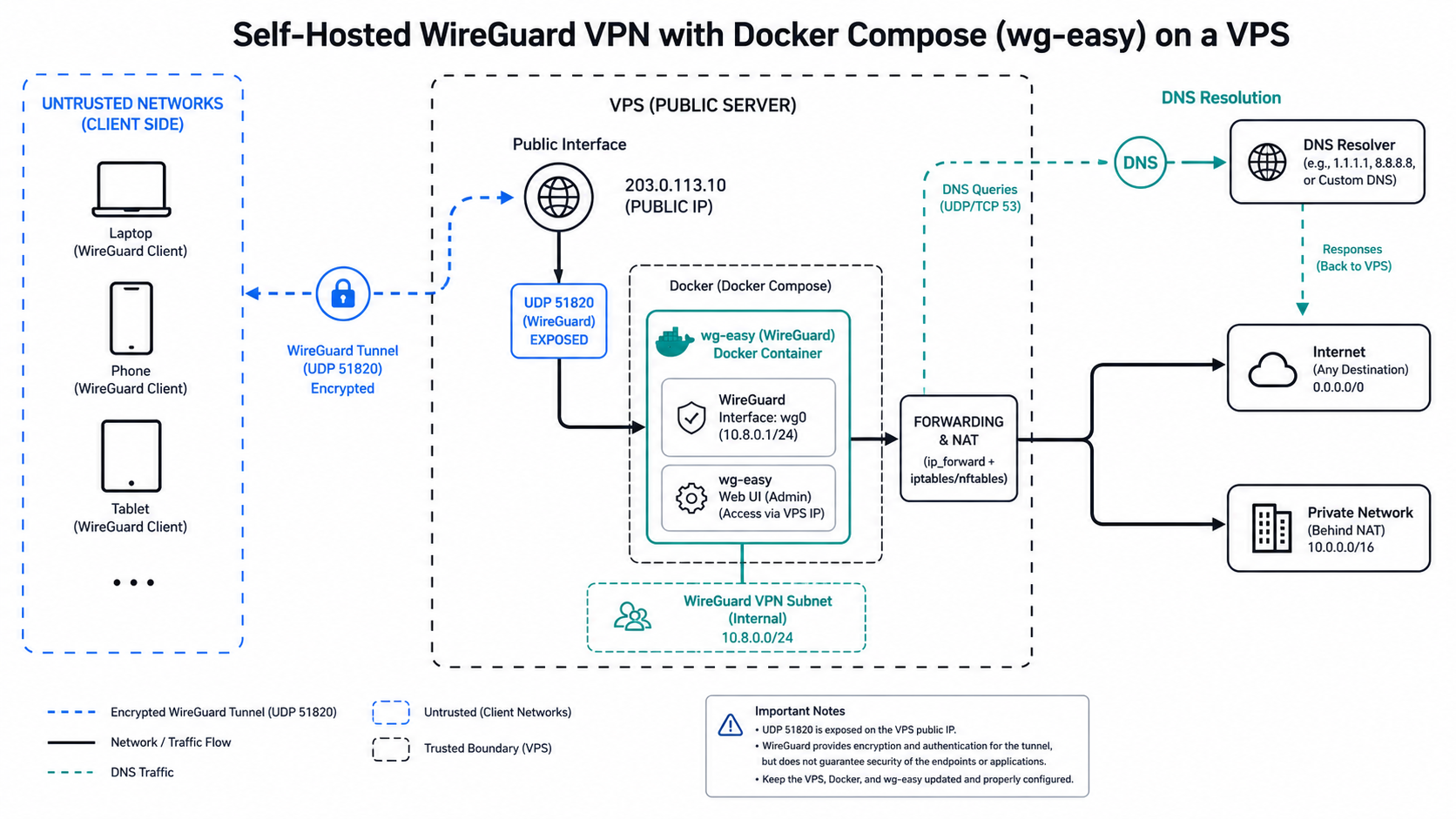
The encrypted tunnel runs from the client to your VPS. Internet destinations see the VPS address, while the VPS provider and server remain part of the trust boundary. This can secure traffic on an untrusted access network and provide controlled access to private services, but it does not provide guaranteed anonymity or automatically secure the applications at either endpoint.
Use the official WireGuard quick start for protocol commands and the official Docker Compose documentation for current container syntax. Compare the broader VPS, VPN, and proxy trust boundaries before choosing a device-wide tunnel.
Prerequisites and deployment plan
- An English-language Linux VPS with a stable public address and provider console access.
- Docker Engine and the Compose plugin from supported packages.
- A firewall that permits the selected WireGuard UDP port.
- A documented client subnet that does not overlap the local networks clients use.
- Backups of configuration and a recovery path that does not depend on the VPN.
Keep the initial design small: one server, one UDP port, one test client, and one DNS choice. Add split routes and more peers only after the full-tunnel baseline works.
Deploy WireGuard with Docker Compose
The exact image and environment variables depend on the maintained container you select. Pin an audited version rather than using an unbounded latest tag, read its release notes, and do not expose a web administration interface to the public internet without strong access controls.
services:
  wireguard:
    image: ghcr.io/wg-easy/wg-easy:VERSION_PIN
    container_name: wireguard
    cap_add:
      - NET_ADMIN
      - SYS_MODULE
    environment:
      - WG_HOST=vpn.example.com
    volumes:
      - ./wireguard:/etc/wireguard
      - /lib/modules:/lib/modules:ro
    ports:
      - "51820:51820/udp"
    sysctls:
      - net.ipv4.ip_forward=1
    restart: unless-stopped
Replace the placeholder image version and host after reviewing the image documentation. Store secrets outside the Compose file when supported. Run docker compose config before deployment, then docker compose up -d and inspect logs without printing private keys.
Forwarding, NAT, and firewall rules
A WireGuard handshake proves that peers exchanged authenticated packets; it does not prove forwarded internet traffic works. The host must enable forwarding, allow traffic between the WireGuard and public interfaces, and apply NAT when clients use the VPS as an internet gateway. Limit inbound traffic to SSH from trusted sources, the WireGuard UDP port, and any explicitly protected admin endpoint.
Full tunnel versus split tunnel
| Mode | AllowedIPs concept | Use | Risk to test |
|---|---|---|---|
| Full tunnel | Default routes through VPN | Untrusted network protection and fixed egress | DNS, bandwidth, and route conflicts |
| Split tunnel | Only selected subnets | Private-service access | Missing routes and overlapping subnets |
For per-application routing instead, compare Proxifier SOCKS5 rules and SOCKS5 proxy behavior. A VPN is broader than many scraping or browser-testing jobs require.
Client configuration and key lifecycle
Create one peer key pair per device. Record ownership and creation date, deliver configuration through an approved secure channel, and remove lost or retired devices promptly. Never reuse a private key across a team. For roaming clients behind NAT, a bounded persistent keepalive can help maintain reachability, but it should be enabled only where needed.
Test the client first on a network that permits UDP. Confirm handshake time, assigned tunnel address, DNS resolution, expected public address, and access to any private subnet. Then repeat after sleep/wake and a Wi-Fi-to-mobile transition.
DNS and leak checks
Choose whether clients use a public resolver, a resolver on the VPS, or split DNS for private zones. Verify both DNS requests and application traffic follow the intended path. A public-IP check alone cannot prove DNS routing. Test a known hostname, inspect the configured resolver, and verify behavior when the tunnel disconnects.
If a destination reports the wrong region, use the region mismatch guide to separate egress IP, resolver location, account preferences, and device geolocation. A static proxy endpoint may be simpler when only one application needs a stable allowlisted address.
Hardening checklist
- Patch the VPS, Docker Engine, Compose plugin, kernel, and pinned container image.
- Use key-based SSH, disable password login where recovery access is proven, and restrict management sources.
- Do not publish the administration UI directly; place it behind a protected management path.
- Back up encrypted configuration and test restoration.
- Monitor authentication, container restarts, disk use, firewall changes, and package updates.
- Document key revocation, incident response, and server replacement.
Troubleshooting WireGuard methodically
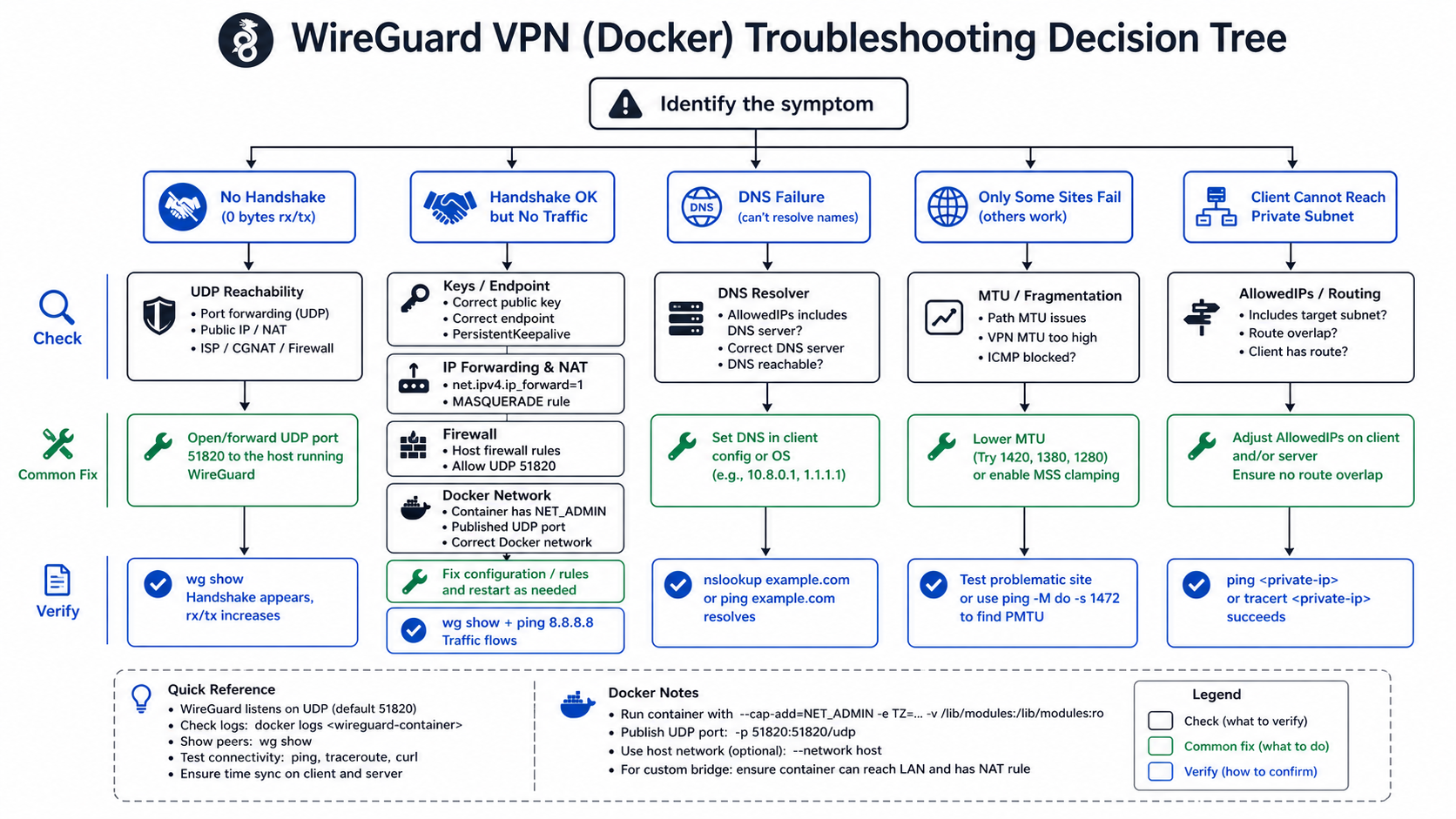
No handshake
Verify endpoint DNS, UDP reachability, provider firewall, host firewall, port mapping, public and private keys, and the server process. Check clocks and logs, but never paste private keys into tickets.
Handshake works but no internet
Inspect forwarding, NAT, interface names, AllowedIPs, container capabilities, and host routes. Test an IP address before a hostname to separate routing from DNS.
Some sites hang
Suspect path MTU or blocked fragmentation. Test smaller packets and cautiously lower the tunnel MTU on one client. Record the working value instead of copying a universal number.
Works on Wi-Fi but not mobile
Confirm UDP is permitted, endpoint DNS resolves over the mobile network, and NAT mappings remain active. Test keepalive only after the baseline is understood.
When a VPN is the wrong tool
A VPN routes broad device traffic and centralizes egress on the VPS. For regional browser QA or data collection, that VPS address may be less representative than residential proxy infrastructure or ISP proxy sessions. For Android, compare the system and app-specific proxy methods. For automation, combine any network choice with browser-state validation; routing alone does not change application identity.
Operations and maintenance
Review peers monthly, rotate access after device loss, update pinned images in a staged window, and test backups. Monitor handshake recency as an operational clue, not as proof that application traffic is healthy. Keep a direct console path for recovery so a firewall mistake does not lock out the team.
Choose a container image and version responsibly
Convenience images can generate peers and expose a management UI, but the image publisher becomes part of the software supply chain. Verify the repository, release history, documentation, update process, and supported environment variables. Pin a version or digest, review changes before upgrading, and scan the image through the team's normal process. Avoid copying a Compose file that exposes an admin password or unrestricted web port.
Validation after deployment
- Use
wg showto confirm the peer and latest handshake. - Confirm the client receives the intended tunnel address.
- Test a private destination if split tunneling is configured.
- Test an internet IP, then a hostname, and record the resolver.
- Inspect the public egress address only after routing works.
- Reconnect after client sleep, server restart, and an image update.
- Remove a test peer and verify that its old configuration no longer connects.
Monitoring without over-collecting
Monitor server health, container status, interface counters, peer handshake recency, firewall changes, and unexpected restart loops. Avoid retaining detailed destination histories unless they are necessary and permitted. A handshake timestamp shows tunnel activity but not which application succeeded, so pair infrastructure monitoring with a small synthetic test to a controlled endpoint.
Backup and disaster recovery
Back up the Compose file, pinned image reference, firewall description, DNS choice, peer inventory, and encrypted key material. Test restoration on a separate host with a different temporary address. Document how DNS or client endpoints will move after a server replacement and how old keys will be revoked. A backup that cannot be restored without the failed VPN is not a recovery plan.
Cost and capacity planning
VPS cost is only one component. Include outbound transfer, backups, monitoring, administrator time, incident response, and replacement. Measure concurrent peers, actual throughput, CPU, memory, packet loss, and regional route quality. Do not publish a universal capacity claim from one VPS size. If a browser workload only needs application egress, compare proxy provider evaluation criteria before operating a full tunnel.
Frequently Asked Questions
Is a self-hosted WireGuard VPN private?
It encrypts traffic between your client and VPS. The VPS provider, server configuration, DNS, destination services, and application accounts remain in the trust model.
Does WireGuard work in Docker?
Yes, when the host kernel, container capabilities, forwarding, port mapping, firewall, and persistent configuration are correctly set.
Why is there a handshake but no internet?
Usually forwarding, NAT, AllowedIPs, DNS, or firewall policy is incomplete. Test an IP before a hostname and inspect the host route.
Should I use full or split tunneling?
Use full tunnel when broad device traffic should exit through the VPS. Use split tunnel when only specific private subnets should use it.
How do I add another client?
Create a unique peer key and address, add the peer to the server, deliver the client configuration securely, and test revocation.
Is a VPN the same as a proxy?
No. A VPN usually changes the device-level route and encryption scope; a proxy routes supported application traffic and has a different trust boundary.