Puppeteer vs Playwright: the practical answer
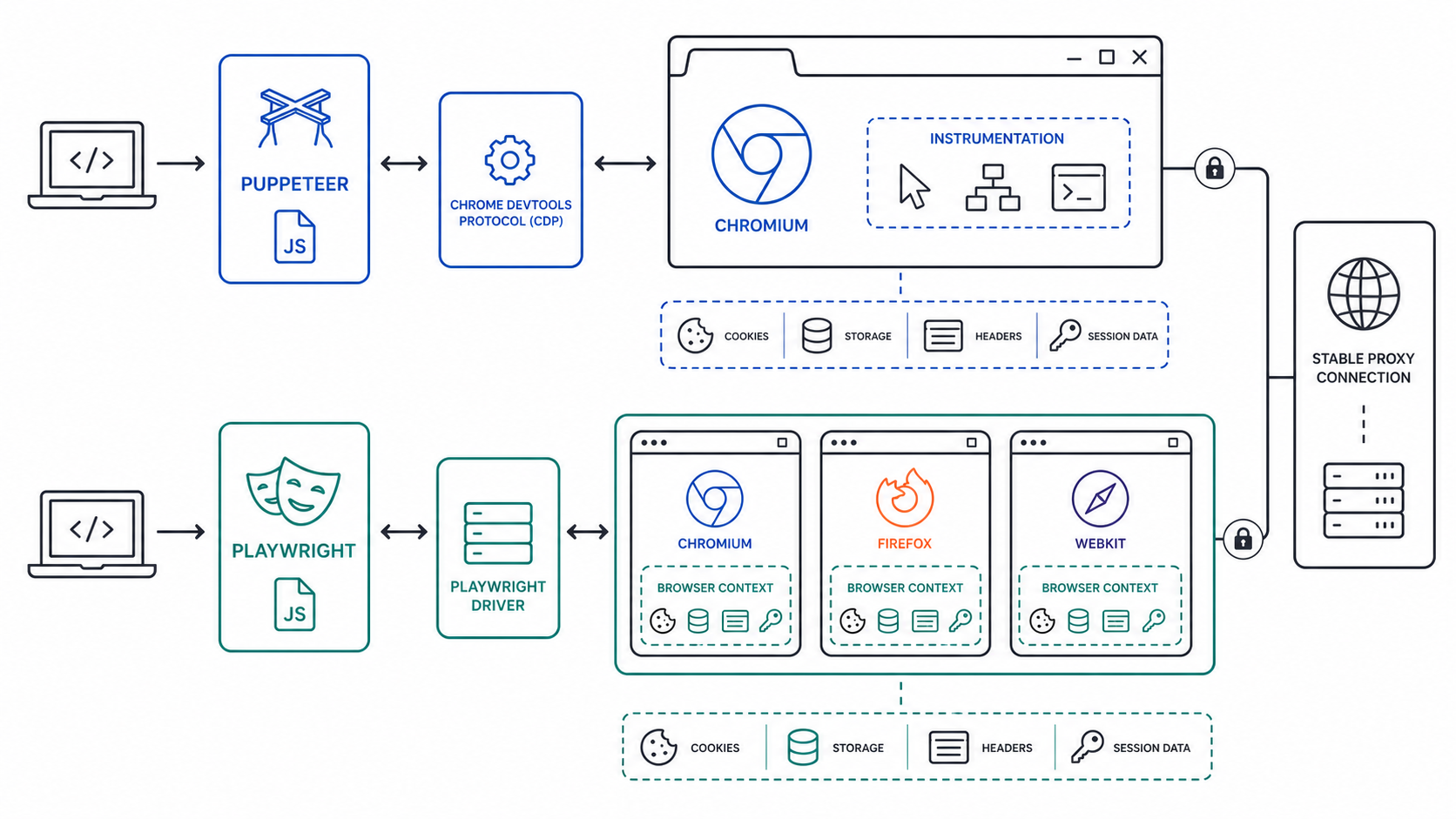
Choose Playwright when a project needs Chromium, Firefox, and WebKit coverage, parallel isolated contexts, resilient locators, and an integrated test runner. Choose Puppeteer when Chromium is the explicit target and the team values a smaller API surface or direct CDP access. The official Puppeteer documentation and Playwright browser-context documentation are the sources of truth for current APIs.
| Decision factor | Puppeteer | Playwright |
|---|---|---|
| Browser scope | Chromium-first | Chromium, Firefox, and WebKit |
| Session isolation | Incognito browser contexts | First-class isolated contexts |
| Waiting model | Explicit waits and Puppeteer locators | Auto-waiting around actions and assertions |
| Low-level control | Direct CDP workflows are a core strength | CDP available for Chromium-specific cases |
| Best fit | Focused Chrome tooling and instrumentation | Cross-browser testing and parallel workflows |
What stealth means and what it does not mean
Stealth is not a switch that makes automation indistinguishable from every human session. Sites can evaluate network context, TLS behavior, browser-exposed properties, storage, account history, navigation timing, interaction patterns, and request consistency. Plugins can change selected browser signals, but they cannot guarantee access or remove the need for authorization.
Start with the browser fingerprinting signal model and the Playwright bot-detection workflow. Use them to define what the application under test observes, then change one variable at a time. A blanket collection of evasions makes failures harder to reproduce.
Session state and browser-context isolation
One logical user should have one coherent browser context. Keep cookies, local storage, permissions, locale, time zone, and authentication state together. Reusing one context for unrelated identities contaminates state; creating a fresh identity for every request looks inconsistent and removes useful continuity.
Context lifecycle
- Create a context with the required locale, time zone, permissions, and proxy before opening pages.
- Authenticate through the approved flow and save storage state only when policy permits.
- Reuse that state for the same logical test identity.
- Close the context after the workflow and remove secrets from logs and artifacts.
For more Playwright-specific patterns, compare the Playwright configuration guide. For manual browser profiles, the Chrome proxy extension guide explains a different, user-operated routing model.
Proxy sessions and network consistency
A proxy changes the network route; it does not repair contradictory browser state. Keep a stable proxy session for authenticated journeys and avoid changing country, ASN class, or exit IP halfway through a login or checkout. Rotation is better suited to independent, authorized tasks with no shared account state.
Compare residential proxy fit, ISP proxy sessions, and SOCKS5 routing before selecting infrastructure. LycheeIP is relevant when an authorized test needs consistent proxy sessions or controlled regional endpoints; the browser library still owns cookies, context isolation, and error handling.
A repeatable authorized validation workflow
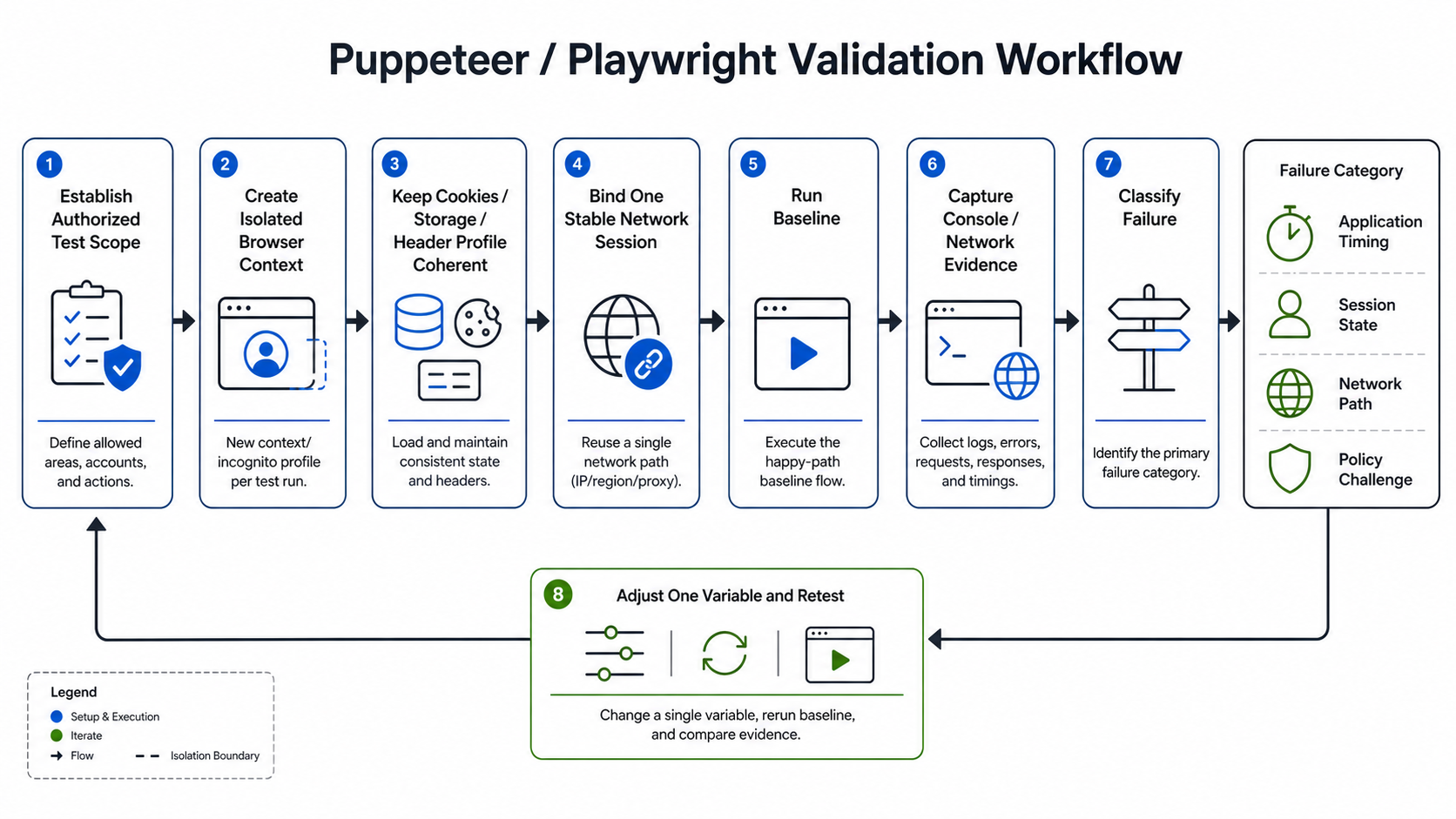
- Confirm written permission, scope, rate limits, and data-handling rules.
- Run a headed baseline without stealth changes and capture console, network, screenshots, and server-side evidence.
- Test one browser engine and one known-good network path.
- Stabilize waits, selectors, redirects, and session state before changing fingerprints.
- Change one signal or routing variable per experiment.
- Compare results across multiple runs and retain a direct-control run.
- Stop when the target signals denial, verification, or a policy boundary that the test does not authorize.
Failure diagnosis by symptom
Selector or timing failure
If a button is visible but the click fails, inspect overlays, navigation, frame boundaries, hydration, and actionability. This is application synchronization, not necessarily detection.
Login succeeds and the next request fails
Check cookie scope, redirects, CSRF tokens, storage state, proxy continuity, and whether the account requires an additional verification step. Do not rotate the route during diagnosis.
Only headless runs fail
Compare browser version, launch arguments, viewport, graphics availability, permissions, headers, and timing. Keep the headed and headless runs otherwise identical.
Only one network path fails
Investigate DNS, IP reputation, region, TLS path, rate limits, and network policy. The region-mismatch checklist helps separate IP location from account and browser geolocation.
Code pattern: one context per logical session
import { chromium } from 'playwright';

const browser = await chromium.launch({ headless: true });
const context = await browser.newContext({
  locale: 'en-US',
  timezoneId: 'America/New_York'
});
const page = await context.newPage();
await page.goto('https://example.test', { waitUntil: 'domcontentloaded' });
// Run only against systems you own or are authorized to test.
await context.close();
await browser.close();
Common mistakes
- Calling a timing or selector bug a bot-detection event without evidence.
- Sharing cookies between unrelated identities.
- Rotating the proxy inside an authenticated journey.
- Adding many stealth patches at once, making regressions impossible to isolate.
- Assuming a proxy changes canvas, storage, browser version, or account history.
- Ignoring rate limits, robots controls, terms, or authorization boundaries.
Decision framework
Use Playwright for new cross-browser test suites and parallel contexts. Use Puppeteer for Chromium-specific tooling, PDF/screenshot services, or CDP-heavy instrumentation. Use application-level proxy routing only when process routing is the actual requirement, and use a VPN or VPS tunnel when the trust boundary is device-wide rather than browser-specific.
Instrumentation and evidence collection
Capture browser console output, failed requests, response codes, redirect chains, screenshots, trace files, and server-side correlation identifiers. Redact credentials and personal data before sharing artifacts. Playwright traces can connect actions, DOM snapshots, and network events; Puppeteer teams can combine page events with CDP sessions. Evidence should answer whether the failure happened in navigation, rendering, application state, network policy, or an explicit verification response.
Keep the control run
For every experimental change, retain a control with the same browser version, network, account, and target. If both control and modified runs fail, the change is not the explanation. If only one browser engine fails, inspect engine support and application compatibility before treating it as detection.
Concurrency, rate limits, and state ownership
Scale by adding isolated contexts only after one session is deterministic. Bound concurrency by the target's authorized rate, local CPU and memory, proxy capacity, and downstream service limits. Queue work instead of launching an unbounded set of pages. Assign each context its own storage and network session, and do not let workers share mutable cookie jars.
Record retries as retries rather than new successful samples. Exponential backoff is appropriate for transient infrastructure errors, but it should not be used to hammer a verification or denial response. The static endpoint guide can help when a test allowlist requires predictable egress.
Maintenance and version drift
Pin browser and library versions in repeatable environments, review release notes, and run a small compatibility suite before upgrades. Browser updates can change defaults, headers, permissions, and rendering. A stealth patch tied to one version can become ineffective or break normal behavior after an update. Remove patches that no longer have a measured purpose.
Store the test purpose, authorization, library version, browser build, launch arguments, context options, proxy session policy, and expected outcome with each run. That record is more useful than a list of generic evasions because another engineer can reproduce it.
Frequently Asked Questions
Is Playwright more stealthy than Puppeteer?
Neither is automatically stealthy. Playwright offers convenient context isolation and cross-browser coverage; Puppeteer offers focused Chromium control. Detection outcomes depend on the complete session and authorized test design.
Should I use a stealth plugin?
Only after a controlled baseline identifies a specific browser signal and the target permits the test. Treat plugins as version-sensitive code, not as a guarantee.
How should proxies be rotated?
Keep a sticky session for one authenticated journey. Rotate between independent tasks only when the workflow is authorized and state does not need to persist.
Why does automation fail after login?
Check cookies, storage, CSRF state, redirects, proxy continuity, account verification, and application timing before attributing the failure to detection.
Can Puppeteer and Playwright run in Docker?
Yes, but browser binaries, system libraries, sandbox policy, fonts, shared memory, and container permissions must match the supported runtime.
Is browser automation legal?
It depends on authorization, jurisdiction, contract terms, data type, and method. Obtain permission and legal guidance for the specific use case.