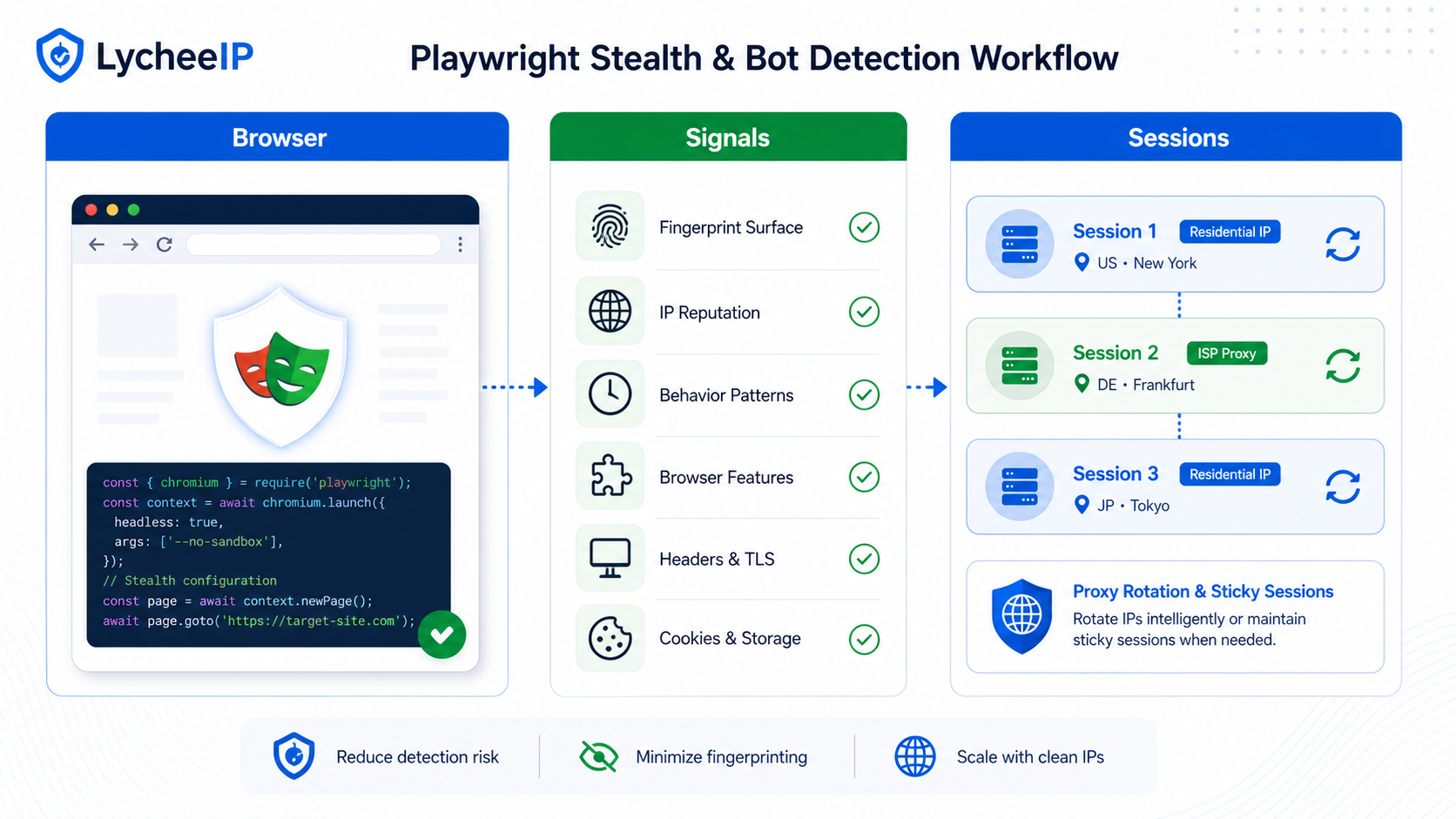
Playwright stealth is a workflow, not a magic plugin: reduce obvious automation mismatches, validate each change, and pair browser behavior with sane session and proxy design.
Searchers looking for playwright stealth, playwright stealth plugin, or bot detection workflow usually do not need another hype-heavy “undetectable browser” claim. They need a clear operating model: what browser signals matter, when IP reputation matters, how to validate changes, and how to avoid random trial-and-error. This repair keeps the original practical framing and restores the missing workflow depth.
What Playwright Stealth Can and Cannot Do
Playwright can drive real browsers, but automation still leaves patterns. A stealth layer may reduce obvious browser mismatches, yet it does not make a session invisible. Your target can still evaluate behavior, timing, IP history, account state, TLS fingerprints, challenge responses, and inconsistent geographic signals. That is why it is more accurate to treat stealth as one layer in a detection-reduction workflow rather than as a finished solution.
| Layer | What to validate | Why it matters |
|---|---|---|
| Browser context | User agent, locale, viewport, timezone, permissions, and rendering behavior | These are the first places where fake or contradictory signals become obvious. |
| Session state | Cookies, storage, account continuity, navigation order | Real users usually have coherent state across multiple pages and visits. |
| Network layer | IP type, region, request pacing, concurrency, and retry behavior | Even a well-shaped browser can fail if the IP reputation or region pattern is wrong. |
| Outcome telemetry | Status codes, blocks, challenge pages, screenshots, and parse success | Without measurement, teams mistake luck for improvement. |
How Bot Detection Actually Spots Playwright Sessions
Bot detection rarely depends on one flag. A target may combine browser fingerprint checks, JavaScript capability checks, navigation timing, challenge results, IP reputation, and account reputation. That means one fix can help while the session still fails overall. For example, cleaning up browser headers might remove one obvious mismatch while the site still blocks the request because the IP rotates too aggressively or the login flow looks synthetic.
A useful mental model is to separate presentation, behavior, and infrastructure. Presentation is what the browser says it is. Behavior is how it moves through the flow. Infrastructure is where the requests originate and how consistently the session behaves over time. The article on browser fingerprinting and bot detection is a good companion because it helps map failures to the right layer instead of blaming everything on the plugin.
Reference Workflow: Start Plain, Then Add One Change at a Time
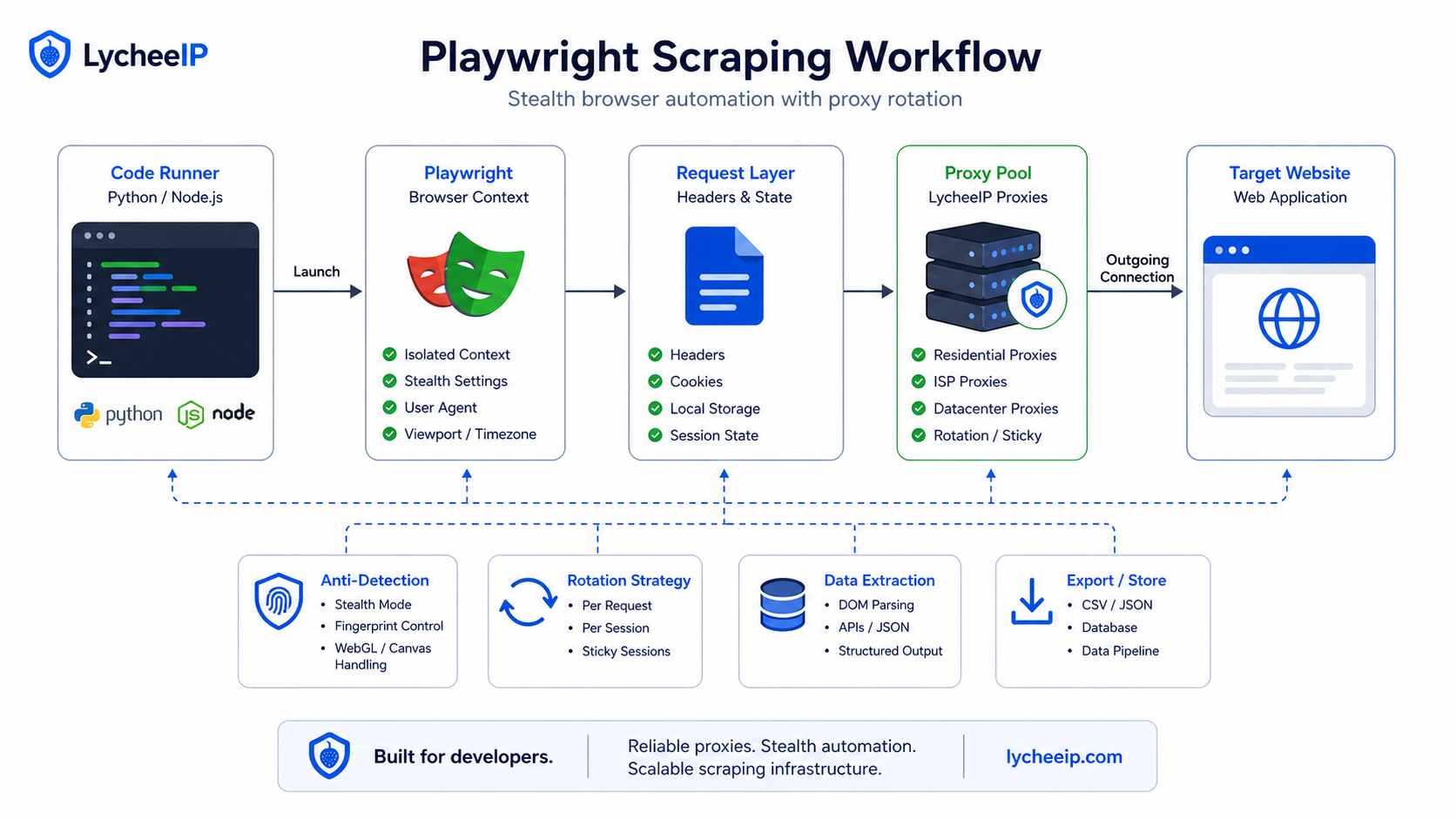
Treat stealth changes like a controlled experiment: keep one baseline, change one signal at a time, and log browser, network, and outcome differences separately.
- Run plain Playwright first and save the exact failure pattern: status code, screenshot, block text, challenge page, or timeout.
- Add one stealth or context change at a time rather than a pile of unrelated tweaks.
- Keep region, IP type, and account state stable while you test browser-level changes.
- Track success, challenge, timeout, parse failure, and login failure as separate outcomes.
- Only scale concurrency after a small baseline run proves the session is coherent.
from playwright.sync_api import sync_playwright

with sync_playwright() as p:
    browser = p.chromium.launch(headless=False)
    context = browser.new_context(
        locale="en-US",
        viewport={"width": 1365, "height": 768},
        timezone_id="America/New_York"
    )
    page = context.new_page()
    page.goto("https://example.com", wait_until="domcontentloaded")
    print(page.title())
    browser.close()
The point of the baseline is not to prove that plain Playwright always fails. It is to give you a reference. If the site works plainly, you may not need stealth at all. If the site fails, the baseline tells you which symptom changed after each modification. Use Playwright stealth workflow context when you need a browser-first framing, and compare it with Puppeteer vs Playwright tradeoffs when the question is whether the tool choice itself is affecting implementation speed.
Validation Is the Real Workflow, Not the Plugin Install
Stealth work becomes expensive when teams do not define success before making changes. Decide what counts as improvement: fewer challenge pages, better page completion, more stable parsing, or fewer login resets. Then keep that metric visible. If a change makes screenshots look better but completion rates worse, it is not a real win.
What to log for each test pass
- Final URL and response code
- Whether a challenge, consent screen, or login wall appeared
- Screenshot or HTML snapshot of the result
- IP type and region used for the run
- Whether cookies or storage were reused
- Completion time, parse success, and retry count
What to compare between runs
Compare one variable at a time. If you swap browser flags, user agent, timezone, viewport, cookies, and IP type all at once, you cannot tell which change mattered. That makes rollback impossible. Good validation is slower at the beginning, but it is what lets you scale later without mystery regressions.
When Proxies Help and When They Do Not
Proxies help when IP reputation, region, or request distribution is part of the failure pattern. They do not automatically solve incoherent browser state. If the browser claims one locale but the IP geolocates somewhere else, the session can still look suspicious. Likewise, if login cookies vanish between steps, swapping proxies will not fix that root cause.
That is why proxy choice should follow the workflow, not lead it. Use rotating residential proxies when distributed public-data work needs frequent IP changes. Use static residential proxies when a session must stay sticky across logins or carts. Use datacenter proxies when speed matters more than residential origin realism. If you need adjacent browser-side tuning, compare with Chrome proxy extension testing rather than assuming the automation stack and the manual browser stack should behave the same way.
Troubleshooting Common Failure Modes
The page loads but blocks after login
That usually points to session continuity, challenge handling, or account reputation rather than to simple browser startup flags. Validate cookies, post-login redirects, and IP stability across the whole sequence.
Stealth changes help one target and hurt another
That is normal. Targets differ. Keep per-target configs and resist the urge to force one universal profile across every site.
Residential proxies improve access but destroy cost control
That means the team has not yet matched the IP type to the job. Some targets need residential origin only for a narrow step; other stages can stay on cheaper infrastructure. Use the residential proxy explainer and the rotating proxy guide to split those jobs rather than paying the same premium for every request.
Ethics, Limits, and Infrastructure Fit
The Playwright network documentation on contexts, routing, and network control is the right technical reference for browser behavior. The OWASP project on automated threats is the right reminder that automation can create abuse risk. Together they frame the legitimate way to use this workflow: respect access controls, terms, rate limits, and the difference between testing, research, and abusive scraping.
LycheeIP fits when teams need proxy infrastructure that they can map cleanly to session design rather than bolt on as a last-minute fix. The goal is not to market stealth as invisibility. The goal is to help teams build observable, testable browser workflows that fail for understandable reasons and improve with controlled changes.
Explore LycheeIP Proxy Infrastructure
What Detection Systems Check After the First Page Load
A surprising number of stealth discussions stop at browser launch flags, but many production failures happen later. Targets watch how the session navigates, whether the timing between actions looks coherent, whether challenges are solved in a stable order, and whether the account keeps one believable path through the flow. That means a browser can look cleaner at startup and still fail because the session behaves like a machine after the first redirect or login wall.
This is also where teams benefit from splitting metrics. A challenge page is not the same failure as a timeout, and a timeout is not the same as a parse failure after the page technically loaded. When those outcomes are mixed together, engineers keep tweaking stealth without knowing whether they are solving the wrong layer.
A/B Test Plan for Stealth Changes
- Keep one stable baseline profile and one experimental profile.
- Run both against the same target, region, and account conditions.
- Compare screenshots, response codes, challenge frequency, and completion rate.
- Only keep the change if the measured outcome improves rather than merely looking cleaner in DevTools.
Account State, Cookies, and Human-Looking Continuity
Stealth work often fails because teams fix browser signals while ignoring session continuity. If cookies disappear, locales change between runs, or one step jumps regions mid-flow, the target can still flag the session. That is why persistent contexts and sticky routes should be applied intentionally rather than by superstition. Use them when the workflow needs continuity, not because they sound more “undetectable.”
In practice, the best question is: what would a believable repeat visit look like for this target? Once you can answer that, you can map storage reuse, session persistence, and IP stability to a real behavioral model instead of toggling features blindly.
Proxy Choice Should Follow the Workflow Shape
If the workflow is short, public, and low concurrency, plain Playwright or a light stealth layer may be enough. If the workflow is account-heavy, multi-step, or geographically sensitive, the IP choice starts to matter more. That is why proxy planning belongs after the baseline but before scale-out. Teams can compare the IP layer they need against provider-comparison discipline rather than treating every residential product as interchangeable.
Common Workflow Smells
- One profile is used for every target even though each target blocks for different reasons.
- The team has no saved baseline screenshots or metrics, so regressions look random.
- Proxy changes happen before the browser flow itself is understood.
- Concurrency is scaled before one low-volume path proves stable.
Session State, Browser Contexts, and Detection Surfaces
A stealth plugin changes selected browser-visible properties; it does not make the rest of the session coherent automatically. Detection can combine JavaScript-exposed browser features with request headers, TLS and HTTP protocol behavior, IP history, cookie age, navigation timing, storage state, and the sequence of actions after the page loads. The useful engineering goal is not to hide every signal. It is to avoid contradictions between signals that should describe the same browser session.
Isolate identities with browser contexts
Use a separate persistent context or carefully managed storage state for each authorized identity. Reusing one cookie jar across unrelated proxy locations creates an obvious continuity problem and makes debugging nearly impossible. Keep cookies, local storage, permissions, locale, timezone, and proxy session configuration together as one testable unit.
Keep proxy sessions consistent with stored state
A sticky proxy session is useful when a workflow includes login, redirects, multi-page navigation, or checkout-like state. Rotation is better between independent jobs, not in the middle of one stateful journey. If a failure appears after navigation rather than on the first request, compare the IP observed at each step and confirm that retries did not silently create a new route.
A Failure-Diagnosis Checklist
Record the first failing request, response status, challenge text, screenshot, browser console errors, and the exact configuration variant. Reproduce with plain Playwright, then enable only the required stealth behavior, then add the proxy, and finally add stored account state. This order distinguishes a selector or application bug from a browser-fingerprint issue, an IP issue, or a stale account session.
Common mistakes include changing the user agent without matching client hints, sharing one storage state across test identities, rotating an IP during a login flow, retrying challenges aggressively, and testing only whether the first page loaded. A valid test checks the complete authorized workflow and records whether the same configuration remains stable across repeated runs.
Frequently Asked Questions
Does playwright-stealth make Playwright undetectable?
No. It can reduce some obvious browser mismatches, but targets also evaluate behavior, session continuity, and IP reputation.
Should I always use proxies with Playwright?
No. Add proxies when IP reputation, region, or session distribution is part of the problem. Do not use them as a substitute for debugging broken browser state.
What is the best first metric to track?
Track the exact failure symptom: challenge pages, login failure, response code, page completion, or parse success. Improvement needs a measurable definition.
Why does one configuration work on one site and fail on another?
Detection stacks differ. Keep per-target baselines and avoid forcing one universal stealth profile across every workflow.
When should I use sticky sessions?
Use sticky sessions when logins, carts, or multi-step flows must keep one consistent route. Rotating too early can break continuity.
How should I validate changes safely?
Change one variable at a time, keep screenshots and logs, and compare runs against a stable baseline before you scale concurrency.
Do I need persistent browser profiles?
Only when the workflow benefits from stable state. Persistent contexts are helpful for continuity, but they are not automatically the right answer for every target.
What usually fails after the first page load?
Navigation order, challenge handling, storage continuity, and region consistency often break after startup even when the browser fingerprint looks cleaner.