In the debate of WireGuard vs OpenVPN, the headline for 2026 has shifted from performance to survival. Major VPN providers are actively deprecating OpenVPN support, creating a "forced migration" for anyone managing routers, Linux servers, or manual configurations.
Mullvad is scheduled to remove OpenVPN entirely on January 15, 2026, while Proton VPN has set a February 28, 2026 deadline for older manual config files. If your infrastructure relies on set-and-forget .ovpn files, your connection is likely on a countdown.
Why are major VPNs removing OpenVPN in 2026, and what breaks first?
Providers are removing OpenVPN to shed "technical debt" and minimize the security risks associated with massive, legacy codebases. OpenVPN contains hundreds of thousands of lines of code, whereas WireGuard operates on roughly 4,000, making it significantly easier to audit and maintain.
Mullvad removing OpenVPN: The Jan 15, 2026 cutoff
Mullvad is taking the most aggressive stance by removing OpenVPN server support entirely. On January 15, 2026, any device, be it a GL.iNet travel router or a Linux workstation, pinned to an OpenVPN profile will simply fail to handshake.
Proton legacy config cutoff: What “old” means for your setup
Proton's approach focuses on security hygiene. They are invalidating manual OpenVPN configurations downloaded before September 2023. After February 28, 2026, these files will stop working because they lack modern cryptographic standards like AES-256-GCM and tls-crypt.
What are the core differences in WireGuard vs OpenVPN that matter in 2026?
WireGuard is a streamlined, "opinionated" protocol that uses modern cryptography by default, while OpenVPN is a highly flexible, SSL-based framework that can be configured in thousands of ways.
- WireGuard: A lean protocol using the Noise_IK handshake. It is built directly into the Linux kernel for maximum efficiency.
- OpenVPN: A mature, TLS-based protocol that relies on the OpenSSL library. It is the "Swiss Army Knife" of VPNs, capable of running on almost any port or protocol (TCP/UDP).
Codebase, complexity, and configuration surface area
The primary difference is "attack surface." Because WireGuard is so small, it is inherently more secure against undiscovered bugs. OpenVPN’s flexibility is its weakness; one wrong line in a custom config can downgrade your encryption to obsolete standards.
Which protocol wins on WireGuard vs OpenVPN speed for real users?
WireGuard is consistently faster than OpenVPN in almost every benchmark. Because it runs in the "kernel space" (the core of the operating system), it processes data with much lower latency than OpenVPN, which typically runs in "user space."
When OpenVPN narrows the gap (UDP, DCO)
OpenVPN isn't entirely obsolete in the speed department. Using Data Channel Offload (DCO) on Linux allows OpenVPN to move data handling into the kernel, similar to WireGuard. However, this requires specific hardware and software support that isn't always available on consumer routers.
Which is more secure: WireGuard vs OpenVPN encryption algorithms?
Both protocols are cryptographically sound if configured correctly, but WireGuard makes it harder to "get it wrong."
WireGuard fixed suite (Noise_IK) vs OpenVPN cipher agility
WireGuard uses a fixed set of modern primitives (ChaCha20, Poly1305, Curve25519). If a vulnerability is found in one, the whole protocol is versioned up. OpenVPN uses "cipher agility," allowing it to negotiate between different algorithms. While flexible, this opens the door to "downgrade attacks" where an attacker forces the connection to use a weaker, crackable cipher.
Common mistakes that make either protocol insecure:
- OpenVPN: Using outdated tls-auth instead of tls-crypt, or sticking with 1024-bit RSA keys.
- WireGuard: Hard-coding static IPs in a way that allows for traffic correlation (privacy risk) or failing to rotate keys after a device is lost.
How do privacy and logging risks differ between WireGuard and OpenVPN?
By default, WireGuard requires storing user IP addresses on the server to manage the connection. To solve this, privacy-focused providers (like Mullvad and Proton) have built custom "erasure" systems that delete this metadata as soon as the session ends. When choosing a protocol, the provider's logging policy is more important than the protocol's default behavior.
Which protocol stays stable for remote access on flaky networks?
WireGuard is the clear winner for mobile users. It is "stateless," meaning if you switch from Wi-Fi to 5G, the connection doesn't drop and renegotiate. It simply keeps sending packets. OpenVPN often "hangs" during network transitions, requiring a manual reconnect that can take 5-10 seconds.
How to migrate from OpenVPN to WireGuard without downtime?
Migration should be treated as a staged rollout, not a "flip of the switch."
Step-by-step migration checklist
- Inventory: Identify every NAS, router, and VM using .ovpn files.
- Parallel Run: Set up WireGuard on a single test device while leaving the rest on OpenVPN.
- MTU Testing: WireGuard has different overhead; test if your connection stalls on certain websites and adjust MTU if necessary (usually to 1320 or 1420).
- Batch Update: Move non-critical devices first, then routers, then production servers.
Router and Linux-specific migration tips
On Linux, avoid the "one config forever" trap. Use wireguard-tools (wg-quick) and ensure you are not reusing the same private key across multiple devices. For routers, check if your firmware (OpenWrt, pfSense) supports WireGuard efficiently, then measure throughput on your own hardware.
What to do if your Linux OpenVPN config stopped working?
If your config fails, check the logs (journalctl -u openvpn). In 2026, the likely cause is an expired certificate or a provider disabling a legacy endpoint. If you see "TLS Auth Error," your provider has likely moved to a newer configuration standard, and you should download a fresh .ovpn or switch to WireGuard.
Which protocol should you self-host for remote access in 2026?
For most users, self-host WireGuard. It is easier to set up (no complex PKI/CA management) and offers better performance on low-power hardware like a Raspberry Pi. Only use OpenVPN if you must tunnel over TCP Port 443 to bypass restrictive firewalls (e.g., in a hotel or corporate office).
When should you use a VPN protocol versus a proxy provider like LycheeIP?
A VPN protocol like WireGuard or OpenVPN is designed to create a secure tunnel for all your device's traffic. It is an "all-or-nothing" approach to networking.
However, for data engineers, scraping teams, or multi-account agencies, a VPN is often too blunt a tool. This is where a professional proxy infrastructure like LycheeIP fits in.
How LycheeIP fits into your tech stack
While WireGuard secures your connection, LycheeIP manages your IP identity and reputation.
- Endpoint fit: Select residential, ISP, or datacenter routing according to the application's session and destination requirements.
- Operational checks: Validate endpoint reachability, authentication, and session behavior with a small test before migration.
- Routing scope: A proxy can provide application-level routing when a device-wide VPN tunnel is too broad.
- Real-time Visibility: Monitor usage via a simple API or web dashboard, avoiding the "black box" nature of traditional VPN protocols.
The Rule of Thumb: Use a VPN (WireGuard) to access your office server; use a Proxy (LycheeIP) to access the web at scale.
Comparison: WireGuard vs OpenVPN at a Glance
| Feature | WireGuard | OpenVPN |
| Speed | Excellent (Kernel-level) | Moderate (Higher overhead) |
| Code Size | ~4,000 lines (Easy to audit) | ~100,000+ lines (Complex) |
| Encryption | Modern, Fixed (ChaCha20) | Flexible, Legacy-friendly (AES) |
| Mobility | Seamless (Handles IP changes) | Poor (Often drops/reconnects) |
| Censorship | Easy to block (UDP only) | Hard to block (TCP/443 support) |
| Setup | Simple Public/Private Keys | Complex Certificates/CA |
Troubleshooting Common Failures
| Failure | Likely Cause | Fix |
| OpenVPN "TLS Error" | Outdated config or expired cert | Download new config from provider |
| WireGuard "No Traffic" | Blocked UDP port or MTU mismatch | Change port to 51820; Lower MTU to 1280 |
| VPN Connected, no Web | DNS Leak or Kill-switch bug | Manually set DNS to 1.1.1.1 or 8.8.8.8 |
| Slow Speeds on Router | CPU Bottleneck (OpenVPN) | Upgrade to WireGuard-capable hardware |
WireGuard vs OpenVPN: choose by constraints, not a universal winner
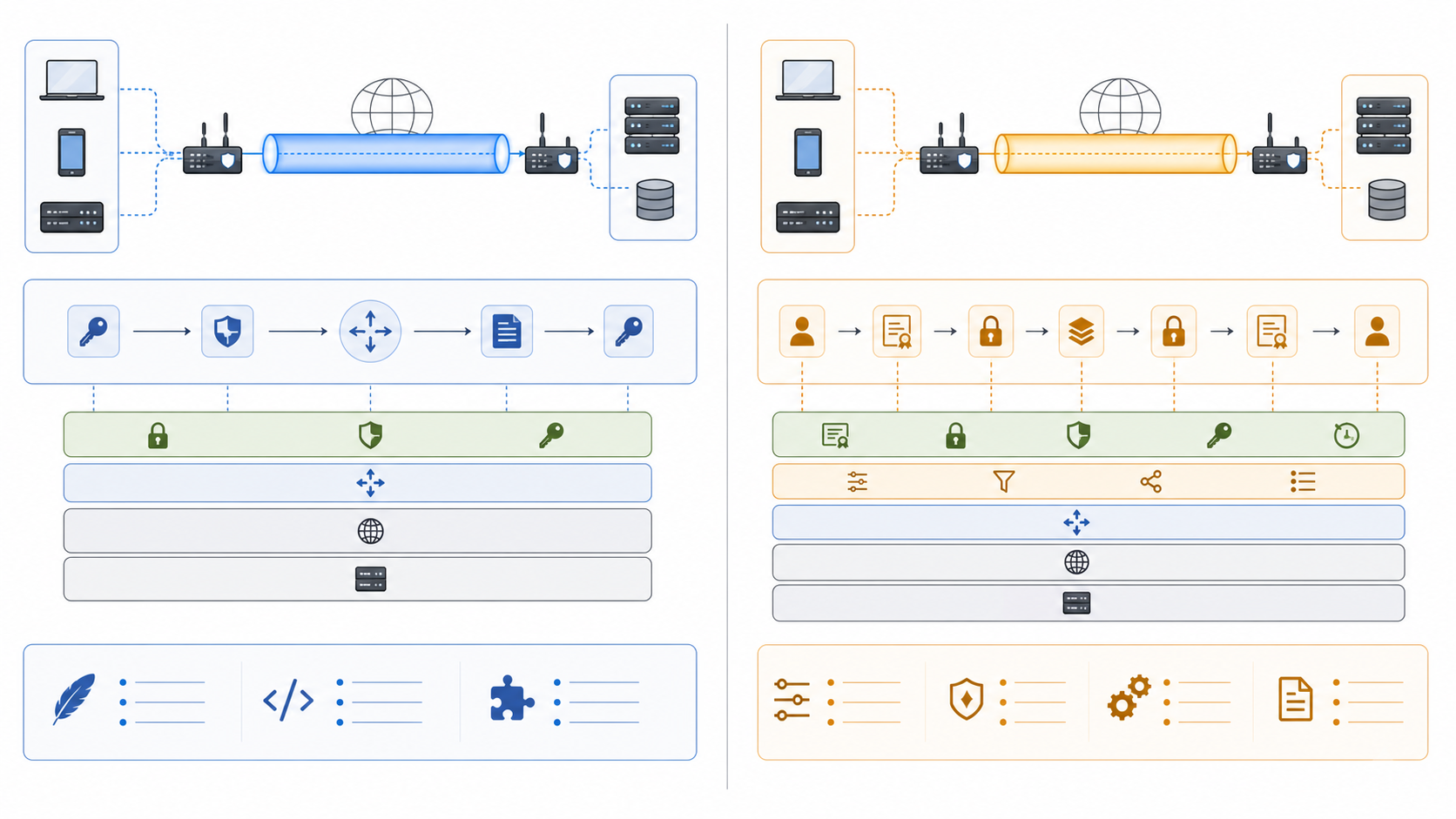
WireGuard uses a compact protocol and a fixed cryptographic design described in the official WireGuard protocol documentation. OpenVPN exposes more transport, certificate, and compatibility choices through its official 2.6 manual. That difference changes operational risk: WireGuard reduces configuration surface, while OpenVPN can fit networks that require TCP transport, existing PKI, or established enterprise controls.
| Decision factor | WireGuard | OpenVPN |
|---|---|---|
| Configuration model | Small fixed protocol surface | More transport and certificate options |
| Network compatibility | UDP-focused | UDP or TCP profiles |
| Identity lifecycle | Public-key peer configuration | Certificate or credential-based deployments |
| Operational fit | Simple modern deployments | Existing PKI and compatibility-heavy environments |
| Migration risk | New addressing and peer inventory | Legacy configuration and version drift |
How to test WireGuard vs OpenVPN speed responsibly
There is no useful universal benchmark. Throughput depends on CPU, kernel support, MTU, packet loss, distance, congestion, and whether OpenVPN uses UDP, TCP, or data-channel offload. Test both protocols on the same host, route, time window, cipher policy, and destination. Record median throughput, latency distribution, packet loss, reconnect time, and CPU utilization rather than reporting one peak number.
If results collapse only on one access network, investigate UDP blocking, MTU, or middlebox behavior before blaming the protocol. For a broader trust-boundary comparison, use the VPS vs VPN decision guide; for implementation details, pair this article with the self-hosted WireGuard and Docker setup.
Security and privacy tradeoffs
WireGuard's smaller configuration surface can reduce some classes of operational error, but key distribution, endpoint protection, access revocation, logging, and server hardening still determine the deployment's security. OpenVPN's flexibility is valuable when you need certificate authorities, TCP fallback, or mature policy integrations, but each option adds configuration that must be maintained.
Neither protocol guarantees anonymity. The VPN operator or self-hosted VPS provider can observe connection metadata according to its position in the path. DNS configuration, endpoint logs, application accounts, and browser identifiers remain separate. When the goal is application-level IP routing rather than device-wide encryption, a proxy may be the more precise tool; compare SOCKS5 proxy behavior and ISP proxy fit before forcing every workflow through a VPN.
Staged migration with a tested rollback path
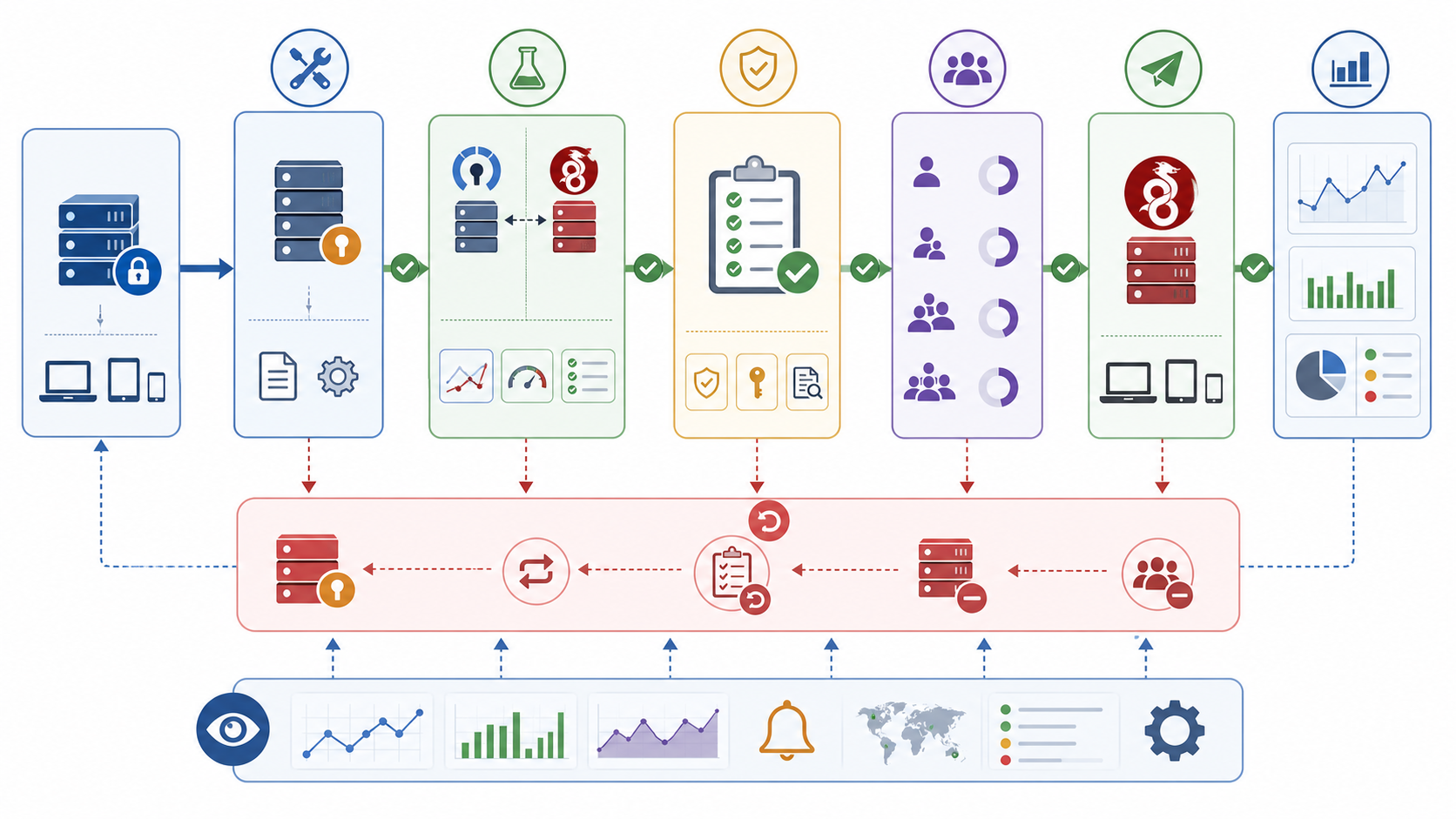
- Inventory clients, routes, DNS settings, authentication dependencies, and firewall rules.
- Build a parallel WireGuard endpoint without disabling the OpenVPN service.
- Validate routing, DNS, MTU, reconnect behavior, monitoring, and access revocation with test users.
- Move a small cohort and compare error rates and support tickets against the OpenVPN baseline.
- Expand the rollout only after the acceptance criteria pass.
- Keep the old configuration and rollback trigger until all critical clients are verified.
- Retire credentials and firewall rules only after the rollback window closes.
Migration failure diagnosis
A handshake without application traffic usually points to AllowedIPs, forwarding, NAT, firewall, or MTU. No handshake points to endpoint reachability, UDP policy, clock/key mistakes, or an incorrect peer configuration. Intermittent mobile failures may require keepalive tuning. If OpenVPN works but WireGuard does not on one network, test UDP reachability before changing keys.
For distributed browser or data-collection workloads, keep tunnel design separate from browser session design. Browser fingerprinting signals and automation validation are not corrected by changing the VPN protocol.
Operational decision criteria before migration
Map requirements before selecting a default. Record whether clients need UDP or TCP transport, whether remote networks block UDP, how identities are issued and revoked, whether split tunneling is required, how DNS is controlled, which routes overlap, and which monitoring system confirms tunnel health. Also document who owns client updates and how quickly compromised credentials or keys can be removed.
OpenVPN may remain the conservative choice when an organization already operates a certificate authority, depends on TCP fallback, or must support older managed devices. WireGuard may be easier when a team wants a smaller protocol surface, controls endpoint configuration, and can manage peer keys and addresses reliably. Mixed environments are normal: the correct target can be a phased coexistence period rather than an immediate single-protocol standard.
Acceptance criteria for a production cutover
- All required subnets and split routes are reachable without route leaks.
- DNS follows the intended resolver and search-domain policy.
- MTU-sensitive applications work across representative access networks.
- Mobile and roaming clients reconnect within the team's operational threshold.
- Monitoring distinguishes endpoint, handshake, and application failures.
- Key revocation and device offboarding have been rehearsed.
- The rollback owner, trigger, and expiration date are documented.
Router, Linux, and mobile deployment differences
On Linux, kernel integration can simplify WireGuard, but forwarding, firewall policy, policy routing, and DNS remain deployment work. On routers, CPU architecture, firmware support, configuration persistence, and upgrade behavior matter more than desktop benchmark claims. On mobile devices, roaming between Wi-Fi and cellular networks tests keepalive and route recovery in ways a stable lab connection does not.
Test one representative device from each supported class. A successful handshake is not sufficient: verify DNS, application traffic, sleep and wake recovery, captive-portal behavior, and revocation. Store the evidence with the migration decision so future maintainers know which assumptions were validated.
Key and certificate lifecycle
WireGuard peer keys and OpenVPN certificates solve different identity problems, but both need inventory, issuance, secure delivery, rotation, revocation, and offboarding. Do not leave peer configuration as an undocumented server file. Track device ownership and last validation, remove lost devices promptly, and test revocation before the cutover. For OpenVPN, verify certificate expiry and revocation-list distribution; for WireGuard, verify that removed public keys can no longer reach protected routes.
DNS also belongs in the migration record. Specify whether clients use an internal resolver, a tunnel-provided resolver, or split DNS. Test short names, internal zones, public names, and behavior after the tunnel disconnects. A protocol migration that passes an IP ping but breaks DNS is not complete.
Compare proxy infrastructure for application-level routing
Frequently Asked Questions
Is WireGuard faster than OpenVPN?
WireGuard often has lower protocol overhead, but actual results depend on hardware, kernel support, transport mode, distance, packet loss, and configuration. Test both on the same path and report distributions, not one peak.
Is WireGuard more secure than OpenVPN?
WireGuard has a smaller fixed design; OpenVPN offers more configurable controls. Deployment security still depends on key handling, patching, access revocation, firewall policy, and logging.
When is OpenVPN still the better choice?
OpenVPN can be preferable when TCP transport, existing certificate infrastructure, mature integrations, or compatibility with restricted networks is required.
Can WireGuard use TCP?
WireGuard itself is UDP-based. If a network blocks UDP, you need a different transport strategy or a protocol such as OpenVPN that can operate over TCP.
How do I migrate without downtime?
Run both services in parallel, validate a small cohort, define rollback thresholds, retain the old configuration through the acceptance window, and retire it only after critical clients pass.
Does changing VPN protocols change browser fingerprints?
No. VPN protocols affect the network path; browser, device, storage, and behavioral signals remain separate.