Browser fingerprinting bot detection is the technical process of distinguishing between human users and automated scripts by analyzing distinct attributes of the connecting client. Rather than relying solely on IP addresses, which are easily rotated, engineering teams use these techniques to protect logins, checkouts, and analytics from abuse.
However, implementing this incorrectly leads to frustrated users and broken conversion funnels. This guide breaks down how to architect a detection system that scores risk accurately without treating every visitor like a criminal.
What is browser fingerprinting bot detection?
Browser fingerprinting bot detection is a security method that aggregates hundreds of data points from a user’s device, network, and behavior to assign a "bot probability" score to a session.
Unlike cookies, which are stored on the device and can be cleared, a fingerprint is calculated remotely based on how the device appears to the server. Effective bot detection uses this fingerprint not as a permanent ID, but as a consistency check: Does this client's claims (User-Agent, headers) match its actual behavior (rendering, network stack)?
How does browser fingerprinting bot detection work in production?
In a production environment, browser fingerprinting bot detection operates as a pipeline, not a single gate. The goal is to collect signals, normalize them, and apply a proportional response.
Most robust systems follow this workflow:
- Collection: The system passively reads headers and actively injects JavaScript (e.g., WebGL tasks) to gather device traits.
- Normalization: Raw data is cleaned. For example, slight variations in clock skew or floating-point math are grouped to prevent "fingerprint drift."
- Enrichment: The fingerprint is combined with reputation data (IP usage history) and context (is this a login or a blog post?).
- Scoring: A risk engine calculates a score (e.g., 0–100).
- Response: The system triggers an action based on the score—allow, CAPTCHA, MFA step-up, or block.
Which bot detection signals matter most, and why?
A single signal is rarely enough. Attackers can spoof User-Agents easily. High-fidelity browser fingerprinting bot detection relies on the correlation between four key layers.
1. TLS and Network Fingerprints (JA3/JA4)
Before a webpage even loads, the SSL/TLS handshake reveals details about the client. Signals like JA3 analyze the order of cipher suites and TLS extensions.
- Why it matters: Standard browsers (Chrome, Firefox) have very specific, consistent handshake patterns. Python scripts, headless browsers, or Go-based scrapers often use different libraries that create mismatched TLS fingerprints.
2. Browser and Canvas Fingerprints
This involves asking the browser to render a hidden image or perform a calculation.
- Canvas & WebGL: Variations in GPU hardware and drivers cause tiny differences in how pixels are rendered.
- AudioContext: Similar to graphics, the way a device processes an audio signal creates a unique signature.
- Consistency Checks: If a User-Agent claims to be an iPhone, but the WebGL renderer lists a dedicated desktop NVIDIA card, the score spikes.
3. Behavioral Modeling
Fingerprints identify the machine; behavior identifies the operator.
- Mouse Dynamics: Humans move in curves with variable velocity. Bots often move in straight lines or jump instantly between coordinates.
- Timing: Humans pause to read. Scripts often execute form fills in milliseconds.
How to balance Privacy vs. Security (The Decision Matrix)
One of the biggest mistakes teams make is applying maximum friction to every endpoint. This destroys the user experience and increases infrastructure costs.
Use this decision matrix to apply browser fingerprinting bot detection proportional to the risk.
| Endpoint | Abuse Risk | Recommended Signal Depth | Response Strategy |
| Public Content / Blog | Low | Level 1 (Hygiene): Basic header checks, rate limiting. No active fingerprinting. | Cache aggressively; do not block unless volumetric attack. |
| Search / Inventory | Medium | Level 2 (Integrity): TLS consistency + basic behavior anomalies. | Soft block (temporary rate limit) or serve cached results. |
| Sign-Up / Registration | High | Level 3 (Scoring): Full canvas/device fingerprinting + email reputation. | Trigger phone/email verification or CAPTCHA on medium scores. |
| Login / Checkout | Very High | Level 4 (Defense): Multi-signal scoring + behavioral biometrics + history. | Step-up MFA or "Account Locked" for high-risk scores. |
How can you reduce false positives in browser fingerprinting bot detection?
False positives, blocking a legitimate human, are the primary failure mode of bad bot detection. They usually happen because a rule is too brittle or a fingerprint "drifted" (e.g., the user updated their browser).
Troubleshooting Common Failures
If your support team is receiving complaints, check this table:
| Symptom | Likely Cause | Investigation & Fix |
| Mobile users blocked often | Fingerprint Drift: Mobile OS updates and randomized MAC addresses change fingerprints frequently. | Reduce reliance on static identifiers for mobile. Weigh "touch event" behavior more heavily than device traits. |
| Accessibility users flagged | Behavior Rigidity: Screen readers and keyboard navigation do not look like "standard" mouse usage. | Ensure your behavioral model accepts keyboard-only navigation and strictly adheres to WCAG compatibility. |
| New browser version blocked | Unknown User-Agent: A new Chrome release may mismatch your known TLS or header allowlists. | Implement a "monitoring mode" for unknown versions rather than an auto-block. Update rules weekly. |
| Corporate users blocked | Shared IP Reputation: Users behind corporate VPNs or NATs look like a botnet due to high volume. | Whitelist known corporate ASN ranges or rely on session cookies over IP reputation. |
How does reliable infrastructure impact testing and legitimate automation?
For data engineers and developers building scrapers or testing their own defenses, the infrastructure you use dictates your visibility. If you test browser fingerprinting bot detection systems using low-quality, abused IPs, you will trigger false positives based on network reputation alone, masking the actual behavior of your code.
To isolate variables during testing or data collection, the underlying IP must be clean and act like a real user.
The Role of LycheeIP
LycheeIP provides developer-first proxy infrastructure designed for high-fidelity testing and data operations. By prioritizing quality over quantity, it ensures that network reputation doesn't become a bottleneck.
- Endpoint choice: Use LycheeIP proxy types as controlled network variables during authorized tests.
- Network consistency: Keep the endpoint and session stable while evaluating browser-side signals, and record network failures separately.
- Diverse Types: Whether you need Dynamic Residential for broad geo-coverage or Static Residential for keeping a consistent session identity, you can match the IP type to the user behavior you are simulating.
Pro Tip: When testing detection thresholds, start with Static Residential proxies to simulate a stable "logged-in user" before rotating IPs.
When should you avoid fingerprinting?
You should not use aggressive browser fingerprinting bot detection when:
- Consent is ambiguous: In jurisdictions like the EU (GDPR) or California (CCPA), collecting device data for tracking may require explicit consent, even for security. Consult legal counsel.
- The cost of a false positive is infinite: For critical services (e.g., healthcare portal access, emergency services), allow-lists and strict authentication are safer than probabilistic scoring.
- Simple hygiene works: If basic rate limiting stops the abuse, do not over-engineer a fingerprinting solution.
Assumptions & Limitations
- Probability, not Certainty: No score is 100% accurate. Always have a "break glass" option for users to prove they are human (e.g., contacting support).
- The Arms Race: Attackers constantly update "anti-detect" browsers to spoof new signals. Maintenance is required.
- Client-Side Manipulation: Any data coming from the client (browser) can be faked. Server-side signals (TCP/IP analysis, timing) are generally more trustworthy.
A layered browser fingerprinting model
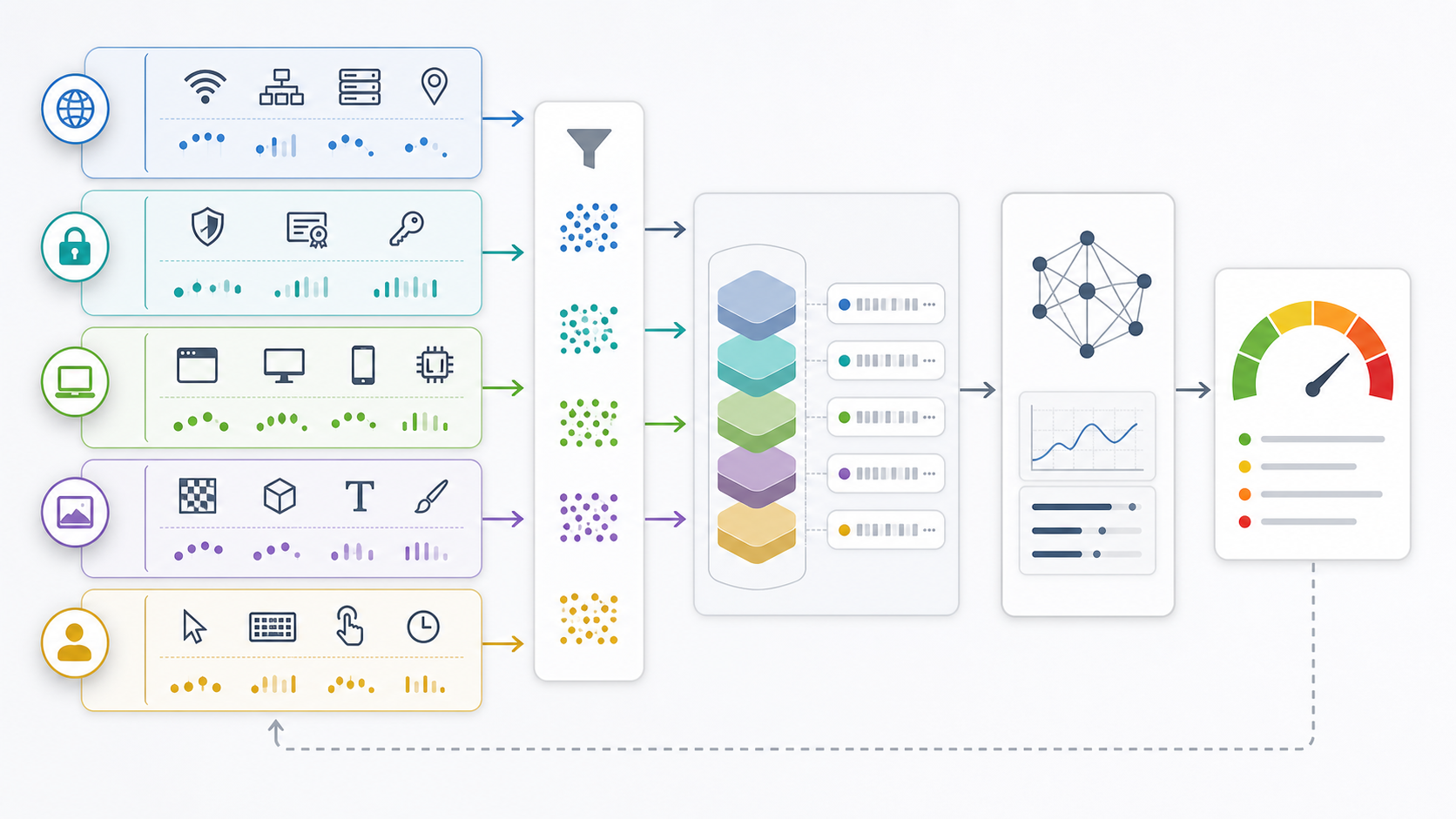
The W3C's fingerprinting guidance treats fingerprinting as a privacy concern because attributes can become identifying in combination. Security teams also need a threat model such as the OWASP Automated Threats framework to decide which abuse they are actually trying to prevent. Collecting more attributes is not a substitute for defining the threat.
Separate signal families before scoring them: network and TLS context, browser-exposed properties, rendering outputs, storage and session continuity, interaction timing, and account-level history. Correlated anomalies across independent families are more informative than one rare font, one canvas hash, or one IP change.
Privacy-aware collection and retention
Document the purpose of each signal, its retention period, who can access it, and how users can challenge an automated decision. Prefer coarse or ephemeral features where they answer the security question. Avoid retaining raw high-entropy values when a bounded risk feature is sufficient. Security use does not remove the need for jurisdiction-specific privacy review.
A proxy or VPN affects the network layer, not the complete fingerprint. Compare the VPS, VPN, and proxy trust boundaries before interpreting an IP change. For controlled automation tests, preserve browser context and proxy session consistency as described in the Playwright bot-detection workflow.
Progressive decisions reduce false positives
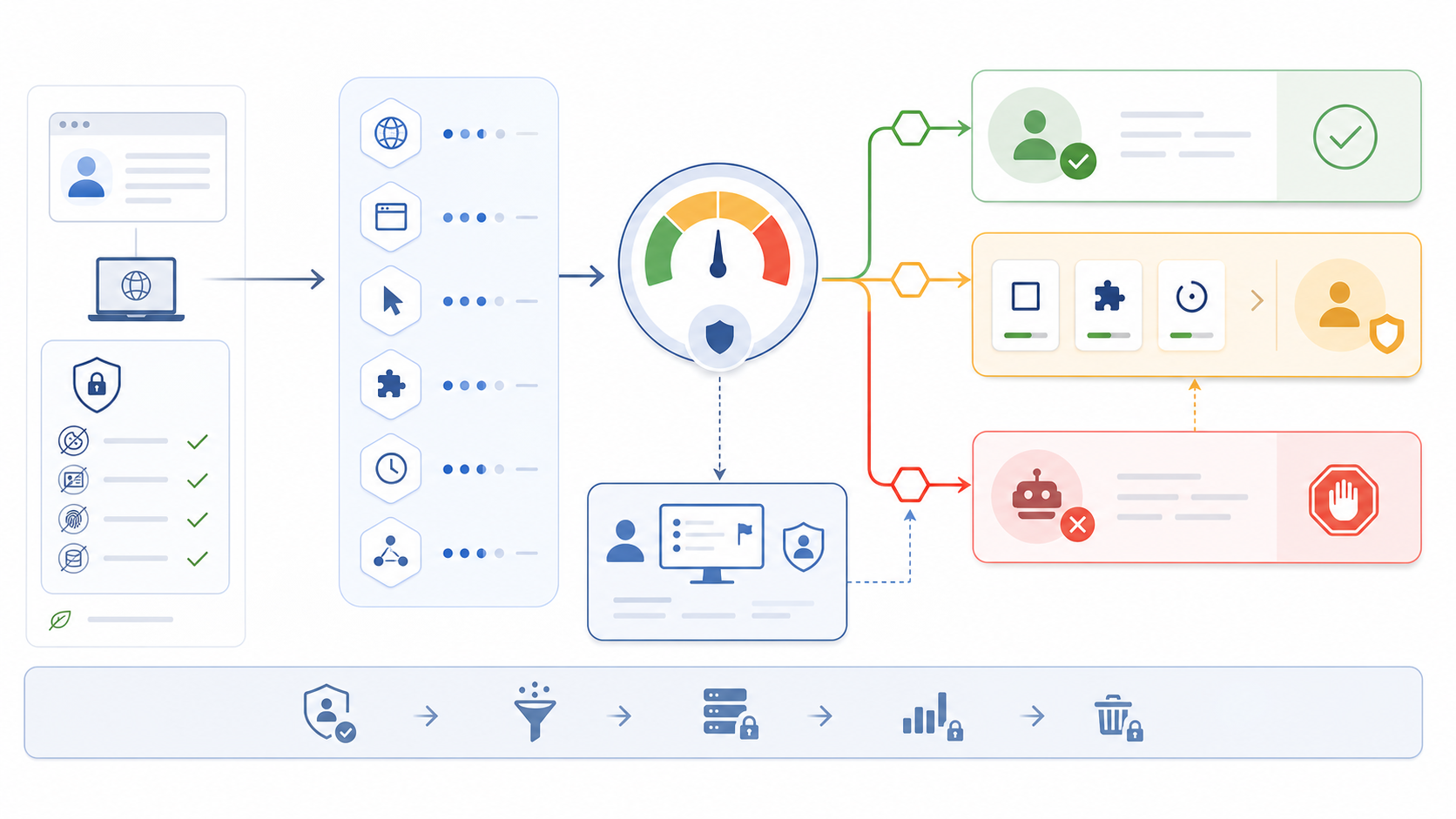
Use a staged response: allow low-risk sessions, request low-friction verification for uncertain sessions, add rate limits around high-impact actions, and reserve blocking for high-confidence evidence. Provide a recovery path for legitimate users. Device diversity, accessibility tools, privacy browsers, corporate gateways, and unstable mobile networks can all look unusual without being abusive.
Validation methodology
- Build a labeled test set that includes real device diversity and authorized automation.
- Measure false-positive and false-negative rates by browser, device, network, geography, and user cohort.
- Run controlled ablations to learn which signal families actually change decisions.
- Test missing, randomized, and contradictory attributes rather than only default browsers.
- Monitor model drift and appeal outcomes after deployment.
- Review whether every retained signal still has a documented purpose.
When testing browser automation, use isolated contexts and compare Puppeteer and Playwright behavior. When testing location-sensitive flows, select proxy infrastructure based on authorized test requirements rather than assuming IP rotation fixes fingerprint inconsistency.
Governance and common implementation mistakes
Assign an owner for the signal inventory, thresholds, retention policy, user appeals, and periodic review. A detection system becomes difficult to audit when teams add attributes without removing obsolete ones. Version the feature set and decision policy so an investigation can reproduce which signals influenced a historical outcome.
- Do not block on one high-entropy attribute without corroborating context.
- Do not treat privacy tools, accessibility software, or corporate gateways as automation by default.
- Do not train and evaluate on the same narrow device population.
- Do not assume a changing IP is malicious; diagnose session and location consistency.
- Do not use a passing Playwright stealth test as proof that every production defense behaves identically.
Review proxy infrastructure for authorized testing
Frequently Asked Questions
What is browser fingerprinting?
Browser fingerprinting combines multiple browser, device, network, storage, and behavioral attributes to distinguish or relate sessions with varying confidence.
How is fingerprinting used for bot detection?
A risk system combines fingerprint inconsistencies with rate, behavior, account, and network context. One unusual attribute should not be treated as conclusive proof.
Does changing an IP address change a browser fingerprint?
It changes a network signal, but browser, device, rendering, storage, and behavioral attributes remain separate.
Can Playwright or Selenium be detected?
Automated browsers can expose configuration, timing, state, and network inconsistencies. Detection depends on the environment and the signals a site uses.
How can teams reduce false positives?
Use diverse labeled data, progressive verification, cohort-level monitoring, appeal paths, and regular testing of privacy tools, accessibility software, and unstable networks.
Is browser fingerprinting legal?
Requirements vary by jurisdiction, purpose, notice, and data handling. Security teams should document purpose and retention and obtain appropriate privacy or legal review.