Developers and data engineers often face a stubborn problem: many applications simply do not support proxy configuration. Whether it is an old legacy email client, a specific game launcher, or a custom Python script, the inability to route traffic through a secure IP can hinder data collection and security testing.
Proxifier solves this by acting as a "wrapper" for your network traffic. It is an advanced proxy client that intercepts connections from applications that lack built-in proxy support and forces them through a SOCKS5 or HTTPS proxy. This capability allows for granular control over which applications go direct and which ones are tunneled, making it an essential tool for scrapping, multi-account management, and network testing.
What is Proxifier and why would you use it with SOCKS5 or HTTPS proxies?
Proxifier is a proxy client that forces apps on your system to send traffic through a proxy server, even if those apps have no proxy settings of their own. At its core, Proxifier intercepts TCP connections from Windows, macOS, or Android and transparently routes them through SOCKS5 or HTTPS proxy servers using customizable rules.
What problems does Proxifier solve on Windows, macOS and Android?
On Windows, Proxifier behaves like a smart overlay on top of the default proxy server stack rather than a replacement for it. Instead of toggling per-browser proxy options which can be tedious and prone to leaks, you define rules inside the proxy client and point your traffic at a specific endpoint. On macOS, Proxifier offers a similar rule engine, so you can send Mail, Terminal, or a desktop browser through a remote SOCKS5 path without touching system-wide network settings.
On Android, Proxifier acts as a lightweight alternative to a VPN. The mobile proxy client redirects selected apps through a configured proxy server while leaving other Android apps untouched. This is particularly useful for social media managers who need an Instagram or TikTok account to appear in a specific region without slowing down the rest of the phone’s internet connection.
Which proxy protocols does Proxifier actually support?
Under the hood, Proxifier supports multiple proxy protocols, including SOCKS4, SOCKS5, HTTPS proxy, and HTTP proxy. Each protocol serves a different purpose:
- SOCKS5: The most versatile standard. It supports authentication, IPv6, and UDP (essential for DNS queries and some games).
- HTTPS Proxy: Uses the HTTP CONNECT method to tunnel secure SSL traffic. This is excellent for web scraping and browser automation.
- HTTP: Generally not recommended for secure tunneling as it lacks the encryption capabilities of the other proxy protocols.
How should you prepare your Windows, macOS and Android devices before using Proxifier?
You prepare your devices by disabling older proxy settings and deciding which applications the proxy client will control to avoid "routing loops."
What built-in Windows proxy server settings should you reset first?
On Windows, start by checking the system proxy server settings in "Internet Options" or the modern "Network & Internet > Proxy" pane. If "Use a proxy server" or "Automatically detect settings" is enabled (often due to a corporate PAC file), these settings can fight with Proxifier. Ideally, applications should be configured for a "Direct" connection so the proxy client can manage routing exclusively.
How do macOS and Android network settings interact with a proxy client like Proxifier?
On macOS, the same principle applies. Reset per-Wi-Fi or Ethernet proxy checkboxes so Safari, Chrome, and your other tools talk directly to the internet. Then, let the macOS edition of Proxifier add a proxy server for you.
For Android, preparation is simpler but requires attention to VPN slots. Android only allows one active VPN service at a time. Since Proxifier utilizes the VPN slot to intercept traffic without root access, you must disconnect from other VPN apps. Once the networking is clean, the proxifier client can register itself as the primary route for your chosen SOCKS5 or HTTPS proxy servers.
How do you configure a SOCKS5 proxy server in Proxifier on Windows?
You configure a SOCKS5 proxy server in Proxifier by adding proxy details from your provider and binding them to applications through specific rules.
Which proxy server details do you need from your provider?
First, collect the SOCKS5 proxy server information from your provider. You will need the IP address (or hostname), port, username, and password. If you are using a provider like LycheeIP, you can easily generate these credentials from your dashboard, so you can choose an appropriate residential or datacenter IP ready for connection.
How do you add SOCKS5 to the Proxy Servers list and test it?
Open Proxifier on Windows and navigate to Profile → Proxy Servers. Click Add, then enter the proxy server address and port. Select SOCKS Version 5 as the protocol. If your proxy requires a login, enable authentication and supply your username and password.
Crucial Step: Use the built-in Check button. This attempts to connect to the internet (usually https://www.google.com/search?q=google.com) through the proxy. Only proceed if the test returns a green "Testing Passed" message. If it fails, check your firewall or verify the credentials.
How can you enable DNS over proxy for Windows rules?
To enable DNS over proxy on Windows, open Profile → Name Resolution (or Advanced → DNS in older versions). Ensure "Resolve hostnames through proxy" is selected. This forces the proxifier client to send DNS queries through the SOCKS5 tunnel rather than using your local ISP’s DNS. This is critical for preventing DNS leaks that could reveal your true location.
How do you set up HTTPS proxy servers and proxy chaining in Proxifier?
You set up HTTPS proxy servers and proxy chaining in Proxifier using the same dialog but with different protocol selections and chain definitions.
Which apps work best with HTTPS proxy in Proxifier?
For HTTPS proxy, add a new server entry and select "HTTPS" as the protocol. This configures the client to use the HTTP CONNECT method. This protocol works exceptionally well with browsers, messaging clients (like Slack or Discord), and fintech tools that rely heavily on TLS/SSL traffic.
Note: Some older HTTP proxies do not support SSL tunneling. Proxifier requires full CONNECT support to function correctly as an HTTPS proxy.
How can you chain multiple proxy protocols safely?
Proxy chaining involves routing traffic through two or more proxy servers in a sequence (e.g., PC → Proxy A → Proxy B → Internet). To configure this:
- Add all individual proxy servers to your list.
- Click Proxy Chains (or Create Chain).
- Drag and drop your servers into the chain list in the desired order.
You can mix protocols, such as entering a SOCKS5 gateway that forwards to a residential HTTPS proxy. This is often used by security teams to hop between regions or to separate routing paths, though it will increase latency.
How do you create Proxifier rules for browsers, scrapers and fintech tools?
You create Proxifier rules by matching applications, IP addresses, or ports and assigning specific actions (proxies) to each match.
Which rule types fit browsers, web-scraping tools and games?
Navigate to Profile → Proxification Rules. By default, you will see a "Localhost" rule (Keep this Direct!) and a "Default" rule.
- Browsers: Click Add. Name it "Browsers". In the "Applications" field, enter chrome.exe; firefox.exe. Set the Action to your desired SOCKS5 or HTTPS proxy.
- Scrapers: If you are running a Python script, you can target python.exe or strict port ranges.
- Games: Gamers often define rules by the game’s executable name to lower ping via a closer proxy server, while leaving voice chat apps on the "Direct" connection.
How can growth and risk teams separate traffic with different proxy protocols?
A growth team might manage five different social media accounts using five different browsers (e.g., Chrome, Firefox, Opera). By creating a unique rule for each browser executable (or duplicate browser processes) and assigning each to a different proxy server, you ensure that Account A never shares an IP with Account B.
Fintech teams often use "Target Host" rules. For example, a rule can be set so that any traffic going to *bank-api.com uses a high-security, static IP from LycheeIP, while all general Windows browsing traffic goes Direct.
How does Proxifier work on macOS and Android compared to Windows?
Proxifier works similarly on macOS and Android, but the user interface and operating system limitations differ from Windows.
Which limitations should macOS users know before adding a proxy server?
On macOS, the proxy client is robust but must contend with Apple's strict networking security. You add a proxy server via the "Proxies" tab and define rules in "Rules". However, macOS users must ensure that "Localhost" connections (127.0.0.1) are strictly set to Direct. If you accidentally proxy localhost traffic, you may break internal system communications.
How does the Android app act as a mobile proxy client?
The Android version of Proxifier is a standalone app. Unlike desktop versions that filter by executable name, the Android client filters by App. You select which installed apps (e.g., Instagram, Twitter) should be routed through the SOCKS5 tunnel. It runs as a background service. Because mobile networks fluctuate, using a reliable proxy server is even more critical here to prevent connection drops when switching between 4G and Wi-Fi.
Why do speed, DNS over proxy and protocol choice matter for security and compliance?
Speed, DNS over proxy, and protocol choice matter because they determine the user experience and whether DNS and application traffic follow the intended route.
Which proxy protocols are safer for fintech and risk operations?
For sensitive financial operations or fraud analysis, SOCKS5 is generally superior. It handles data packets at a lower level than HTTPS proxy and does not rewrite packet headers, ensuring data integrity. When coupled with a provider like LycheeIP that emphasizes clean, ethical infrastructure, SOCKS5 offers the transparency developers need for logging and compliance.
How does DNS over proxy reduce leaks and false confidence?
If your Windows machine resolves hostnames locally (using your ISP's DNS) but tunnels the data through a proxy, your ISP still knows exactly which websites you are visiting. This is a "DNS leak." Enabling DNS over proxy ensures the DNS lookup request travels through the encrypted proxy server tunnel. The destination site sees the proxy's IP, and your ISP sees only encrypted traffic to the proxy server.
How can you troubleshoot common SOCKS5 and HTTPS issues in Proxifier?
You troubleshoot SOCKS5 and HTTPS proxy issues in Proxifier by checking connectivity, rules, and log outputs in a systematic order.
What should you check when Proxifier is not running or rules don’t fire?
If traffic ignores your proxy:
- Check the Log: The output window shows live traffic. If you don't see your app name appearing, Proxifier isn't hooking into it.
- Check Rule Priority: Rules are processed from top to bottom. If you have a broad "Direct" rule above your specific "Chrome" rule, the traffic will go Direct. Move specific rules to the top.
- Restart the App: Sometimes, the proxy client needs to be running before you open the target application.
Which settings help when SOCKS5 or HTTPS proxies feel slow?
If the connection is active but sluggish:
- Protocol Mismatch: Ensure you aren't trying to push UDP traffic (like video streams or QUIC) through an HTTPS proxy that only supports TCP.
- Chain Length: Proxy chaining adds latency with every hop. Reduce the chain to a single high-quality node.
- Resolution: Verify DNS over proxy settings. If the remote proxy has a slow DNS resolver, the initial connection to any website will feel laggy.
Comparison: Proxy Protocols in Proxifier
| Feature | SOCKS5 | HTTPS Proxy | HTTP (Plain) |
| Security | High (Supports Auth & No header rewrite) | High (SSL Tunneling) | Low (Plaintext) |
| Speed | Excellent (Lower overhead) | Good | Good |
| DNS over Proxy | Yes (Native support) | Yes (via Connect) | No |
| UDP Support | Yes (Great for games/streaming) | No (TCP only) | No |
| Best For | General use, Scrapers, Games | Web Browsers, TLS Tools | Debugging only |
Proxifier SOCKS5 setup: the shortest reliable path
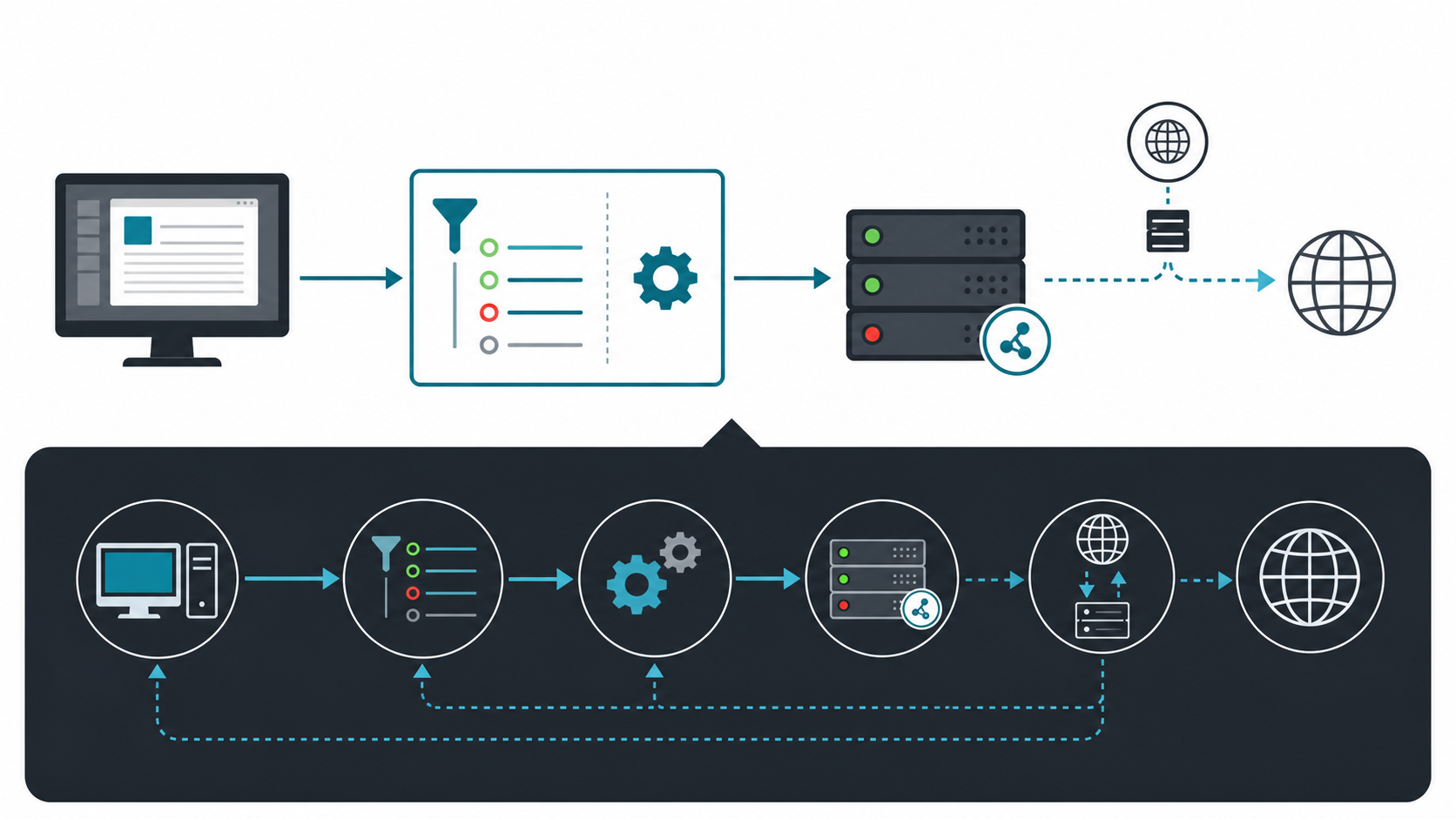
For the query proxifier socks5 setup, the reliable sequence is simple: add the endpoint under Proxy Servers, run Proxifier's connection check, enable proxy-side name resolution when the application requires it, and create a rule above the Default rule for the target executable. Keep Default set to Direct until the scoped rule works. This prevents update services, local tools, and the proxy process itself from being routed into an accidental loop.
A SOCKS5 endpoint follows the behavior defined by IETF RFC 1928, but the client still controls which application traffic enters the tunnel. Proxifier's own configuration documentation should be the reference for version-specific menu names. If the workload needs stable identity rather than broad device tunneling, compare private SOCKS5 proxy selection, static proxy setup, and the session requirements of residential proxy workflows.
Rule order, DNS behavior, and loop prevention
Proxifier evaluates rules from top to bottom. Put narrow executable and destination rules above broad catch-all rules. Add explicit Direct rules for localhost, private subnets, and the proxy server hostname or IP. A rule that sends the proxy client's own connection back through itself creates an infinite loop; a Direct exception breaks that cycle.
DNS behavior is a separate decision. Resolving names locally can expose destination lookups or produce region-mismatched answers. Resolving through the proxy can improve route consistency, but only when the proxy protocol and application path support it. Test with a hostname and an IP address separately. If the IP works and the hostname fails, investigate DNS before changing proxy credentials.
A deterministic Proxifier troubleshooting sequence
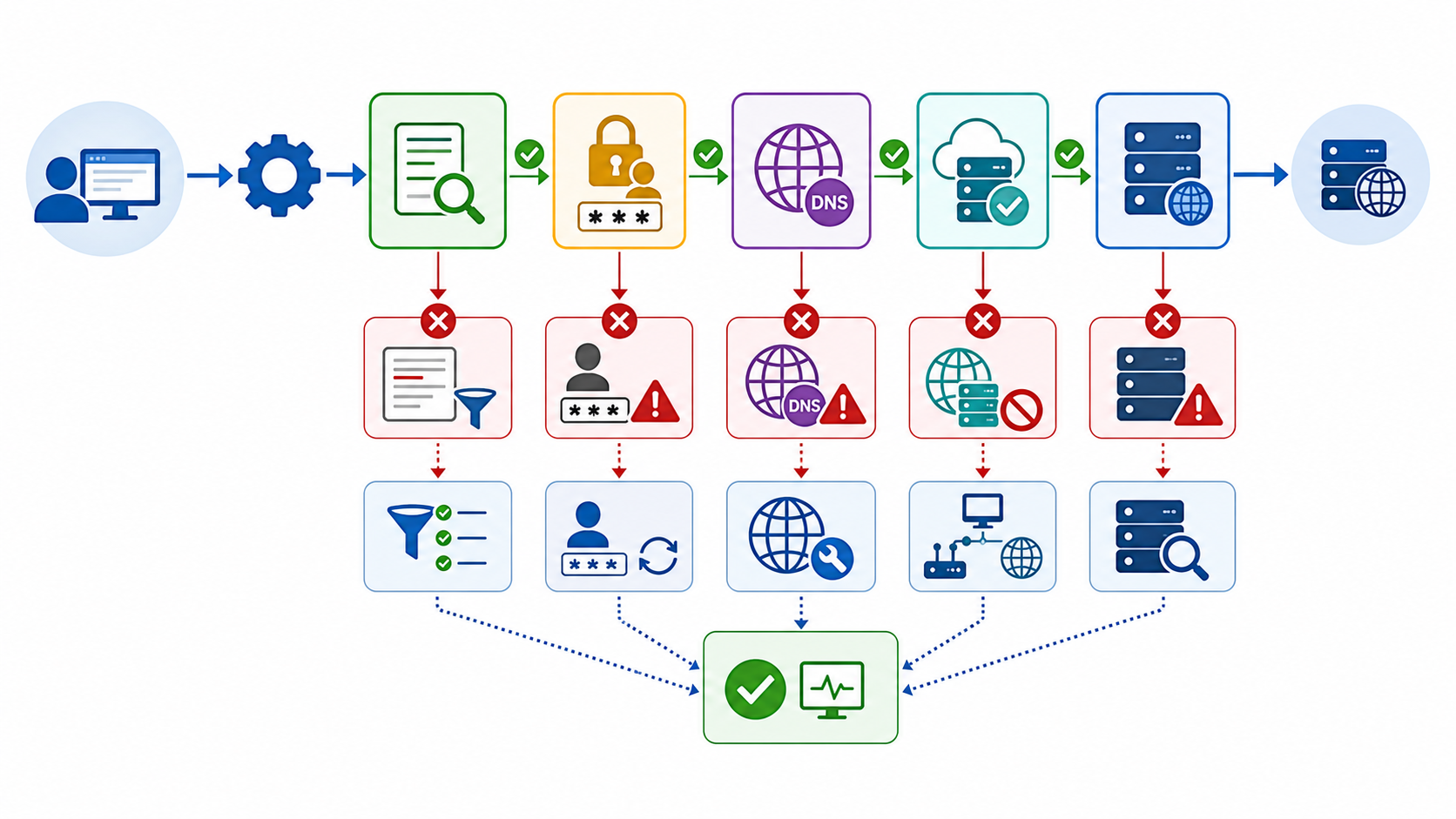
- Confirm the endpoint, port, protocol, and authentication method outside the target application where possible.
- Run Proxifier's proxy check and record whether TCP connection, authentication, or name resolution fails.
- Confirm the target process name in the Proxifier log and verify that the intended rule, not Default, handled it.
- Test a direct IP destination, then a hostname, to isolate transport from DNS.
- Remove chains and use one proxy until the baseline works.
- Check firewall, endpoint security, and local-network bypass rules before changing providers.
On mobile devices, Proxifier-style app routing differs from the system proxy model described in the Android proxy setup guide. For browser automation, preserve one proxy session with one browser context and review the Playwright detection workflow before adding rotation.
If a destination reports the wrong region after the route works, use the region-mismatch diagnosis to separate proxy location, DNS answers, account state, and application geolocation.
Review LycheeIP proxy options for application routing
Frequently Asked Questions
How do I configure SOCKS5 in Proxifier?
Add the proxy under Proxy Servers, choose SOCKS Version 5, enter the host, port, and authentication details, run the built-in check, then create a scoped rule for the target application.
Should Proxifier resolve DNS through the proxy?
Use proxy-side DNS when destination lookups must follow the proxy route and your endpoint supports it. Test IP and hostname destinations separately so DNS failures are not mistaken for authentication failures.
Why does Proxifier show a connection loop?
The proxy process or proxy server address is probably being routed through the same proxy rule. Add a Direct exception for the proxy endpoint and local subnets.
Why does a Proxifier rule not match my application?
Check the executable recorded in the Proxifier log, move the specific rule above broader rules, and confirm the rule is enabled for the correct profile.
Is SOCKS5 or HTTPS better in Proxifier?
SOCKS5 is flexible for application traffic and can support proxy-side DNS. HTTPS proxies are useful for HTTP-oriented environments. Choose based on application protocol, network policy, and endpoint support.
Can Proxifier replace a VPN?
Not completely. Proxifier routes selected application connections, while a VPN normally changes the device-level network path and encryption scope. The right tool depends on the traffic and trust boundary.