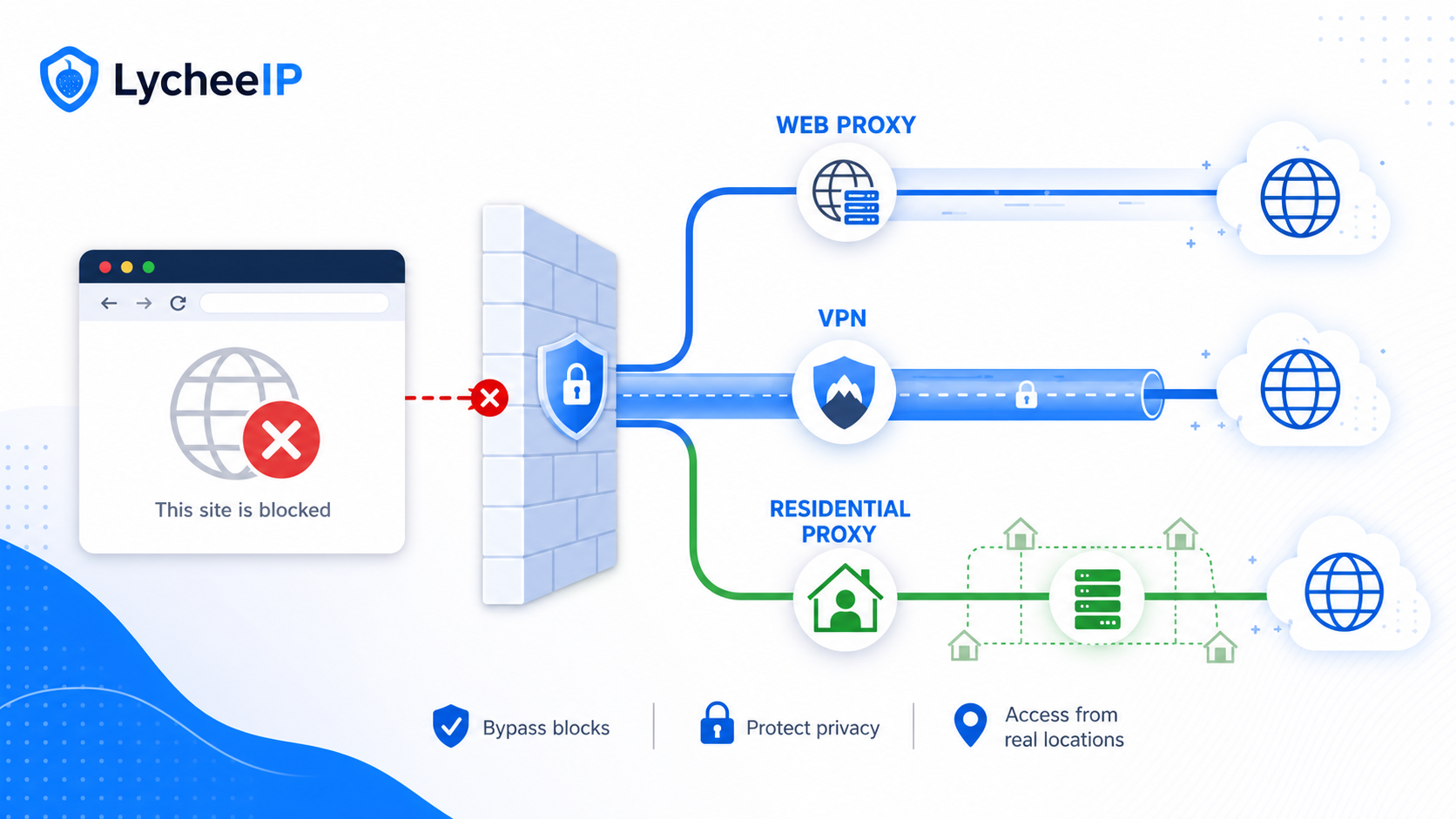
The unblocker is not one product. It is a search term people use for web proxies, VPNs, Smart DNS tools, browser extensions, and managed proxy infrastructure that can help with blocked-site access in different ways.
The important question is not simply “which unblocker works?” It is “what am I trying to unblock, how much privacy do I need, and how much account or device risk am I accepting?” Readers searching for the unblocker, website unblocker, or browser unblocker are often comparing tools that solve different problems. This guide keeps the original safe-use intent, but adds the missing decision depth so you can choose the smallest tool that solves the job without overpromising security.
Quick Answer: Use the Smallest Tool That Matches the Job
Use a website unblocker only when a single blocked page is the problem and you do not need account security, whole-device routing, or stable automation sessions.
| Tool | Best fit | Where it fails |
|---|---|---|
| Website unblocker / web proxy | Opening one blocked page, testing a region block, or reading public content from a browser without changing the whole device route. | Weak privacy, poor account continuity, limited support for logins, uploads, downloads, or apps outside the browser. |
| VPN | Whole-device routing, Wi-Fi privacy, or accessing blocked content from apps and browsers together. | A VPN is not ideal when you need many rotating sessions or isolated IPs for multiple workflows. |
| Smart DNS | Streaming or simple geo-unlock situations where you only need DNS-level rerouting and not a full encrypted tunnel. | Does not behave like a full browser proxy or VPN and usually does not solve anti-bot or session reputation problems. |
| Managed proxy infrastructure | Testing, automation, multi-account isolation, browser automation, and region-specific public-data work. | More setup overhead than a casual unblocker and should be chosen only when the workload genuinely needs session control or IP planning. |
What People Mean When They Search for “The Unblocker”
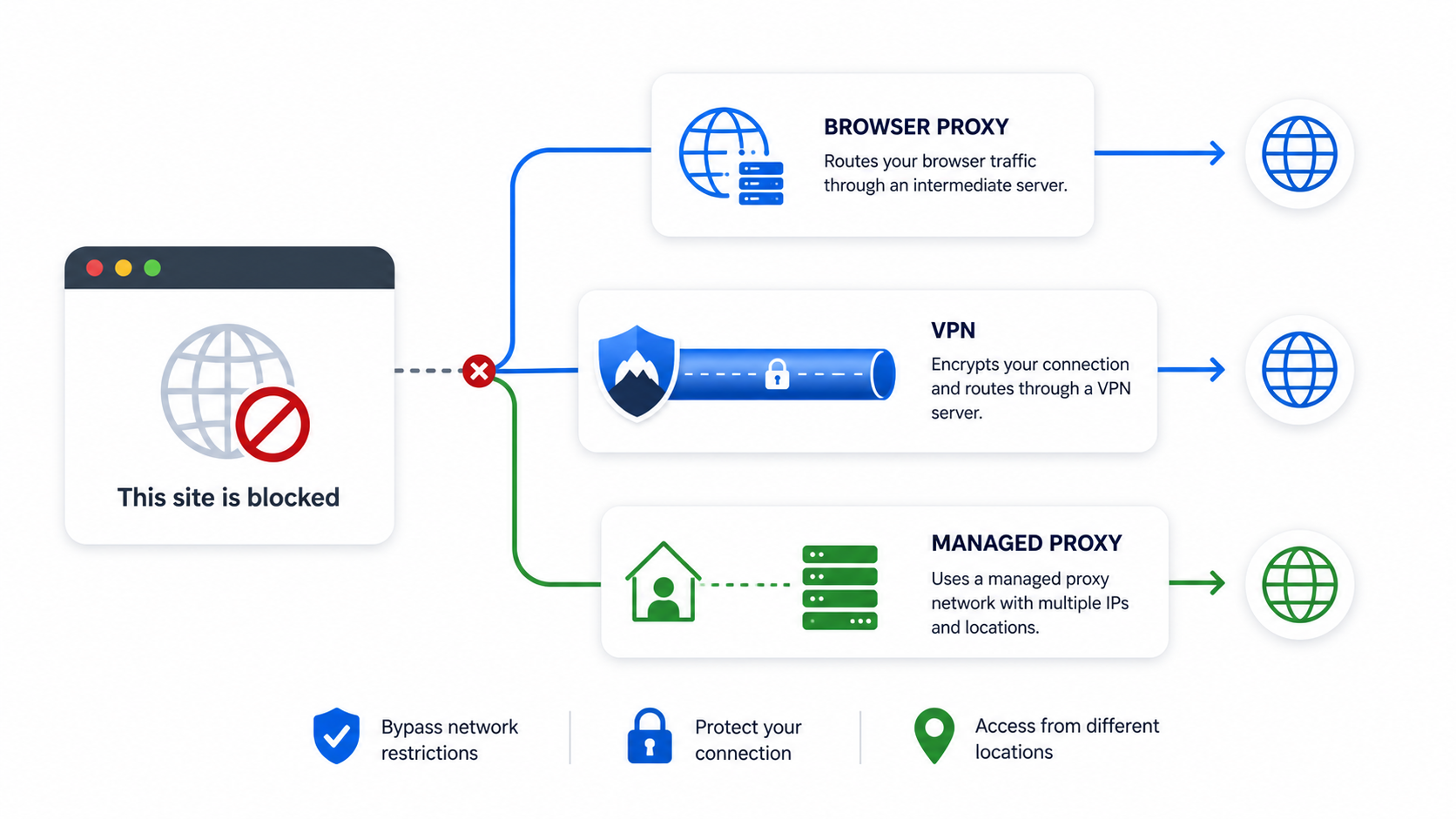
Searchers often use the same phrase for four separate categories: browser proxies, VPN services, Smart DNS tools, and technical proxy infrastructure. That is why result pages can feel noisy. A browser proxy changes the path for one browser session. A VPN changes the route for broader device traffic. Smart DNS changes how certain lookups resolve. Managed proxy infrastructure is closer to a developer or operations toolset, especially when the work requires multiple IP types or explicit session management.
If you only need a quick explanation of residential proxy behavior, start with the residential proxy guide. If you already know you need IP rotation, session persistence, or infrastructure-level control, compare rotating residential proxies, static residential proxies, and datacenter proxies rather than treating every tool as a generic unblocker.
When a browser unblocker is enough
A website unblocker is enough when the task is narrow: reading one public page, testing whether a region block is causing an error, or confirming that a local network policy is the problem. In that case, a full-device VPN may be unnecessary. The tradeoff is that browser unblockers usually have weaker trust guarantees, weaker download support, and weaker compatibility with accounts that expect long-lived, consistent sessions.
When a VPN is the safer choice
A VPN is the better choice when the entire device needs a private route, especially on hotel, airport, campus, or shared Wi-Fi. The Electronic Frontier Foundation overview on choosing a VPN is useful here because it frames the real trust question: the provider, logging posture, and device coverage matter more than marketing slogans. A VPN can also be more predictable than a browser unblocker when the same app and browser session must use one encrypted route.
How to Choose the Right Tool Without Guessing
Start with three questions. First, is the problem browser-only or device-wide? Second, is the destination public reading, account login, or automation? Third, do you need one stable path or many isolated sessions? Those three questions usually settle the decision faster than a long feature checklist.
- Choose a website unblocker when one browser tab or one public page is the problem and you do not need persistent account state.
- Choose a VPN when you need full-device routing for browsers, apps, and background traffic together.
- Choose managed proxy infrastructure when you need multiple regions, sticky sessions, isolated account routes, or automation-safe debugging.
- Choose Smart DNS only when media or DNS-level redirection is the real use case and you do not need browser or account isolation.
For device-specific workflows, review how to use a proxy on Android. For region mismatch problems, use geo-restriction troubleshooting. For Chrome-specific routing choices, the Chrome proxy extension guide is a better match than a generic unblocker article.
Why Website Unblockers Fail on Chrome or Logged-In Sessions
Many unblocker complaints come from a mismatch between the tool and the workload rather than from one vendor bug. Browser-only tools can fail when the site expects the same IP and browser state across login, challenge, redirect, and callback steps. They also fail when cookies, fingerprint signals, downloads, or cross-domain requests do not survive the route change cleanly.
Chrome failures are often policy or session failures
A browser unblocker can appear to work for one page and then fail at sign-in, file upload, or checkout because the browser session stops being coherent. If the site sees an IP change between steps, or if a proxy path strips or modifies headers, the session can break. That is also why “works in incognito but not in my account” and “works on one page but not after login” are common complaints.
Free website unblockers fail for reasons that have nothing to do with speed
Free tools often fail because they overload shared IPs, inject ads or scripts, provide weak HTTPS handling, or break under challenge pages. The MDN guide to proxy servers and tunneling is useful because it grounds the basic networking model: once you understand how the proxy sits between the browser and the target, it becomes easier to spot why a low-trust relay can create account and privacy problems.
Safety Checklist Before You Trust an Unblocker
- Do not use a casual browser unblocker for banking, payroll, or any login that would be costly to expose.
- Assume free tools may inspect, transform, or log traffic unless you have a strong reason to trust them.
- Test with public pages first before attempting sign-in or multi-step flows.
- Prefer a VPN when the goal is device-wide protection on untrusted Wi-Fi rather than one-page access.
- Prefer managed proxies when the goal is controlled session routing, debugging, or repeated technical workflows.
A good operational rule is simple: the more valuable the session, the less appropriate a random browser unblocker becomes. Account continuity, MFA, and saved credentials all increase the cost of using a low-trust route. That does not mean every website unblocker is malicious; it means readers should treat “unblock” and “secure” as separate requirements.
Legal, Workplace, and Policy Limits
An unblocker can solve a routing problem without solving a policy problem. If a school, employer, or network administrator explicitly restricts access, using a browser unblocker may still violate policy even when it technically works. That matters because many readers search for unblockers from controlled environments and assume the tool choice alone answers the bigger compliance question.
A practical standard is to separate personal privacy from policy circumvention. Privacy tools are legitimate in many contexts, but work, school, or platform rules can still limit what you should do with them. When the workflow is business-critical, write down the use case, approved destinations, and escalation path before you choose infrastructure.
When LycheeIP Fits Better Than a Casual Unblocker
LycheeIP is relevant when the problem is not “open one blocked page,” but “build a stable access workflow.” That usually means multiple sessions, region testing, repeatable browser automation, debugging anti-bot mismatches, or choosing the right IP type for a workload. In those cases, the right comparison is not “free unblocker versus paid unblocker.” It is whether you need browser-only access, a whole-device tunnel, or proxy infrastructure with explicit control over session behavior.
Readers deciding between a quick web proxy and more durable routing can compare the operational tradeoffs in the rotating proxies guide and the best residential proxies guide. The goal is not to force a bigger tool into a smaller problem. The goal is to avoid pretending a casual unblocker can do the work of a session-aware network stack.
Explore LycheeIP Proxy Infrastructure
How to Diagnose Why a Site Is Blocked Before You Change Tools
A lot of bad unblocker choices come from skipping diagnosis. If one page fails only on school Wi-Fi but opens on mobile data, the network policy is part of the story. If the page opens publicly but breaks after login, session continuity is the story. If the same site fails in the browser and in the app, you are probably past the limit of a browser-only unblocker. Those distinctions matter because they tell you whether you need a page-level relay, a whole-device tunnel, or a session-aware proxy workflow.
- Test the public page without logging in so you can separate access failure from account failure.
- Check whether the site breaks only in one browser or across apps and devices.
- Compare the result on a different network if you can do so safely.
- Only then decide whether the fix is browser-only, device-wide, or infrastructure-level.
Decision Matrix by Scenario
| Scenario | Likely best fit | Why |
|---|---|---|
| One blocked article or public page | Website unblocker | The need is narrow and temporary, so whole-device routing may be unnecessary. |
| Shared Wi-Fi, travel, or device-wide privacy | VPN | The whole device needs an encrypted route, not just one browser tab. |
| Logged-in browser automation or repeated region testing | Managed proxies | The workflow needs session control and clearer IP planning. |
| Streaming or simple DNS-based geo routing | Smart DNS | The bottleneck is often DNS or media-region resolution rather than full browser state. |
Mobile, Shared Devices, and Account Risk
Mobile and shared-device use cases deserve separate attention because they magnify the downside of the wrong tool. A user who only needs to read a blocked public page on a desktop browser can tolerate more limitation than a user who plans to log into a personal account from a phone, a campus network, or a borrowed device. On mobile, app traffic, push flows, and browser traffic often need to agree. That makes a whole-device VPN more predictable than a browser unblocker in many real situations.
Account risk also changes the answer. The more valuable the session, the less attractive a casual unblocker becomes. If the workflow touches identity, billing, saved credentials, or workplace systems, the smallest “it loads the page” win is not enough. The safer comparison is the one that includes session trust, device coverage, and whether the route can stay stable long enough to finish the task without tripping account defenses.
Request Flow: Browser Unblocker, VPN, and Managed Proxy
The tools differ most clearly when you follow one request from the user to the destination. A browser unblocker receives a URL or browser request, fetches the page through its own relay, and returns the result inside a browser tab or extension. A VPN creates a network interface on the device and sends a broader set of traffic through an encrypted tunnel to the VPN gateway. A managed proxy sits at the application or browser-automation layer: the client explicitly sends selected requests through a proxy endpoint and can control location, authentication, rotation, and session persistence.
That request-flow difference determines what each tool can protect and what it can break. A browser unblocker may not cover DNS lookups, desktop apps, background services, or cross-domain login callbacks. A VPN covers more device traffic, but typically gives the device one shared exit identity. A managed proxy can isolate individual browser profiles or application jobs, but it does not automatically encrypt every connection on the device or protect traffic that was not configured to use it.
Access restrictions are not all the same
A local network block, a country-level route restriction, a destination-site geo rule, and an account-level security challenge can all produce a page that appears blocked. Changing the route can help with the first three, but it may worsen the fourth if the account suddenly appears from a different location or IP type. Diagnose whether the block is imposed by the local network, the destination, or the account system before switching tools.
User-side access versus developer-side access
A person opening one public page needs a different control surface from a developer running hundreds of authorized browser tests. User-side tools emphasize a simple interface and broad device compatibility. Developer-side proxy infrastructure emphasizes repeatable credentials, explicit routing, session IDs, concurrency controls, and logs that make failures diagnosable. Treating these as interchangeable produces both security mistakes and unreliable automation.
Failure Cases and a Practical Escalation Sequence
When an unblocker fails, change one layer at a time. First confirm that the destination is actually online from another network. Next test a public, non-authenticated page to separate basic reachability from account security. Then clear only the site-specific state or use a clean browser profile, keeping the same route. If the public page works but login fails, the problem is likely session continuity, cookies, challenge state, or IP reputation rather than simple network blocking.
Escalate from a browser-only tool to a VPN only when the whole device or another application needs the route. Escalate from a single-route VPN to managed proxies only when the workload needs multiple isolated sessions, explicit regions, or repeatable automation. This sequence avoids adding infrastructure before the failure is understood and makes it easier to identify which change fixed or broke the workflow.
Frequently Asked Questions
Is the unblocker the same as a VPN?
No. A website unblocker usually changes one browser path, while a VPN routes broader device traffic through an encrypted tunnel.
Are free website unblockers safe?
Sometimes they are merely limited; sometimes they are risky. Treat them as low-trust until you have a clear reason to trust the operator and the traffic path.
Why does my unblocker fail only after login?
Logged-in flows depend on stable cookies, coherent browser state, and consistent routing. A browser-only relay can break that continuity.
When should I use a proxy instead of a VPN?
Use a proxy workflow when you need session isolation, multiple IP types, region testing, or browser automation rather than one whole-device tunnel.
Can a Smart DNS tool replace a website unblocker?
Only for narrow media or DNS-routing use cases. Smart DNS does not behave like a full browser proxy or account-routing tool.
What is the safest first test?
Test a public page first, avoid sensitive logins, and verify whether the problem is browser-only or device-wide before escalating to a larger tool.
Why does the same site work on mobile data but fail on Wi-Fi?
That usually means the local network policy or route is part of the problem. The tool decision should follow that diagnosis rather than guess at a brand solution.
Should I use an unblocker for work or school accounts?
Only after you understand the policy and risk. A technical route around a restriction does not remove policy or account consequences.