
Introduction
Stop paying $20/month—these free AI browsers do the same thing. As AI-powered browser tools flood the market with subscription fees ranging from $15 to $30 monthly, budget-conscious professionals and students are left wondering if the premium features justify the cost. The reality is that several legitimate free alternatives offer comparable automation, data extraction, and productivity features without draining your wallet. This article examines which free AI browser tools actually deliver value in 2026 and where they fall short compared to their paid counterparts.
Comprehensive Review of Tabbit and Other Free AI Browser Options
The free AI browser landscape has matured significantly, with several tools now offering production-ready features that were premium-only just two years ago.
Tabbit: The Open-Source Automation Leader
Tabbit stands out as the most feature-complete free AI browser automation tool available in 2026. Built on Chromium, it provides:
Tabbit works well for straightforward automation tasks like collecting product pricing data, monitoring competitor websites, or automating research workflows. Its visual builder lets users create automation sequences by clicking through actions rather than writing code.
- Visual workflow automation with no-code interface
- Basic web scraping capabilities for public data collection
- Form filling and repetitive task automation
- Session management for multiple accounts
- Export options in JSON and CSV formats
- Browser extension support for enhanced functionality
The tool handles common use cases effectively
- E-commerce price monitoring across multiple sites
- Lead generation from public business directories
- Content aggregation from news sources or blogs
- Social media post scheduling and monitoring
- SERP result extraction for keyword research
Other Notable Free Options
Browser Autopilot offers AI-powered command execution through natural language. Users can type instructions like "find all email addresses on this page" and the tool attempts to parse and execute the request. While impressive for simple tasks, complex multi-step workflows often require refinement.
AutoTab focuses specifically on browser-based data extraction. It provides point-and-click selectors for targeting page elements and can handle pagination automatically. The free tier limits users to 100 automated runs per month, which suits occasional users but constrains regular workflows.
FlowBrowser combines tab management with lightweight automation. It excels at organizing research sessions and capturing data snippets but lacks the robust scraping capabilities of dedicated tools.
What Free Tools Handle Well
Free AI browser tools in 2026 competently handle:
These tools work best when websites have consistent structures, data volumes remain manageable, and users can tolerate occasional failures or manual intervention.
- Single-session automation for testing and prototyping
- Public data collection from websites with simple structures
- Personal productivity tasks like form filling and link checking
- Educational projects and learning automation concepts
- Low-volume monitoring workflows (checking a few sites daily)
- Basic session management for account workflows
Feature Comparison Between Free and Paid AI Browser Tools
Understanding the practical differences between free and paid options helps users make informed decisions about when to upgrade.
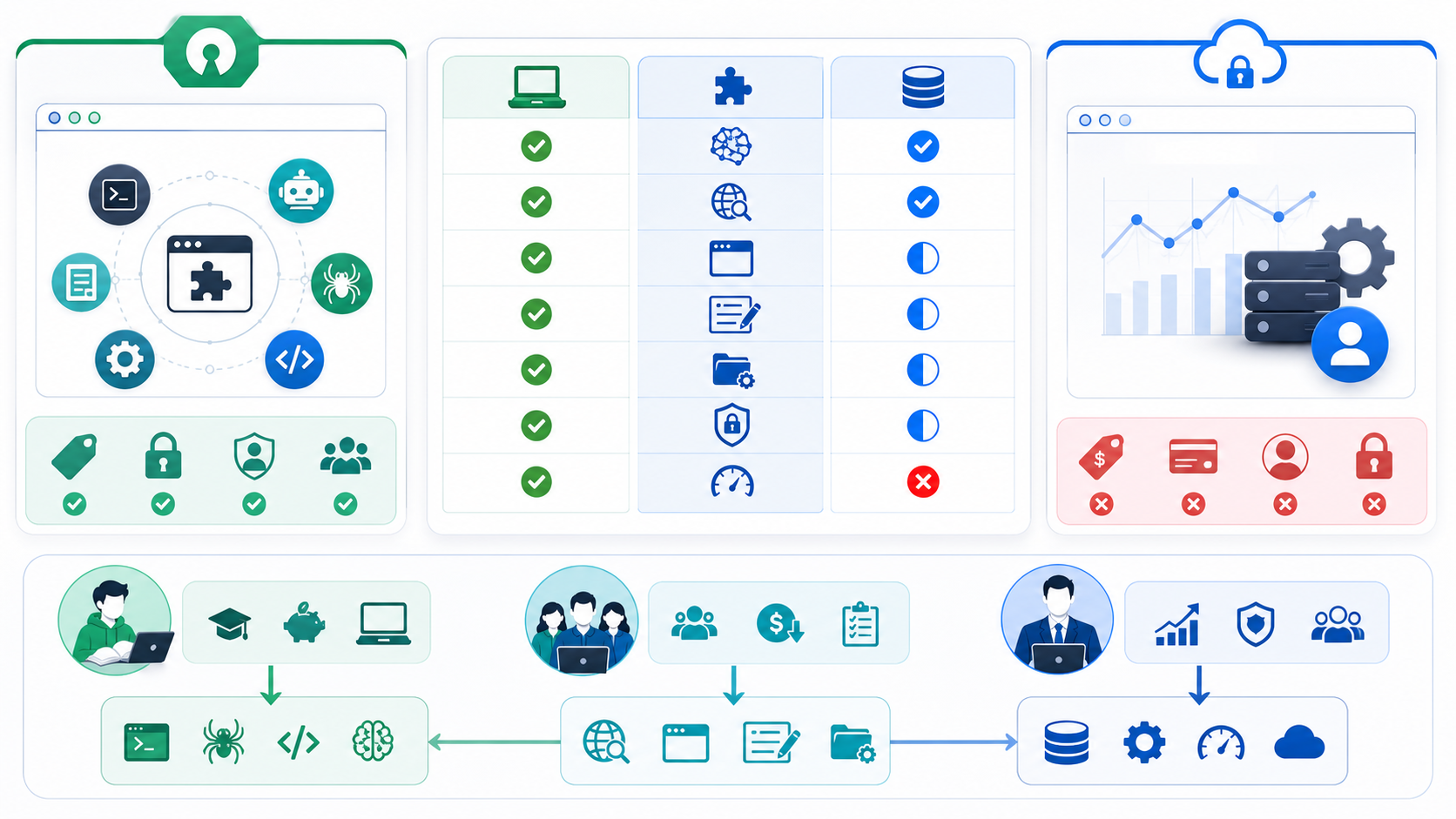
Core Functionality Comparison
Automation Complexity
Free tools typically support linear workflows with 5-15 steps. Paid tools like Bardeen, Browse AI, and Axiom offer advanced logic including:
- Conditional branching based on page content
- Loop iterations with dynamic parameters
- Error handling and automatic retry logic
- Variable management across workflow steps
- Integration with external APIs and databases
Execution Limits
Free versions impose restrictions that affect production use:
Paid tiers remove or significantly expand these limits, enabling continuous monitoring and large-scale data collection.
- Run count limits (50-200 executions monthly)
- Execution time caps (5-10 minute maximums per run)
- Concurrent session limits (typically 1-2 simultaneous tasks)
- Data export volume caps (1,000-5,000 records monthly)
Data Extraction Capabilities
Free tools handle basic extraction from structured HTML but struggle with:
Paid tools often include headless browser capabilities, JavaScript rendering, and sophisticated element detection that handles modern web architectures.
- JavaScript-heavy single-page applications
- Dynamically loaded content requiring scroll triggers
- Sites with aggressive anti-bot measures
- Complex nested data structures
- Real-time data requiring precise timing
Infrastructure and Reliability
Cloud Execution
Most free AI browser tools require local execution, meaning your computer must remain on and connected. Paid services typically offer cloud-based execution that runs independently, critical for:
- 24/7 monitoring workflows
- Scheduled tasks during off-hours
- Multi-region testing and data collection
- Reducing local resource consumption
IP Rotation and Anti-Detection
This represents one of the largest gaps between free and paid tools. Free options typically:
Paid services often include basic proxy pools or partner with proxy providers, though users conducting serious web scraping or geo-specific testing still need dedicated proxy infrastructure.
- Use your residential IP address for all requests
- Lack built-in proxy support or IP rotation
- Provide minimal anti-detection measures
- Offer no geographic targeting capabilities
Support and Maintenance
Documentation and Community
Open-source free tools often have active communities and decent documentation but lack:
Paid tools provide customer support, onboarding assistance, and maintain compatibility as websites change their structures.
- Guaranteed response times for issues
- Direct support channels
- Regular feature updates on a predictable schedule
- Training resources and tutorials
Workflow Templates
Paid platforms curate template libraries for common use cases (LinkedIn scraping, Google Maps extraction, Amazon price monitoring). Free tools require building workflows from scratch or relying on community contributions that may be outdated.
Hidden Limitations and Trade-Offs of Free AI Automation Tools
While free AI browser tools deliver real value, several limitations become apparent during extended use.
Performance Constraints
Speed and Efficiency
Free tools often lack optimization for speed. Tasks that could execute in seconds on paid platforms take minutes on free alternatives due to:
For occasional use, this matters little. For daily workflows processing hundreds of pages, the time cost accumulates significantly.
- Inefficient element selection methods
- Lack of parallel processing
- No connection pooling or request batching
- Suboptimal wait strategies between actions
Reliability and Error Rates
Free automation tools experience higher failure rates because:
Expect success rates of 70-85% for free tools versus 90-98% for premium alternatives on the same tasks.
- Fewer resources dedicated to handling edge cases
- Limited investment in anti-detection capabilities
- Basic error recovery mechanisms
- Inconsistent handling of site structure changes
Data Quality Issues
Extraction Accuracy
Free AI selectors sometimes misidentify target elements, leading to:
Paid tools invest in machine learning models that adapt to site variations and validate extracted data against expected schemas.
- Incomplete data capture (missing fields)
- Incorrect data association (pairing wrong values)
- Duplicate records from pagination issues
- Format inconsistencies requiring manual cleanup
Scalability Limits
Free tools hit walls when scaling
- Memory issues processing large result sets
- Timeout errors on complex multi-page workflows
- Rate limiting from target sites due to predictable patterns
- Storage limits for captured data
Compliance and Risk Considerations
Terms of Service Adherence
Whether using free or paid tools, users must respect website terms of service and robots.txt directives. However, free tools often lack:
Responsible automation requires configuring delays, respecting access restrictions, and using tools for legitimate purposes like public data research, price monitoring, and content aggregation rather than circumventing access controls.
Data Privacy
Free browser tools running locally provide better privacy than cloud-based alternatives since data never leaves your device. However:
- Built-in rate limiting to avoid overloading targets
- Respect for crawl-delay directives
- User-agent customization for identification
- Logs documenting what was accessed when
- Open-source projects may lack security audits
- Extensions request broad browser permissions
- Update mechanisms could introduce vulnerabilities
- No liability coverage if data is compromised
When Free Tools Make Sense
Free AI browser automation tools work well for
- Learning and experimentation: Testing automation concepts before committing to paid tools
- Personal projects: One-off research tasks or hobby projects with no time pressure
- Low-volume monitoring: Checking 3-5 sites daily for changes
- Prototyping workflows: Validating automation logic before production deployment
- Budget constraints: Students and early-stage professionals exploring AI productivity
When to Consider Paid Alternatives
Upgrade to paid tools when
- Running daily automated workflows critical to business operations
- Collecting data from sites with sophisticated anti-bot measures
- Requiring guaranteed execution reliability and support
- Processing volumes exceeding free tier limits
- Needing cloud execution for 24/7 availability
- Scaling to multi-region or multi-account workflows
How Proxy Infrastructure Enhances AI Browser Automation
Regardless of whether you use free or paid AI browser tools, proxy infrastructure becomes essential for certain use cases.
Explore LycheeIP Proxy Infrastructure
Why Automation Needs Proxies
Automated browser tools make predictable, repetitive requests that websites easily identify. When collecting public data at scale, testing geo-targeted content, or managing multiple accounts, proxies provide:
IP Rotation: Distribute requests across multiple IP addresses to avoid rate limiting and blocks. rotating residential proxies appear as regular users from different locations.
Geographic Testing: Verify how your website or ads appear in different countries. static residential proxies from specific cities enable accurate localization testing.
Session Isolation: Maintain separate sessions for different accounts or workflows. Each proxy can represent a distinct user identity for legitimate multi-account management.
Scaling Capacity: Process higher volumes without triggering anti-bot systems. Datacenter proxies offer speed for less sensitive workflows while residential proxies provide authenticity for stricter targets.
Integrating Proxies with Free AI Tools
Most free browser automation tools support proxy configuration through:
For teams evaluating proxy infrastructure for scraping, automation, public data workflows, or geo-testing alongside free AI browser tools, providers like LycheeIP offer proxy solutions that integrate with standard browser automation setups. Proper proxy rotation combined with respectful rate limiting enables responsible large-scale data collection while maintaining target site performance.
- Browser launch parameters specifying proxy servers
- System-level proxy settings the browser inherits
- Extension-based proxy management
- SOCKS5 or HTTP proxy protocols
Responsible Automation Practices
When combining AI browser tools with proxy infrastructure:
These practices protect both your automation infrastructure and the websites you interact with.
- Implement reasonable delays between requests (2-5 seconds minimum)
- Review and respect robots.txt directives on target sites
- Use appropriate user agents identifying your bot
- Monitor your request patterns to avoid overloading sites
- Focus on legitimate use cases: public data research, price monitoring, SEO analysis, ad verification, and competitive intelligence
- Avoid circumventing access controls or paywalls
Common Mistakes When Choosing Free AI Browser Tools
Avoid these pitfalls when evaluating free automation options:
Overlooking Use Case Fit
Many users choose tools based on features lists rather than specific workflow requirements. Define exactly what you need:
Match capabilities to requirements rather than selecting the tool with the most features.
- How many sites will you monitor?
- What data fields do you need to extract?
- How often must tasks run?
- What volume of data will you process monthly?
- Do you need cloud execution or is local sufficient?
Ignoring Maintenance Overhead
Free tools require more hands-on management
Calculate whether the time spent maintaining free tools exceeds the cost of paid alternatives.
- Workflows break when sites change and need manual fixes
- Updates may introduce breaking changes
- No guaranteed support means troubleshooting falls on you
Underestimating Detection Risks
Running automation from a single IP without rotation gets detected quickly. Even free tools need:
Budget for proxy infrastructure if you plan serious automation work.
- Proxy rotation for anything beyond minimal testing
- Randomized timing patterns
- Human-like interaction delays
- Proper browser fingerprinting
Neglecting Data Validation
Free tools extract data but rarely validate it. Implement checks for:
Manual validation catches errors before they propagate to analysis or decision-making.
- Missing required fields
- Unexpected data formats
- Duplicate records
- Logical inconsistencies (negative prices, future dates)
Skipping Legal Review
Automation legality depends on
Consult legal guidance before automating data collection for commercial purposes.
- Website terms of service
- Data protection regulations (GDPR, CCPA)
- Industry-specific restrictions
- Intended use of collected data
Conclusion
Free AI browser tools in 2026 offer legitimate alternatives to paid subscriptions for budget-conscious professionals and students. Tools like Tabbit provide solid automation capabilities for learning, personal projects, and low-volume workflows without monthly fees. However, free options come with real trade-offs in execution limits, reliability, support, and scalability.
The decision between free and paid tools hinges on your specific needs. For occasional automation, educational purposes, or prototyping workflows, free tools deliver excellent value. When automation becomes business-critical, requires guaranteed reliability, or operates at scale, paid alternatives justify their costs through better performance, support, and infrastructure.
Regardless of which path you choose, combining AI browser tools with proper proxy infrastructure enables more sophisticated automation while respecting target websites. Focus on legitimate use cases like public data research, competitive monitoring, and geo-testing while implementing responsible rate limiting and respecting access policies.
The best approach for most users: start with free tools to learn automation concepts and validate your workflows, then upgrade selectively to paid options only for the specific features your production workflows genuinely require.
Related LycheeIP Guides and Resources
- <a href="https://www.lycheeip.com/en/home/ip">LycheeIP proxy infrastructure</a>
- <a href="https://www.lycheeip.com/en/ip/static">static residential proxies</a>
- <a href="https://www.lycheeip.com/en/ip/dynamic">rotating residential proxies</a>
- <a href="https://www.lycheeip.com/en/ip/datacenter">datacenter proxies</a>
- <a href="https://www.lycheeip.com/en/document/residential-proxy-what-it-is-how-it-works-and-when-to-use-it/607">Residential proxy guide</a>
- <a href="https://www.lycheeip.com/en/document/anonymous-proxy-server-how-it-works-types-and-when-to-use-one/608">Anonymous proxy server guide</a>
- <a href="https://www.lycheeip.com/en/document/vpn-privacy-what-actually-gets-logged/643">VPN privacy logging reality</a>
- <a href="https://www.lycheeip.com/en/document/scale-lead-scraping-to-100k-with-n8n/638">Scale lead scraping to 100K+ with n8n</a>
Reference background: <a href="https://developer.mozilla.org/en-US/docs/Web/API">MDN Web APIs documentation</a>, <a href="https://owasp.org/www-project-automated-threats-to-web-applications/">OWASP automated threats guidance</a>, <a href="https://www.rfc-editor.org/rfc/rfc9110">IETF HTTP semantics</a>, <a href="https://playwright.dev/docs/intro">Playwright documentation</a>.
Frequently Asked Questions
Are free AI browser tools actually free or do they have hidden costs?
Most legitimate free AI browser tools are genuinely free for basic use, though they impose limits on execution counts, data volume, or features. Hidden costs emerge from time spent maintaining workflows, lower reliability requiring manual intervention, and the need for separate proxy services if scaling beyond minimal use. Open-source tools like Tabbit have no monetary cost but require technical knowledge to configure and maintain.
Can free AI browser tools handle JavaScript-heavy modern websites?
Free tools vary significantly in their ability to handle dynamic JavaScript content. Basic tools struggle with single-page applications and dynamically loaded content, while more sophisticated options like Tabbit can execute JavaScript and wait for elements to load. However, paid tools generally offer more robust JavaScript rendering and better handling of complex modern web architectures. Test your specific target sites before committing to a workflow.
Will using AI browser automation tools get me blocked from websites?
Automation detection depends on your usage patterns rather than the tool itself. Running repetitive tasks from a single IP address with predictable timing patterns triggers anti-bot systems regardless of whether you use free or paid tools. Avoid blocks by implementing random delays, rotating IP addresses through proxy services, respecting rate limits, and using automation for legitimate public data collection rather than circumventing access controls.
Do I need coding skills to use free AI browser automation tools?
Many modern free AI browser tools offer no-code visual interfaces where you click through actions to build workflows. Tools like Tabbit, AutoTab, and Browser Autopilot let non-developers create basic automation sequences. However, coding skills help when troubleshooting issues, handling edge cases, or building complex conditional logic. Most users can accomplish common tasks like data extraction and form filling without programming knowledge.
How do free AI browser tools compare to browser extensions like Tampermonkey?
Traditional browser extensions require JavaScript coding to create custom scripts for each task, offering maximum flexibility but steeper learning curves. Free AI browser tools provide visual interfaces and pre-built automation patterns that work across sites without coding. Extensions suit developers who need precise control, while AI tools suit users wanting quick automation setup. Some users combine both approaches, using extensions for site-specific customizations and AI tools for general workflows.
Can I use free AI browser tools for commercial purposes?
License terms vary by tool. Open-source options like Tabbit generally permit commercial use, while some freemium tools restrict commercial usage to paid tiers. Always review the specific license agreement. More importantly, ensure your automation complies with target website terms of service, respects robots.txt directives, and follows data protection regulations. Commercial use cases like competitor price monitoring and market research are legitimate when conducted responsibly with appropriate rate limiting.
What is the biggest limitation of free AI browser automation tools?
Execution volume limits represent the most significant constraint for serious users. Free tiers typically cap monthly runs at 50-200 executions, which exhausts quickly if monitoring multiple sites daily. This forces users to either manually trigger workflows selectively or upgrade to paid plans. For learning and occasional use, this suffices, but business workflows requiring continuous monitoring hit limits rapidly. Plan your automation frequency before committing to free tools.
Should I use residential or datacenter proxies with AI browser automation?
The proxy type depends on your target sites and use case. Residential proxies from real ISPs appear as genuine users and work best for sites with strict anti-bot measures, e-commerce platforms, and social networks. Datacenter proxies offer faster speeds and lower costs for less sensitive targets like business directories and news sites. For geo-testing and ad verification, static residential proxies from specific locations provide consistent IP addresses. Many workflows benefit from rotating residential proxies that distribute requests across multiple IPs to avoid detection.
How do I know if my automation is overloading target websites?
Responsible automation includes monitoring your impact on target sites. Implement delays of at least 2-5 seconds between requests, longer for smaller sites. Watch for increasing error rates, timeouts, or CAPTCHA challenges indicating you are triggering anti-bot measures. Check website robots.txt files for crawl-delay directives specifying acceptable request intervals. If you notice site slowdowns or receive abuse complaints, reduce your request frequency immediately. Legitimate public data collection should never degrade site performance for regular users.
When should I upgrade from free to paid AI browser automation tools?
Upgrade when free tier limits constrain your workflows, reliability issues cause missed data or failed executions, or you need features like cloud execution, advanced logic, or guaranteed support. Calculate the value of time spent troubleshooting free tools versus subscription costs. If automation supports revenue-generating activities or business decisions, paid tools justify costs through reliability and support. For personal learning and occasional use, free tools remain sufficient indefinitely.