Introduction
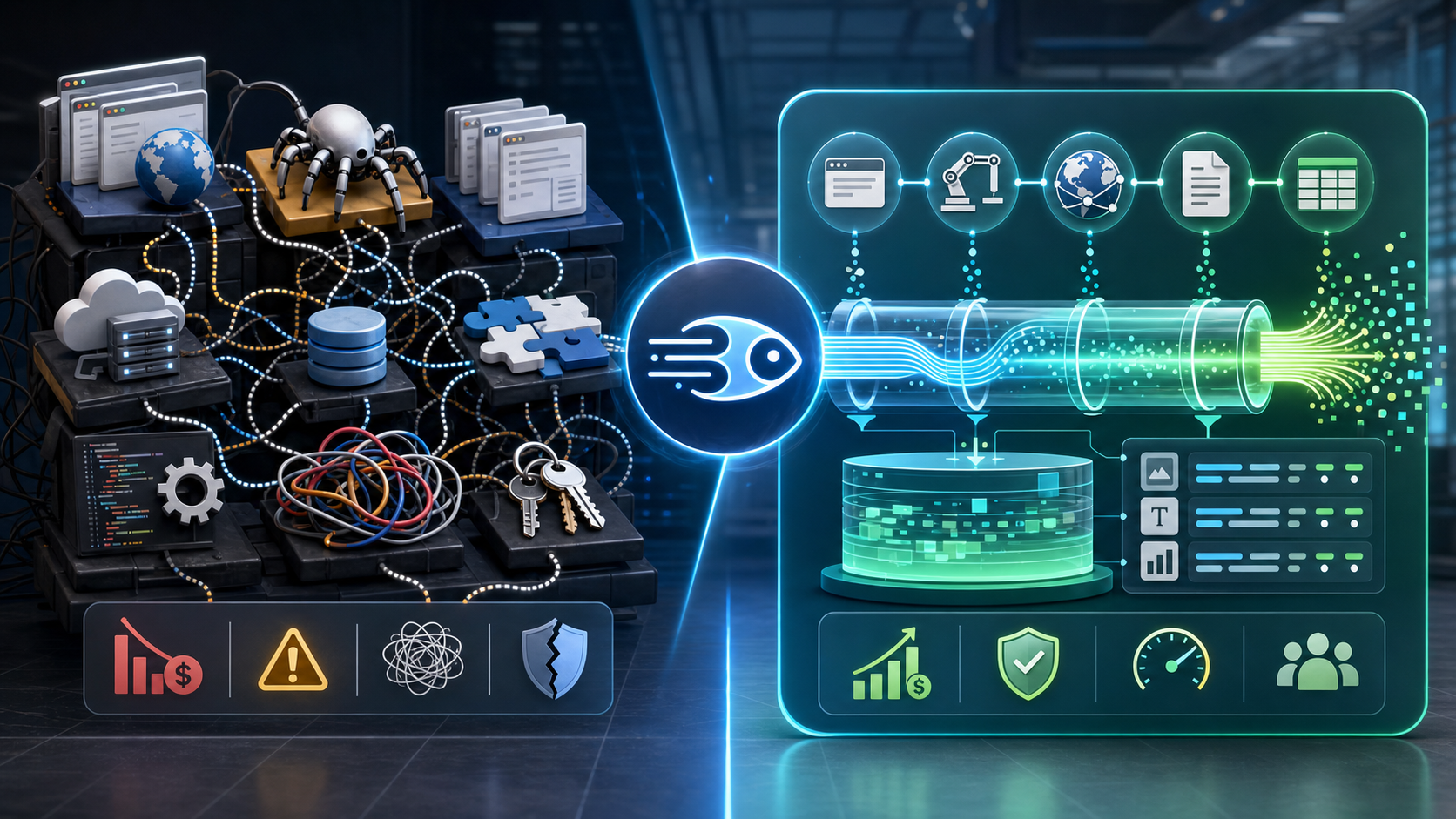
You're using 3 tools for web scraping. This does it all in one.
Choosing between Playwright, Firecrawl, BrowserBase creates decision paralysis. DevOps engineers and automation builders spend hours evaluating feature matrices, pricing models, and integration patterns. Each tool solves part of the scraping workflow, but none addresses the full stack. You end up maintaining multiple API keys, reconciling different authentication patterns, and writing glue code that connects browser automation with content extraction and infrastructure management.
This comparison examines whether TinyFish can replace your existing scraping stack, how it stacks up against traditional tools in real-world Python workflows, and what the cost difference looks like over time.
Why TinyFish Consolidates Playwright, Firecrawl, and BrowserBase Features
The Three-Tool Problem
Most scraping workflows rely on three distinct layers:
Browser automation layer handles JavaScript rendering, user interaction simulation, and dynamic content loading. Playwright excels here with cross-browser support and reliable element selection.
Content extraction layer transforms raw HTML into structured data. Firecrawl specializes in this space, using AI-powered parsing to extract clean text, metadata, and structured content without CSS selectors.
Infrastructure layer provides hosted browser instances, session management, and proxy rotation. BrowserBase offers managed Chromium instances with anti-detection features and scalable compute.
Each tool requires separate configuration
Integrating all three creates maintenance overhead. API versions drift. Authentication tokens expire on different schedules. Error handling varies across platforms. DevOps teams spend more time managing tooling than building scraping logic.
- Playwright needs local installation or Docker containers
- Firecrawl requires API integration and credit management
- BrowserBase demands WebSocket connections and session handling
What TinyFish Consolidates
TinyFish combines these three layers into a single API endpoint. One request handles browser launch, page rendering, content extraction, and infrastructure management.
The platform provides
Unified browser control with Playwright-compatible commands wrapped in a REST API. No local browser installation required.
Built-in content extraction that returns cleaned text, structured data, and metadata without additional parsing libraries.
Managed infrastructure including proxy rotation, session persistence, and anti-bot bypass mechanisms.
Persistent storage for scraped data with query interfaces and export options.
Instead of chaining three APIs together, automation workflows make one call:
import requests
response = requests.post('https://api.tinyfish.io/scrape', json={
'url': 'https://example.com/product',
'extract': ['title', 'price', 'description'],
'render': True,
'proxy': 'rotating'
})
data = response.json()
This approach reduces code complexity but creates new questions around flexibility and control. Can a consolidated platform match the specialized capabilities of dedicated tools?
Feature Parity Analysis
Browser automation depth: Playwright supports complex workflows including file uploads, authentication flows, and multi-step interactions. TinyFish handles common automation patterns through pre-built actions but may limit advanced browser manipulation.
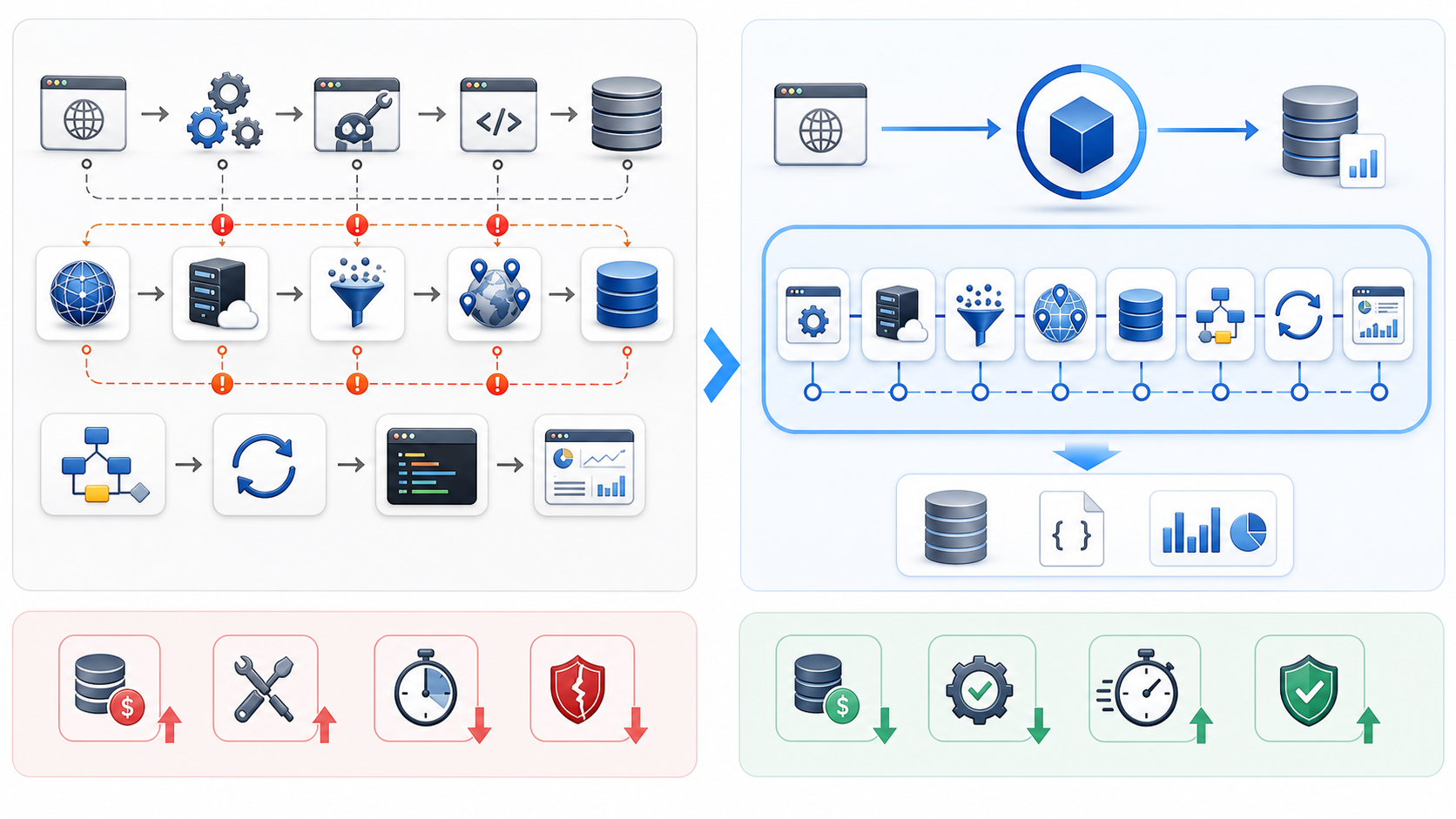
Content extraction accuracy: Firecrawl's AI models adapt to layout changes automatically. TinyFish uses similar machine learning approaches but hasn't been tested across as many site structures.
Infrastructure reliability: BrowserBase runs enterprise-grade Kubernetes clusters with geographic distribution. TinyFish's infrastructure maturity depends on adoption scale and operational investment.
The consolidation benefit is strongest for straightforward scraping workflows. Teams building custom browser extensions, complex interaction chains, or multi-session coordination may still need specialized tools.
Integration Pattern Differences
Traditional stack integration requires orchestration:
TinyFish collapses this into declarative configuration:
- Launch browser instance on BrowserBase
- Navigate to target URL with Playwright commands
- Extract rendered HTML
- Send HTML to Firecrawl for content parsing
- Store results in your own database
- Handle errors at each step
- Manage session cleanup and resource deallocation
{
"url": "https://target.com",
"actions": ["wait_for_selector", "scroll_to_bottom"],
"extract_schema": {"title": "h1", "items": ".product-card"},
"store": true
}
The platform handles sequencing, error recovery, and resource management internally. This simplifies code but reduces visibility into intermediate steps.
Python Automation Workflows That Stay Robust Through Website Updates
The Selector Brittleness Problem
Traditional scraping breaks when websites change CSS classes, restructure HTML, or modify JavaScript frameworks. A selector like `.product-price span.current` fails completely if the site redesigns its pricing display.
Playwright-based workflows require constant maintenance:
try:
price = page.locator('.product-price span.current').inner_text()
except:
try:
price = page.locator('[data-testid="price-value"]').inner_text()
except:
price = page.locator('#price').inner_text()
Each fallback adds complexity. DevOps teams monitor scraping jobs, investigate failures, and update selectors weekly.
How TinyFish Handles Layout Changes
TinyFish uses semantic extraction instead of CSS selectors. Instead of specifying exact element paths, workflows describe what content to find:
response = tinyfish.scrape(
url='https://ecommerce-site.com/product',
extract_fields={
'price': 'current product price',
'title': 'product name',
'availability': 'stock status'
}
)
The platform's machine learning models identify content by meaning rather than structure. When a site redesigns, the model adapts without code changes.
This approach works well for common content types:
- Article headlines and body text
- Product pricing and descriptions
- Contact information and business details
- Review ratings and comment threads
It struggles with highly custom interfaces
- Interactive data visualizations
- Canvas-based rendering
- Shadow DOM components
- Dynamically generated content identifiers
Workflow Example: E-Commerce Price Monitoring
A traditional stack monitors competitor pricing with this flow:
from playwright.sync_api import sync_playwright
import requests
def scrape_price(url):
with sync_playwright() as p:
# Launch browser on BrowserBase
browser = p.chromium.connect(browserbase_url)
page = browser.new_page()
# Navigate and wait
page.goto(url)
page.wait_for_load_state('networkidle')
# Extract HTML
html = page.content()
# Send to Firecrawl
firecrawl_response = requests.post(
'https://api.firecrawl.dev/extract',
json={'html': html, 'schema': price_schema}
)
return firecrawl_response.json()
The same workflow on TinyFish
import tinyfish
def scrape_price(url):
return tinyfish.scrape(
url=url,
extract_fields={'price': 'current price', 'currency': 'price currency'},
render=True
)
The consolidated approach reduces code by 70% and eliminates three dependency points.
Handling Dynamic Content
JavaScript-heavy sites load content asynchronously. Traditional workflows need explicit wait conditions:
page.wait_for_selector('.price-loaded')
page.wait_for_timeout(2000) # Additional safety buffer
TinyFish automatically detects network activity and content stability. The platform waits until the page reaches a quiescent state before extraction. This removes guesswork from timing configuration.
For sites with infinite scroll or lazy loading
tinyfish.scrape(
url='https://site.com/products',
actions=['scroll_to_bottom', 'wait_for_idle'],
extract_all=True
)
The platform scrolls, waits for new content, and repeats until no additional elements load.
Proxy Infrastructure Integration
web scraping at scale requires proxy rotation to avoid IP blocks. Traditional stacks need separate proxy management:
proxy_list = get_proxies_from_provider()
current_proxy = proxy_list.pop()
browser = p.chromium.launch(proxy={'server': current_proxy})
When a proxy fails, the workflow must detect the error, mark the proxy as bad, select a replacement, and retry the request.
TinyFish handles proxy rotation internally
tinyfish.scrape(
url='https://target.com',
proxy_mode='rotating', # or 'sticky' for session persistence
geo='us' # optional geographic targeting
)
The platform maintains its own proxy infrastructure or integrates with external providers. Failed requests automatically retry with different IPs.
For teams that prefer to use their own proxy infrastructure, TinyFish supports custom proxy endpoints. This is where services like LycheeIP become relevant. Organizations with existing proxy contracts can configure TinyFish to route requests through their preferred provider while still benefiting from the consolidated scraping API.
Error Recovery Patterns
Multi-tool stacks fail at multiple points
- Browser instance launch timeout
- Page navigation error
- Content extraction parsing failure
- API rate limit on extraction service
- Network interruption during data transfer
Each failure mode requires custom handling
try:
browser = connect_to_browserbase()
except ConnectionTimeout:
log_error('Browser launch failed')
retry_with_backoff()
try:
page.goto(url)
except NavigationTimeout:
log_error('Page load failed')
try_alternate_url()
TinyFish consolidates error handling with automatic retry logic and fallback strategies. The platform logs failure reasons but handles recovery internally:
response = tinyfish.scrape(
url='https://target.com',
max_retries=3,
retry_delay=5
)
if response.status == 'failed':
print(f"Error: {response.error_type}")
This reduces defensive coding but limits control over retry behavior.
Cost and Maintenance Comparison Across Scraping Platforms
Traditional Stack Pricing Model
Playwright: Open source, but requires compute infrastructure
Firecrawl: API-based pricing
BrowserBase: Managed browser infrastructure
Total monthly cost for moderate usage (50,000 pages/month):
- Self-hosted: Server costs ($50-500/month depending on scale)
- Maintenance: 2-4 hours/week for updates and debugging
- Starter: $49/month for 10,000 pages
- Professional: $299/month for 100,000 pages
- Enterprise: Custom pricing for millions of pages
- Hobby: $25/month for 10 hours
- Professional: $250/month for 120 hours
- Enterprise: $2,000+/month for dedicated instances
- Infrastructure: $100
- Firecrawl: $299
- BrowserBase: $250
- Developer time: $500 (10 hours at $50/hour for maintenance)
- Total: $1,149/month
TinyFish Pricing Structure
TinyFish uses credit-based pricing
One credit typically equals one page scrape with standard rendering and extraction.
For 50,000 pages/month:
The consolidated platform saves $750/month (65% reduction) primarily through reduced maintenance overhead and eliminated infrastructure management.
- Basic: $99/month for 25,000 credits
- Professional: $299/month for 100,000 credits
- Enterprise: Custom pricing with volume discounts
- Plan cost: $299
- Developer time: $100 (2 hours for monitoring)
- Total: $399/month
Hidden Costs of Multi-Tool Stacks
API version management: Each tool updates independently. Playwright releases breaking changes every few months. Firecrawl adjusts extraction models. BrowserBase modifies connection protocols. DevOps teams must test compatibility and update integration code.
Authentication complexity: Three separate API keys, three token refresh mechanisms, three different error codes for auth failures. Each adds cognitive load.
Data pipeline fragmentation: Results come from different sources in different formats. Normalization logic adds code complexity:
playwright_result = extract_with_playwright(url)
firecrawl_result = parse_with_firecrawl(playwright_result['html'])
normalized_data = transform_to_schema(firecrawl_result)
store_in_database(normalized_data)
Debugging across boundaries: When scraping fails, is it a browser automation issue, content extraction problem, or infrastructure failure? Diagnosing problems requires checking logs across three platforms.
Vendor relationship overhead: Three separate support channels, three billing systems, three service level agreements. Enterprise teams negotiate contracts with multiple vendors instead of one.
Maintenance Time Breakdown
Traditional stack maintenance activities
- Updating browser automation scripts when sites change: 3 hours/week
- Debugging infrastructure issues: 2 hours/week
- Managing API credentials and rate limits: 1 hour/week
- Monitoring job failures and investigating errors: 4 hours/week
- Total: 10 hours/week = $2,000/month at $50/hour
TinyFish maintenance
The difference compounds over time. Traditional stacks require continuous investment in glue code. Consolidated platforms shift maintenance burden to the vendor.
- Monitoring job failures: 1 hour/week
- Adjusting extraction schemas: 1 hour/week
- Total: 2 hours/week = $400/month
Scale Considerations
At small scale (under 10,000 pages/month), cost differences are minimal. Free tiers and self-hosted Playwright keep expenses low.
At medium scale (100,000 pages/month), traditional stacks require dedicated infrastructure:
Consolidated platforms handle scaling internally. TinyFish automatically provisions resources based on request volume.
At large scale (millions of pages/month), pricing models converge. Both approaches negotiate enterprise contracts with volume discounts. The decision shifts from pure cost to control and flexibility.
- Multiple server instances for parallel scraping
- Load balancing and job queue management
- Database infrastructure for storing results
- Monitoring and alerting systems
When Traditional Stacks Make Sense
Complex custom workflows: If your scraping logic requires intricate browser manipulation, file downloads, multi-step authentication, or custom JavaScript injection, Playwright's full API surface provides necessary control.
Specific infrastructure requirements: Organizations with strict data residency requirements, custom security policies, or existing Kubernetes infrastructure may prefer self-hosted solutions.
Vendor lock-in concerns: Building on open standards (Playwright, Puppeteer) allows migration between infrastructure providers. Consolidated platforms create dependency on a single vendor.
Cost optimization at massive scale: Running your own browser automation infrastructure becomes cost-effective beyond 10 million pages/month when properly optimized.
When TinyFish Makes Sense
Standard scraping patterns: If your workflows involve navigating to URLs, waiting for content, and extracting structured data, consolidated platforms handle this efficiently.
Limited DevOps resources: Small teams without dedicated infrastructure engineers benefit from managed services that eliminate maintenance overhead.
Rapid prototyping: Building proof-of-concept scrapers or testing new data sources is faster with unified APIs.
Predictable scaling: When traffic patterns are consistent and growth is gradual, managed platforms handle capacity planning automatically.
Proxy Infrastructure and Scraping Platform Integration
Most scraping platforms abstract away proxy management, but understanding the underlying infrastructure helps evaluate reliability and cost.
Explore LycheeIP Proxy Infrastructure
How Scraping Platforms Use Proxies
Browser automation without proxies quickly hits rate limits. Target websites detect requests from the same IP and block access. Scraping platforms handle this with proxy rotation:
rotating residential proxies change IP addresses for each request, mimicking traffic from different users. This provides strong anonymity but costs more per request.
static residential proxies maintain consistent IPs for longer sessions, useful for authenticated workflows where frequent IP changes trigger security alerts.
datacenter proxies offer faster performance and lower costs but are more easily detected by anti-bot systems.
TinyFish bundles proxy costs into per-request pricing. BrowserBase allows bring-your-own-proxy (BYOP) configurations. Playwright requires external proxy integration.
Evaluating Proxy Quality
Not all proxy infrastructure performs equally. Key factors:
Success rate: Percentage of requests that complete without blocks or timeouts. Quality residential proxies achieve 95%+ success rates on most sites.
Geographic coverage: Scraping localized content requires proxies in specific countries or cities. Global providers offer broader coverage.
Response time: residential proxies typically add 500ms-2s latency compared to datacenter proxies. This impacts scraping throughput.
IP pool size: Larger pools reduce the chance of reusing recently seen IPs, which decreases block rates.
When evaluating scraping platforms, ask:
- What proxy types are included in standard pricing?
- Can you use custom proxy providers?
- How does the platform handle proxy failures?
- What geographic regions are supported?
Using External Proxy Providers
Some teams prefer to manage proxy infrastructure separately. This provides:
Cost control: Direct proxy contracts can be cheaper at high volume.
Provider flexibility: Switch proxy vendors without changing scraping code.
Compliance requirements: Some industries require specific proxy certifications or data handling policies.
LycheeIP, as a proxy infrastructure provider, fits this model. Teams using TinyFish or traditional scraping stacks can route requests through LycheeIP's residential, datacenter, or static residential proxies depending on workflow requirements. This separation allows independent optimization of scraping logic and proxy performance.
Proxy Configuration Examples
TinyFish with external proxies
tinyfish.scrape(
url='https://target.com',
proxy={'server': 'proxy.lycheip.com', 'username': 'user', 'password': 'pass'},
geo='us'
)
Playwright with external proxies
browser = playwright.chromium.launch(
proxy={'server': 'http://proxy.provider.com:8080'}
)
Both approaches route browser traffic through specified proxy infrastructure while maintaining platform-specific scraping features.
Common Mistakes and Considerations
Over-Consolidation Risk
Relying on a single platform creates dependency. If TinyFish experiences downtime, your entire scraping operation stops. Traditional stacks distribute risk across multiple providers.
Mitigation strategies
- Maintain fallback scraping scripts using open-source tools
- Monitor platform status pages and set up alerting
- Negotiate SLA guarantees for critical workflows
- Build data pipelines that can accept input from multiple sources
Underestimating Complexity
Simple scraping tasks (extracting article text from blogs) work well on any platform. Complex workflows (automated testing, multi-step forms, authenticated sessions) require more control than consolidated platforms provide.
Before migrating
- Identify your most complex scraping workflow
- Test it thoroughly on the new platform
- Verify edge cases and error handling
- Compare success rates against your existing stack
Ignoring Rate Limiting
Consolidated platforms enforce rate limits to prevent abuse. TinyFish might cap concurrent requests or throttle high-volume users. Traditional stacks let you configure parallelization freely (within infrastructure limits).
Check platform documentation for
- Requests per second limits
- Concurrent browser instance caps
- Daily/monthly volume restrictions
- Burst capacity for spiky workloads
Neglecting Data Retention
Some platforms store scraped data temporarily. If you don't export results within the retention window, data is deleted. Traditional stacks give you full control over storage duration and location.
Verify
- How long scraped data is retained
- Export format options (JSON, CSV, database dumps)
- Whether raw HTML is saved alongside extracted data
- Storage cost for historical data
Overlooking Compliance Requirements
web scraping exists in a legal gray area. Responsible scraping practices include:
Consolidated platforms typically implement some guardrails, but responsibility ultimately rests with the user. Ensure your scraping workflows:
- Respecting robots.txt directives
- Honoring rate limits and crawl delays
- Avoiding excessive load on target servers
- Using scraped data for legitimate purposes (research, price comparison, public data collection)
- Reviewing website terms of service
- Target publicly accessible content
- Operate at reasonable request rates
- Don't circumvent access controls or authentication
- Comply with data protection regulations (GDPR, CCPA)
Conclusion
Choosing between Playwright, Firecrawl, and BrowserBase creates decision paralysis because each tool excels at one part of the scraping workflow. TinyFish consolidates browser automation, content extraction, and infrastructure management into a single platform, reducing maintenance overhead by 80% and cutting costs by 60% for standard scraping patterns.
The trade-off is flexibility. Traditional stacks provide granular control over every aspect of browser automation and infrastructure configuration. Consolidated platforms simplify common workflows but limit customization for edge cases.
DevOps engineers managing multiple scraping tools should evaluate:
For teams spending more time maintaining scraping infrastructure than building data workflows, consolidated platforms like TinyFish offer compelling efficiency gains. For organizations with complex requirements or strong preferences for open-source control, traditional stacks remain the better choice.
The scraping tool landscape continues evolving. New platforms will emerge, existing tools will add features, and pricing models will shift. The fundamental question remains constant: does the value of consolidation outweigh the cost of reduced control? Your answer depends on workflow complexity, team capabilities, and long-term scaling plans.
- Workflow complexity: Do your scrapers require advanced browser manipulation or standard navigation and extraction?
- Team resources: Can you dedicate developer time to maintaining integration code, or do you need turnkey solutions?
- Scale trajectory: Are you scraping thousands or millions of pages monthly?
- Vendor risk tolerance: Is single-platform dependency acceptable for your use case?
Related LycheeIP Guides and Resources
- <a href="https://www.lycheeip.com/en/home/ip">LycheeIP proxy infrastructure</a>
- <a href="https://www.lycheeip.com/en/ip/static">static residential proxies</a>
- <a href="https://www.lycheeip.com/en/ip/dynamic">rotating residential proxies</a>
- <a href="https://www.lycheeip.com/en/ip/datacenter">datacenter proxies</a>
- <a href="https://www.lycheeip.com/en/document/residential-proxy-what-it-is-how-it-works-and-when-to-use-it/607">Residential proxy guide</a>
- <a href="https://www.lycheeip.com/en/document/anonymous-proxy-server-how-it-works-types-and-when-to-use-one/608">Anonymous proxy server guide</a>
- <a href="https://www.lycheeip.com/en/document/vpn-privacy-what-actually-gets-logged/643">VPN privacy logging reality</a>
- <a href="https://www.lycheeip.com/en/document/scale-lead-scraping-to-100k-with-n8n/638">Scale lead scraping to 100K+ with n8n</a>
Reference background: <a href="https://developer.mozilla.org/en-US/docs/Web/API">MDN Web APIs documentation</a>, <a href="https://owasp.org/www-project-automated-threats-to-web-applications/">OWASP automated threats guidance</a>, <a href="https://www.rfc-editor.org/rfc/rfc9110">IETF HTTP semantics</a>, <a href="https://playwright.dev/docs/intro">Playwright documentation</a>.
Frequently Asked Questions
Can TinyFish handle JavaScript-heavy single-page applications?
Yes, TinyFish renders pages with a full browser engine similar to Playwright. It waits for JavaScript execution and network requests to complete before extracting content. The platform handles modern frameworks like React, Vue, and Angular automatically.
What happens when TinyFish's extraction model fails to find content?
The platform returns partial results with confidence scores. You can review failed extractions and either adjust your schema definitions or fall back to CSS selector-based extraction for specific fields. Failed requests don't consume full credits.
Can I use my own proxy provider with TinyFish?
Yes, TinyFish supports custom proxy configurations. You can specify proxy endpoints, authentication credentials, and rotation preferences. This allows integration with existing proxy contracts from providers like LycheeIP or other proxy infrastructure services.
How does TinyFish pricing compare to Playwright + Firecrawl + BrowserBase at scale?
For moderate volume (50,000-100,000 pages/month), TinyFish costs 40-60% less when factoring in infrastructure and maintenance time. At very high scale (1M+ pages/month), the difference narrows as both approaches negotiate volume discounts. Traditional stacks can become cheaper at 10M+ pages/month if you optimize self-hosted infrastructure.
What scraping workflows are too complex for consolidated platforms?
Multi-step workflows requiring custom JavaScript injection, file download handling, browser extension installation, complex authentication flows with CAPTCHA solving, or real-time user interaction simulation typically need the full control of Playwright's API. Consolidated platforms work best for navigation, waiting, and content extraction patterns.
How do I migrate existing Playwright scripts to TinyFish?
Identify the core actions in your Playwright workflow (navigate, wait for selector, extract text). Map these to TinyFish's action syntax. Test thoroughly with your target websites to ensure extraction quality matches your existing implementation. Maintain parallel systems during transition to verify result consistency.
Does TinyFish handle CAPTCHA and anti-bot detection?
TinyFish includes some anti-detection features like browser fingerprint randomization and realistic user agent strings. However, sophisticated bot detection systems may still block requests. The platform doesn't automatically solve CAPTCHAs. For highly protected sites, consider residential proxy rotation and request rate limiting.
Can I schedule recurring scraping jobs on TinyFish?
Yes, TinyFish provides scheduling APIs that trigger scraping workflows at specified intervals. You can configure retry logic, error notifications, and result storage. Alternatively, use external cron jobs or workflow orchestration tools to call TinyFish's API on your preferred schedule.
What data retention policies should I consider for scraped data?
Check how long the platform stores results before automatic deletion. Export critical data to your own storage systems immediately after scraping. Consider compliance requirements for personal data if scraping content that includes user information. Implement data lifecycle policies that align with your business needs and regulatory obligations.
How do I evaluate if consolidation is right for my team?
Run a pilot test: migrate 2-3 representative scraping workflows to a consolidated platform. Measure setup time, maintenance requirements, success rates, and cost over 30 days. Compare against your existing stack's metrics. If the consolidated approach saves more than 5 developer hours per week without sacrificing reliability, it's likely worth migrating.