Random IP Address: A Developer's Look at How IP Rotation Works
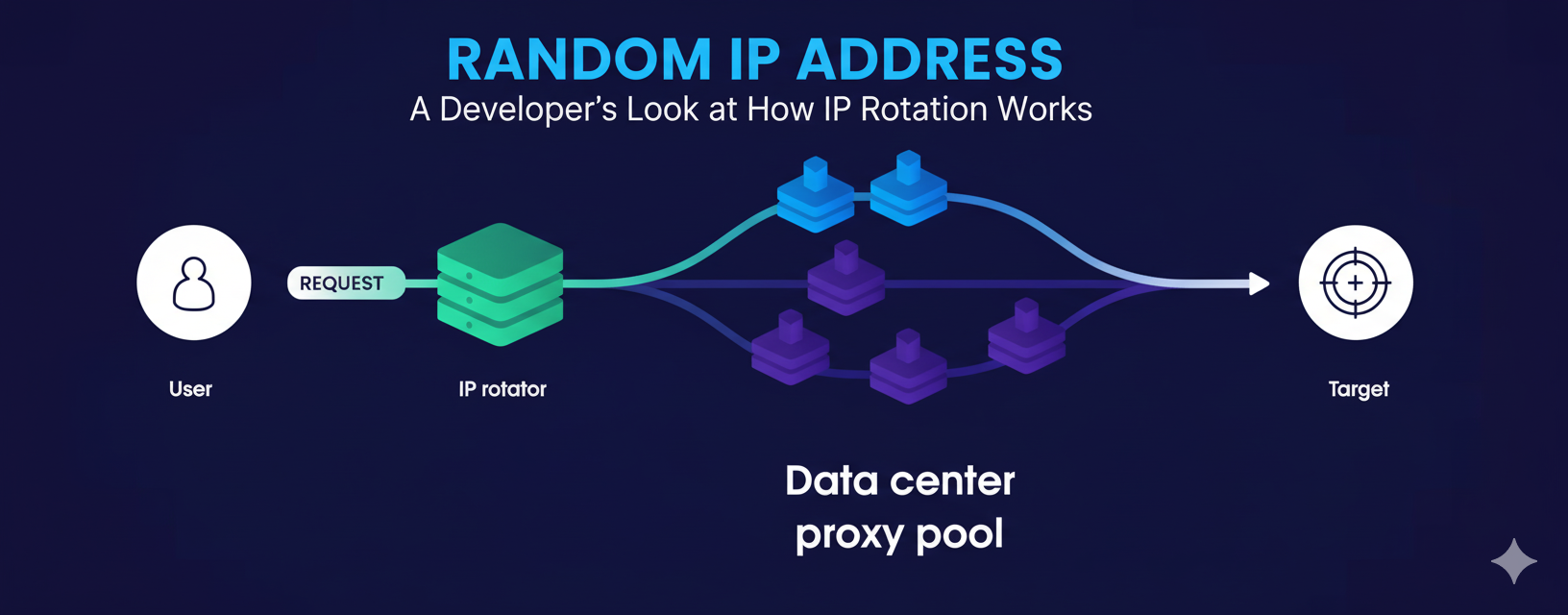
For developers involved in data collection, ad verification, or market research, the need for a random IP address for each connection is a common requirement. The goal is to ensure each request originates from a unique, non-attributable source to avoid blocks and gather accurate, unbiased data. However, the term "random IP address" is often a misnomer. You cannot simply generate a public IP on your machine and expect it to work.
This article provides a deep, technical dive into what developers actually mean when they search for a random IP address. We will explore how network connections are established at the protocol level, explain how rotating proxies provide the real-world solution, and walk through the code and best practices needed to build a resilient and ethical IP rotation strategy.
Confirm our residential proxies rotate with every request.
What Does a "Random IP Address" Mean in Practice?
In practice, a random IP address means using a system that assigns a different, legitimate public IP address to your outgoing connection for each new request or session. An IP address is the unique numerical label assigned to each device on a network, used to route traffic correctly. While your local device has an IP, you cannot invent a new public IP for it on the fly. Doing so would be like putting a random return address on a letter, the postal service would have no way to send a reply back to you.
Therefore, the concept of a client-side "random IP address generator" for live traffic is a technical impossibility. The practical and only legitimate solution is to route your traffic through an intermediary service that controls a large pool of IP addresses and can assign one to your connection. This is the core function of rotating proxies.
How Does the TCP/IP Handshake Lock in Your IP Address?
The TCP/IP handshake locks in your IP address for the duration of a connection, which is why understanding it is critical for proper IP rotation. TCP (Transmission Control Protocol) is the standard that ensures reliable, ordered delivery of data over the internet. Before any data can be sent, a three-step handshake must occur to establish a stable connection.
Here’s a breakdown of the TCP/IP handshake:
- SYN (Synchronize): Your client initiates the connection by sending a SYN packet to the server. This packet contains a random sequence number and effectively says, "Hello, I'd like to start a connection. My IP address is X." At this very first step, your source IP for this connection is declared.
- SYN-ACK (Synchronize-Acknowledge): The server, if it accepts the connection, responds with a SYN-ACK packet. This packet acknowledges the client's sequence number and sends its own. It essentially replies, "I hear you. I am ready to connect. I acknowledge your IP is X."
- ACK (Acknowledge): Finally, your client sends an ACK packet back to the server, acknowledging the server's response. This completes the handshake, and the connection is now open for data transfer.
Your IP address is committed at step one and confirmed by step three of the TCP/IP handshake. It cannot be changed mid-connection. To present a new, random IP address, you must terminate the current connection and initiate an entirely new TCP/IP handshake.
Confirm our residential proxies rotate with every request.
How Do Rotating Proxies Provide a Different IP for Each Connection?
Rotating proxies provide a different IP address by managing a massive pool of IPs and assigning a new one from the pool each time you establish a new connection through their gateway. A developer-first proxy provider like LycheeIP gives you a single endpoint address. When your application connects to this endpoint, the proxy service forwards your request to the target website from one of the thousands or millions of IPs in its pool.
There are two primary rotation strategies:
- High Rotation (Per-Request): For each new request you send, the service assigns a new IP. This is ideal for large-scale web scraping where you want every request to be completely independent. This setup most closely mimics the idea of a "random IP address generator".
- Sticky Sessions: The service assigns one IP to your session and keeps it for a set period (e.g., 1, 10, or 30 minutes). This is essential for multi-step processes, like navigating a checkout flow or managing a logged-in session, where changing IPs mid-session would cause errors.
LycheeIP provides the simple, lightweight control for you to choose the strategy that best fits your workload.
Which Type of Rotating Proxies Should You Use?
The type of rotating proxies you should use depends on your target's sensitivity, your budget, and your performance requirements.
Residential proxies are the top choice for most data collection tasks. These are IP addresses assigned by Internet Service Providers (ISPs) to real homeowners, making them appear as genuine user traffic. Their high reputation makes them very effective at avoiding blocks. Using a pool of residential proxies is the most reliable way to achieve the effect of a random IP address.
| Proxy Type | IP Reputation & Trust | Performance | Cost | Best For |
| Residential Proxies | Highest | Good | Medium-High | Web scraping, ad verification, SEO monitoring, e-commerce. |
| Datacenter Proxies | Lower | Highest | Low | Accessing non-sensitive targets, high-volume crawling. |
| Mobile Proxies | Highest (for mobile) | Lower | High | Mobile app testing, social media automation. |
How Do You Implement IP Rotation in Your Code?
You implement IP rotation by configuring your HTTP client to route traffic through the proxy provider's rotating endpoint. For true per-request rotation, you must ensure your code initiates a new TCP/IP handshake for each request.
Here is a Python example using the requests library:
Python
import requests
# This is your rotating proxy endpoint from a provider like LycheeIP
# It automatically assigns a new IP from its pool for each connection.
proxy_endpoint = "http://YOUR_USERNAME:YOUR_PASSWORD@proxy.lycheeip.com:port"
proxies = {
"http": proxy_endpoint,
"https": proxy_endpoint,
}
# Ensure each request uses a new connection by disabling keep-alive
# This forces a new TCP/IP handshake, which is required for a new IP.
headers = {
"Connection": "close"
}
def get_my_ip():
"""Fetches the current public IP address as seen by the target."""
try:
# We use a session object but force a new connection for each call
with requests.Session() as s:
s.proxies = proxies
s.headers = headers
response = s.get("https://api.ipify.org?format=json", timeout=15)
response.raise_for_status()
current_ip = response.json()["ip"]
print(f"Request made from IP: {current_ip}")
return current_ip
except requests.RequestException as e:
print(f"Failed to get IP: {e}")
return None
# Demonstrate the rotation
print("Making two consecutive requests to show IP rotation...")
ip1 = get_my_ip()
ip2 = get_my_ip()
if ip1 and ip2 and ip1 != ip2:
print("\nSuccess! A different IP was used for each request.")
else:
print("\nIP did not change. Check your proxy rotation settings.")
Why Are You Still Being Tracked Despite Using Rotating Proxies?
You can still be tracked because websites use sophisticated techniques beyond just IP addresses, operating at higher levels of the network stack than the TCP/IP handshake. While rotating proxies are essential, they are not a silver bullet.
Advanced tracking methods include:
- Browser Fingerprinting: Websites analyze a unique combination of your browser's attributes (fonts, screen resolution, plugins, user-agent) to create a consistent identifier.
- Cookies: Cookies are stored in your browser and sent with every request to a domain, allowing sites to link your activity across multiple sessions and IP addresses.
- TLS/JA3 Fingerprinting: The specific parameters used during the TLS handshake (which happens after the TCP/IP handshake) can also create a unique signature that identifies your client.
Confirm our residential proxies rotate with every request.
How Do You Troubleshoot IP Rotation Issues?
You troubleshoot IP rotation issues by systematically checking for problems at the connection, session, and application levels.
- Check Connection Persistence: Ensure you are forcing a new TCP/IP handshake for each request. In many libraries, this means disabling "keep-alive" functionality.
- Verify Proxy Settings: Confirm that your provider's dashboard is set to "rotate per request" and not a "sticky session" if you expect a random IP address every time.
- Use an IP Echo Service: Before making a request to your target, always test your connection against an IP echo service (like api.ipify.org) to confirm your IP has actually changed.
- Clear Cookies and State: Ensure your application is not sending persistent cookies or other identifiers that would link your requests together.
What are the Ethical Guidelines for Using Rotating Proxies?
The ethical use of rotating proxies is paramount. These tools should be used responsibly to gather public data without causing harm.
- Respect robots.txt: Always adhere to the crawling rules set by a website's robots.txt file.
- Rate Limit Your Requests: Do not overwhelm a website's servers. Scrape at a considerate pace.
- Avoid Personal Data: Do not collect personally identifiable information (PII) or copyrighted content.
- Use Ethically Sourced Proxies: Ensure your provider, especially for residential proxies, uses an ethical sourcing model.
Confirm our residential proxies rotate with every request.
Frequently Asked Questions:
1. Can I truly generate a random IP address on my computer?
No, you cannot generate a publicly routable random IP address on your own device. The concept of a "random IP address generator" in practice refers to using a service like rotating proxies that assigns you a different, legitimate IP from its large pool for each connection.
2. What are residential proxies and why are they good for rotation?
Residential proxies are IP addresses that belong to real home internet connections. They are highly trusted by websites, making them very effective for avoiding blocks and CAPTCHAs during data collection tasks that require a random IP address for each request.
3. How does the TCP/IP handshake affect my IP address?
The TCP/IP handshake is the three-step process that establishes a network connection. Your source IP address is fixed for the duration of that connection from the very first step. To use a new IP, you must close the current connection and initiate a new TCP/IP handshake.
4. What's the difference between rotating proxies and a VPN?
Rotating proxies are designed for data collection, allowing for granular control and a different IP for each request. A VPN is a privacy tool that encrypts all your device's traffic and routes it through a single, usually static, server IP.
5. Why isn't my IP changing even with a rotating proxy?
This is often because your HTTP client is reusing the same connection (a feature called "keep-alive"). To ensure a new IP, you must force a new TCP/IP handshake for each request, typically by setting a Connection: close header.
6. Is it legal to use a random IP address via rotating proxies?
Using rotating proxies to access public data is generally legal. However, you must always act ethically, respect a website's Terms of Service, avoid scraping personal or copyrighted data, and comply with all applicable laws like the GDPR or CCPA.