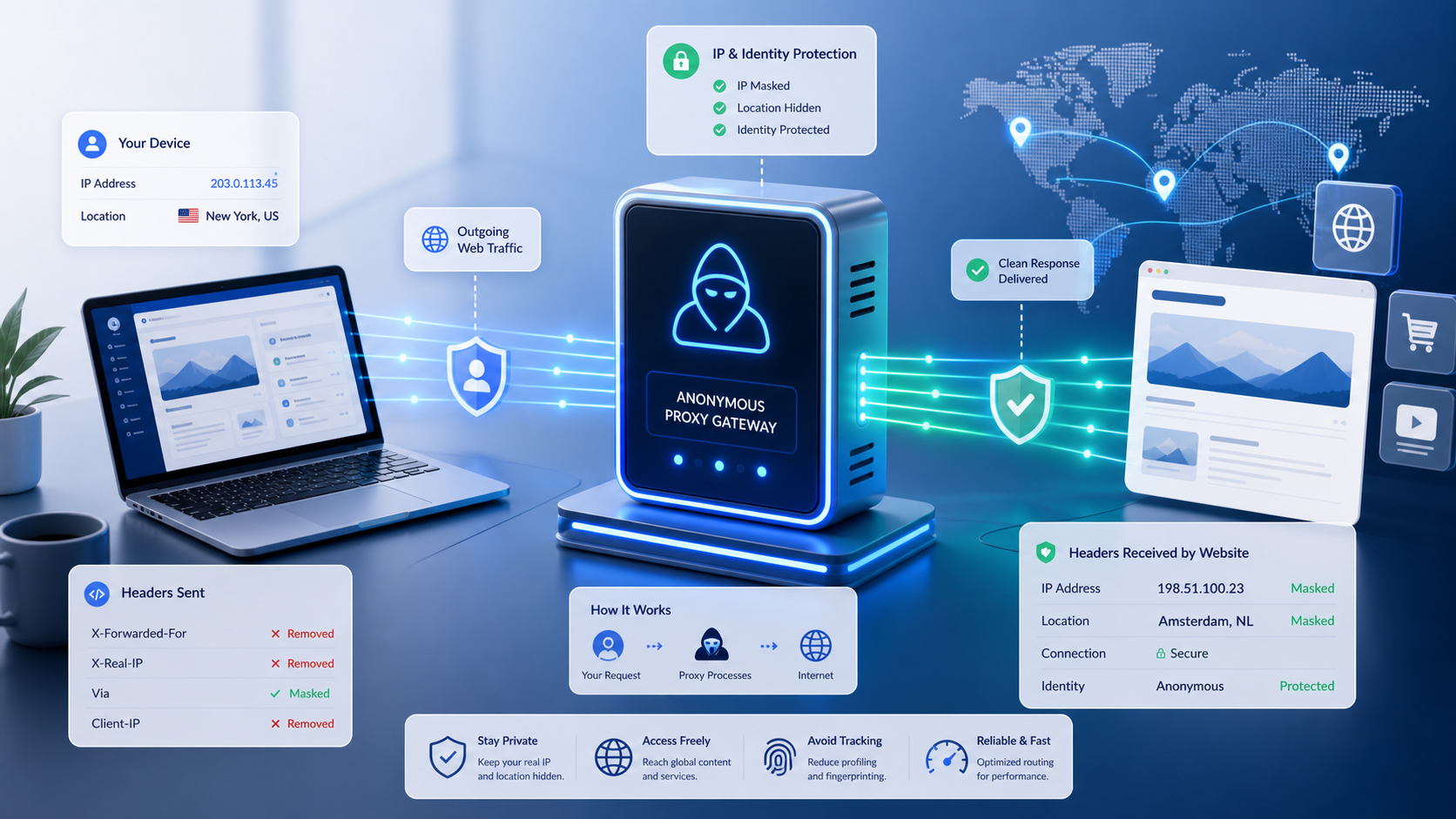
Despite being pivotal tools for online privacy, anonymous proxy servers are often misunderstood in both functionality and application. This guide breaks down how they work, the main proxy types, and the scenarios where using one makes sense.
When you browse normally, your device connects directly to websites using your IP address. That IP address reveals your approximate location, internet service provider, and can become one signal used to track browsing behavior across multiple sites.
An anonymous proxy server changes the path by acting as an intermediary between your device and the websites you visit. It can hide your real IP address from the destination site, but it should be treated as a privacy layer rather than a complete anonymity system.
What Is an Anonymous Proxy Server?
An anonymous proxy server is an intermediate web server that sits between your device and the websites you visit. Your requests go to the proxy first, and the proxy forwards those requests to the destination website on your behalf.
The key privacy mechanism is that the website sees the proxy server’s IP address instead of your actual IP address. Anonymous proxies differ from basic proxies because they actively remove or modify identifying information from your requests.
A standard proxy may still pass along headers that reveal the original client IP. An anonymous proxy strips or replaces those headers so the destination site does not learn your true IP address from the request metadata.
- Accessing geo-restricted content that is only available in certain countries.
- Bypassing simple workplace or school network filters when authorized.
- Reducing casual IP-based tracking during browsing.
- Separating browsing sessions to reduce cross-site correlation.
- Testing how websites appear from different geographic locations.
It is important to recognize that anonymous proxies provide a layer of privacy, not absolute anonymity. Effectiveness depends on proxy type, configuration quality, destination-site detection, and the proxy operator’s own logging and security practices.
How Anonymous Proxy Servers Hide Your IP Address
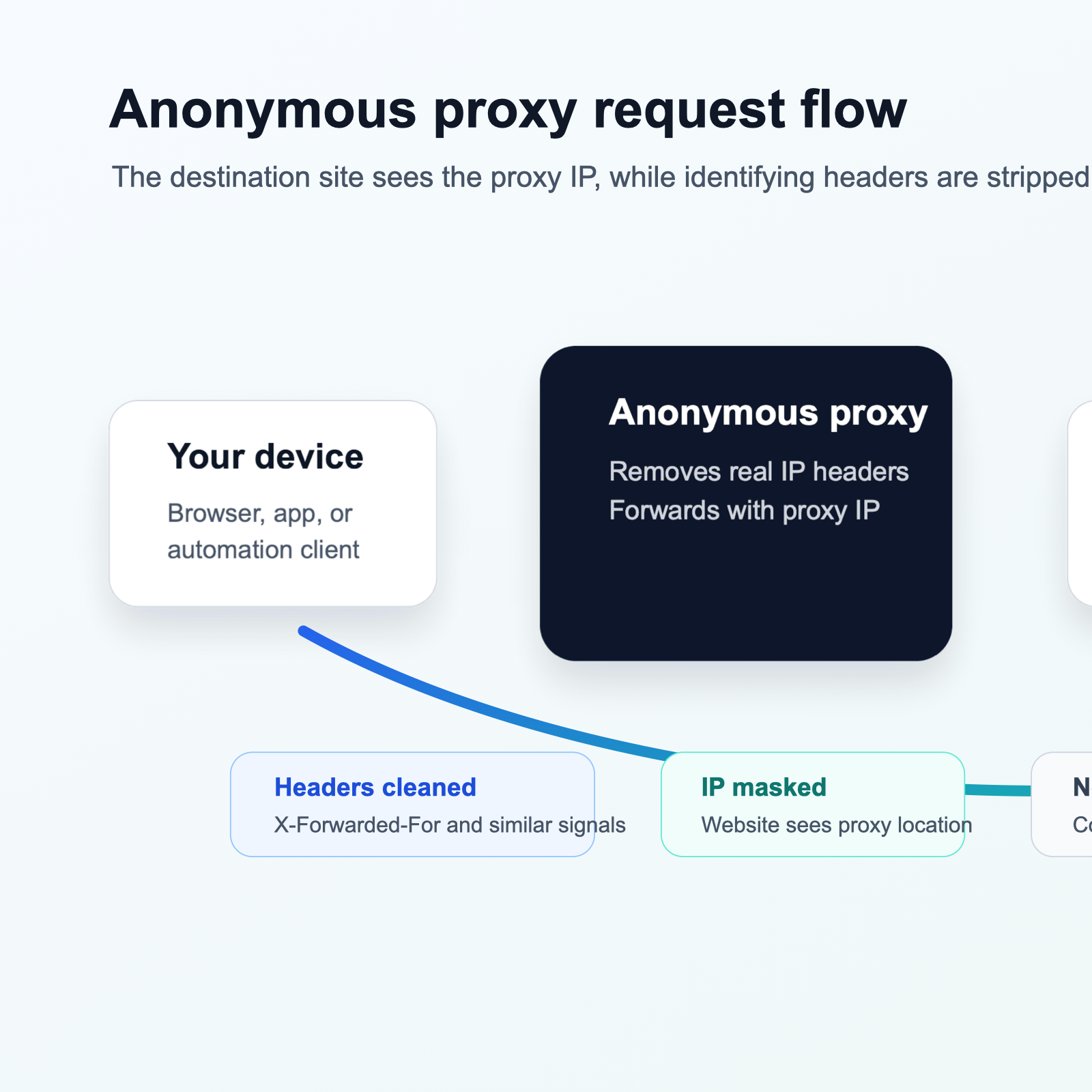
The technical process of IP masking involves request routing, header modification, proxy-side forwarding, and response routing back to your device.
Request Routing Through the Proxy
When you configure your browser or application to use an anonymous proxy, outgoing requests are redirected to the proxy server instead of going directly to the destination website. Your device sends the target URL and request metadata to the proxy endpoint.
Header Modification and IP Replacement
An anonymous proxy strips or modifies HTTP headers that could reveal your identity. The most important example is X-Forwarded-For, which many standard proxies use to pass along the original client IP address.
- Via: indicates that the request passed through a proxy.
- Forwarded: can contain information about the original client and proxy chain.
- X-Real-IP: sometimes used to pass the real client IP address.
- Client-IP: another header that may contain the original IP address.
Response Routing Back to Your Device
When the website sends its response, it addresses that response to the proxy server. The proxy receives it and forwards it back through the established connection to your device. From the website’s perspective, it only interacted with the proxy.
Limitations of IP Masking
Anonymous proxies do not provide complete anonymity. Your ISP can still see that you connect to a proxy server, and websites can detect proxy usage through known proxy IP ranges, header patterns, location inconsistencies, and unusual connection behavior.
Types of Proxy Servers and Anonymizers
Not all proxy servers provide the same anonymity level or serve the same purpose. Choosing the right tool starts with understanding the basic categories.
Forward Proxy
A forward proxy sits between client devices and the internet. When configured on your device, requests go through the proxy to reach external websites. Forward proxies can be transparent, anonymous, or elite depending on whether they hide the original IP and whether they reveal proxy usage.
Reverse Proxy
A reverse proxy sits in front of web servers instead of users. Website operators use reverse proxies for load balancing, caching, security controls, and TLS handling. Reverse proxies hide backend infrastructure, but they do not provide anonymity for end users.
Web-Based Anonymizers
Web-based anonymizers are proxy services accessed through a website. You enter a URL, and the anonymizer fetches and displays the page inside its own interface. They require no setup, but they often break complex websites and should only be used for non-sensitive browsing.
SOCKS Proxies
SOCKS proxies operate at a lower network level than HTTP proxies, so they can route more than web traffic. SOCKS5 supports authentication and UDP, making it useful for applications that need protocol flexibility.
Residential Proxies vs Datacenter Proxies
Datacenter proxies use IP addresses assigned to hosting providers. They are fast and affordable, but easier to detect because datacenter IP ranges are well known. Residential proxies use ISP-assigned home IPs, making them harder to block but usually slower and more expensive.
Comparing Anonymous Proxies with Other Anonymity Tools
Anonymous proxies are one option among several privacy tools. They are useful for IP masking, but they are not the same as VPNs or Tor.
Anonymous Proxy vs VPN
| Feature | Anonymous Proxy | VPN |
|---|---|---|
| Traffic encryption | Usually no encryption unless the destination uses HTTPS | Encrypts traffic between your device and the VPN server |
| Application scope | Often browser-specific or per application | Usually system-wide for all applications |
| Setup complexity | Simple to moderate | Requires software or OS-level configuration |
| Privacy from ISP | ISP can see the proxy connection and may see unencrypted traffic | ISP sees an encrypted VPN tunnel |
| Cost | Free and paid options | Quality services usually require paid subscription |
VPNs provide stronger privacy because they encrypt traffic and route all applications through a tunnel. Anonymous proxies may be sufficient when you only need to mask an IP address for a specific browser or application.
Anonymous Proxy vs Tor Network
| Feature | Anonymous Proxy | Tor Network |
|---|---|---|
| Anonymity level | Basic IP masking | Strong multi-layer routing through relays |
| Speed | Varies by proxy quality | Generally slower due to multiple relays |
| Ease of use | Simple setup | Requires Tor Browser or configuration |
| Website blocking | Some sites block known proxies | Many sites block Tor exit nodes |
| Use cases | Basic privacy, geo-access, light anonymity | Stronger anonymity requirements and sensitive communications |
Tor provides much stronger anonymity than anonymous proxies but sacrifices speed and convenience. For everyday geo-access or casual IP masking, proxies are often more practical.
What is a Proxy Server?
Security Benefits and Privacy Limitations
Anonymous proxy servers provide meaningful privacy benefits when used appropriately, but they are not comprehensive security solutions.
Privacy Benefits
- Reduced IP-based tracking across visits.
- Location privacy from destination websites.
- ISP information hidden from the websites you visit.
- Session separation when different proxies are used for different tasks.
- Access to content that varies by IP location.
Security Limitations
Most HTTP proxies do not encrypt traffic. The proxy server itself can see unencrypted traffic, and free proxy operators may log, modify, inject advertising, or mishandle user data. HTTPS protects content between your browser and the destination site, but the proxy can still see the destination domain.
Proxies also do not protect against browser fingerprinting, cookies, account logins, DNS leaks, or behavior-based tracking. If DNS requests bypass the proxy, your real network path may still leak information.
Trust Considerations
Using a proxy requires trusting the proxy operator. Free proxies have particularly poor trust records, including traffic logging, ad injection, malware risk, and credential theft. Paid providers tend to have clearer policies and better infrastructure, but they still require evaluation.
Free Anonymous Proxy Servers: Benefits and Risks
Free anonymous proxy servers are widely available and require no financial commitment, but their risks often outweigh their convenience.
Advantages of Free Proxies
- Zero cost.
- Quick access without account creation.
- Temporary testing of proxy functionality.
- Simple non-sensitive tasks.
Significant Risks of Free Proxies
- Security risks from traffic interception, logging, or modification.
- Slow speeds, downtime, and inconsistent availability.
- Advertising injection into proxied pages.
- Bandwidth throttling and usage limits.
- Easy detection and blocking by websites.
- Possible use of compromised infrastructure.
When Free Proxies Might Be Acceptable
Free proxies may be acceptable for limited testing, learning proxy configuration, or viewing non-sensitive public content from another IP address. They should never be used for account logins, financial data, personal information, work systems, or anything requiring reliable privacy.
When to Choose Paid Proxy Services
Paid proxy services offer advantages when reliability, security, support, and consistent performance matter.
Advantages of Paid Proxy Services
- Higher uptime and faster replacement when endpoints fail.
- Better performance and lower latency.
- Higher IP quality and better success rates.
- Customer support and documentation.
- Published privacy and acceptable-use policies.
- More geographic options for country or city targeting.
Use Cases Requiring Paid Proxies
- Web scraping workflows that collect public data at scale.
- Automated testing from different geographic locations.
- Market research and regional pricing analysis.
- Ad verification across markets.
- SEO monitoring and localized search checks.
- Production workflows where downtime has business impact.
For teams comparing infrastructure, LycheeIP is relevant to evaluate alongside your routing, geo-targeting, session-control, and documentation requirements. Compare rotating residential proxies, static residential proxies, and datacenter proxies based on the workflow, not only price.
Explore LycheeIP Proxy Infrastructure
When Not to Use Anonymous Proxies
Anonymous proxies are the wrong tool when you need strong confidentiality, regulated access, or guaranteed anonymity.
- Banking or financial transactions through untrusted proxies.
- Sensitive communications that require end-to-end encryption.
- Evading bans or enforcement actions that violate terms of service.
- Illegal activities or unauthorized access.
- Secured corporate resources that should use approved VPN or zero-trust access.
Setting Up and Configuring Anonymous Proxy Servers
Proxy configuration varies by operating system and tool, but most setups require a server hostname, port number, proxy type, and optional username and password.
Browser-Level Proxy Configuration
Browser-level proxy settings let you route web browsing through the proxy while other applications connect directly. Browser extensions can simplify switching between proxies, but they require trust in the extension developer.
System-Wide Proxy Configuration
System-wide proxy settings apply to all applications that respect the OS network configuration. This is useful when non-browser applications need proxy routing.
Web-Based Proxy Usage
Web-based proxies require no configuration. You visit the proxy site, enter a URL, and view the fetched page. This is convenient but limited and should be used only for non-sensitive content.
Proxy Configuration Files and Scripts
Organizations sometimes use Proxy Auto-Configuration files. PAC files contain JavaScript rules for choosing whether a request should use a proxy, bypass a proxy, or fail over to another proxy.
Testing Your Proxy Configuration
- Check your apparent IP address with an IP lookup service.
- Verify the IP location matches the selected proxy endpoint.
- Confirm websites load correctly through the proxy.
- Test for DNS leaks and header leaks.
- Confirm the proxy is not exposing identifying information.
Legal and Ethical Considerations
Using anonymous proxy servers is legal in many jurisdictions, but how you use them determines whether your activity complies with laws, terms, and ethical standards.
Legal Use of Proxy Servers
- Protecting privacy while browsing.
- Testing software and website functionality.
- Collecting publicly available information responsibly.
- Bypassing network filters when authorized.
- Accessing lawful content from another location.
Terms of Service Compliance
Proxy usage may violate a website’s terms of service even when it is not illegal. Review terms before using proxies with accounts, paid services, marketplaces, or platforms with strict access policies.
Responsible Scraping and Data Collection
When proxies support data collection, respect robots.txt, rate limits, authentication boundaries, copyright, and database rights. The robots.txt overview from Google Search Central is useful background for crawler rules.
Activities to Avoid
- Accessing systems without authorization.
- Bypassing security measures or access controls.
- Distributing malware or conducting cyberattacks.
- Committing fraud or identity theft.
- Creating fake accounts for spam or manipulation.
Evaluating Proxy Services: Decision Criteria
When free services are not enough, evaluate proxy providers across more than cost. The right service depends on proxy type, location needs, integration requirements, performance, support, and compliance expectations.
Proxy Type and IP Source
Match the proxy type to the job. Datacenter proxies are fast and affordable. Residential proxies are harder to detect. Rotating proxies suit collection workflows, while static proxies support session continuity.
Geographic Coverage
If the workflow depends on a country, region, or city, verify coverage before purchase. City-level precision matters for ad verification, localized testing, and some SEO workflows.
Integration and Technical Features
- API access for programmatic management.
- Authentication options and security controls.
- Session persistence and rotation controls.
- HTTP, HTTPS, and SOCKS5 support.
- Documentation, examples, dashboards, and usage analytics.
Performance and Reliability
Test average latency, success rates, uptime, bandwidth policies, concurrent connections, and performance on your real target sites. Trial periods are useful when available.
Support, Pricing, and Compliance
Review support channels, response times, documentation quality, pricing model, acceptable-use policy, and compliance needs. Most proxy services are not designed for regulated data workflows unless explicitly stated.
Common Mistakes When Using Anonymous Proxies
Users often compromise privacy or performance through avoidable proxy mistakes.
Trusting Free Proxy Services for Sensitive Activities
Never use free proxies for banking, email, social media logins, work systems, sensitive documents, or personal data.
Expecting Complete Anonymity
Proxies hide IP addresses, but cookies, account logins, browser fingerprints, behavior, and self-disclosed information can still identify you.
Ignoring DNS Leaks
DNS leaks occur when DNS requests bypass the proxy and go through the regular ISP path. Test for leaks before assuming your proxy setup is private.
Using Proxies Alone for Security
Continue using security basics: software updates, strong passwords, two-factor authentication, HTTPS, and caution with suspicious links or downloads.
Not Testing Proxy Functionality
Verify IP masking, DNS behavior, header behavior, and page functionality before using a proxy for real workflows.
Choosing Proxies Based Only on Speed
The fastest proxy is not necessarily the best. Reliability, IP quality, detection resistance, sourcing, and trust matter just as much.
Conclusion
Anonymous proxy servers are practical tools for IP masking and basic privacy protection when used with realistic expectations. They route requests through an intermediary so destination websites see the proxy IP address rather than your real IP address.
They work best for specific uses such as geo-access, simple network filter bypassing where authorized, casual IP-based privacy, and testing how websites behave from different locations. They are not complete anonymity or security systems.
For professional scraping, automation, SEO monitoring, market research, and geo-testing workflows, proxy quality, documentation, geographic coverage, session control, and support matter more than minimizing cost.
Frequently Asked Questions
What is an anonymous proxy server?
An anonymous proxy server is an intermediary that forwards requests to websites using its own IP address instead of yours while removing or modifying headers that could reveal your identity.
How does an anonymous proxy hide my IP address?
Your request goes to the proxy first. The proxy strips identifying headers, forwards the request using its own IP address, then relays the website response back to you.
Are anonymous proxy servers safe to use?
Safety depends on the provider. Free proxies can intercept, log, or modify traffic. Paid services from reputable providers are generally safer, but you still need to trust the operator.
What is the difference between a proxy and a VPN?
A proxy routes traffic through an intermediary, usually without encrypting all traffic. A VPN encrypts traffic between your device and the VPN server and typically applies system-wide.
Can websites detect that I am using a proxy?
Yes. Websites can detect proxies using IP reputation, known proxy lists, header analysis, behavior patterns, and location inconsistencies.
What is the difference between residential and datacenter proxies?
Residential proxies use ISP-assigned home IPs and are harder to detect. Datacenter proxies use hosting-provider IPs and are faster and cheaper but easier to flag.
Are free anonymous proxy servers worth using?
Only for limited non-sensitive testing. They should not be used for logins, financial data, work systems, or anything requiring reliable privacy.
What are web-based anonymizers?
They are proxy websites where you enter a URL and view the fetched page inside the proxy site. They are convenient but limited and often break complex websites.
Can I use anonymous proxies for web scraping?
Yes, but reliable scraping usually requires high-quality paid proxies, responsible rate limits, monitoring, and compliance with terms and robots.txt.
Is using an anonymous proxy server legal?
Proxy use is legal in many countries for legitimate privacy and access purposes, but some jurisdictions restrict anonymity tools and misuse remains illegal.
What is the difference between anonymous and elite proxies?
Anonymous proxies hide your IP but may reveal that a proxy is being used. Elite proxies hide your IP and attempt not to reveal proxy usage.
Do anonymous proxies protect me from my ISP?
No. Your ISP can usually see that you connect to a proxy and may see unencrypted traffic. Use a VPN if you need encrypted traffic from your device to the privacy provider.
How do I choose between free and paid proxy services?
Choose paid services when you need reliability, performance, security, support, or regular usage. Free proxies are only suitable for temporary non-sensitive testing.